


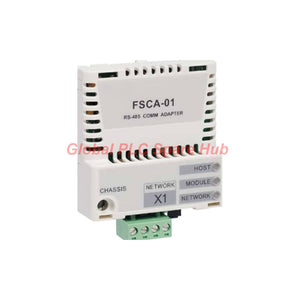
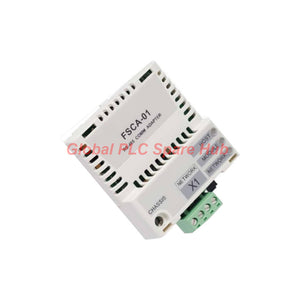
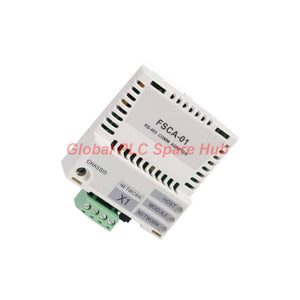
FSCA-01 ABB RS-485 Adapter Module Modbus RTU Drive Connectivity
Manufacturer: ABB
Product No.: FSCA-01
Condition: In stock
Product Type: Adapter Module
Product Origin: SE
Payment: T/T, Western Union
Weight: 500g
Shipping port: Xiamen
Warranty: 12 months
Estimate delivery times: 12-26 days (International), 3-6 days (United States).
Return within 30 days of purchase. Duties & taxes are non-refundable.
Guaranteed Safe Checkout
FSCA-01 | ABB RS-485 Adapter Module for Modbus RTU Drive Networks
The ABB FSCA-01 is a drive-mounted communication adapter that connects compatible ABB drives to serial control networks using Modbus RTU over RS-485. It supports established industrial communication architectures where PLCs, supervisory controllers, and drives exchange operating commands and register data.
The module supports asynchronous, half-duplex RS-485 communication at selectable transfer rates from 9.6 to 115.2 kbit/s. Its register access functions support common Modbus read/write operations, making it suitable for integrating drive parameters and operating data into existing automation systems.
01 | Communication Architecture — From PLC to Drive
| Communication Layer | FSCA-01 Function | Integration Consideration |
|---|---|---|
| Control system | Exchanges commands and register data with the drive network. | Confirm that the PLC or master supports Modbus RTU. |
| Serial protocol | Modbus RTU | Match the device address, baud rate, parity, and stop-bit settings. |
| Physical interface | Half-duplex RS-485 | Use suitable shielded twisted-pair cable and the correct bus wiring. |
| Drive connection | 20-pin connector to the drive option slot | Verify drive model support and option-slot compatibility. |
| Bus connection | Four-pin detachable screw connector | Follow the applicable terminal assignment in the installation manual. |
| Bus termination | Built-in 120-ohm termination with jumper configuration | Configure termination according to the physical network topology. |
The FSCA-01 acts as a communication interface rather than a standalone PLC or protocol gateway. The host drive supplies its operating power and provides the drive-side connection.
02 | Technical Specification Matrix
| Parameter | Specification |
|---|---|
| Manufacturer | ABB |
| Model | FSCA-01 |
| Product type | RS-485 adapter module |
| Communication protocol | Modbus RTU |
| Serial communication | Asynchronous, half-duplex RS-485 |
| Transfer rates | 9.6, 19.2, 38.4, 57.6, or 115.2 kbit/s |
| Network topology | Trunk line; drop lines allowed |
| Compatible bus devices | RS-485-compliant devices, subject to protocol and configuration compatibility |
| Recommended cable type | Shielded twisted pair |
| Cable impedance | 100–150 ohms |
| Termination | Built-in 120-ohm termination |
| Mounting | Drive option slot |
| Degree of protection | IP20 |
| Drive-side connector | 20-pin connector |
| Bus connector | Four-pin detachable screw connector |
| Termination configuration | Six-pin jumper block, jumper block 2 |
| Power supply | +3.3 V DC ±5%, maximum 400 mA, supplied by the drive |
| Status indicators | HOST, MODULE, NETWORK LEDs |
| EMC reference | EN 61800-3:2004 |
| Isolation | Bus interface functionally isolated from the drive |
| PCB protection | Conformal coating |
The applicable ambient conditions are those specified in the host drive's manuals. Check the drive installation requirements rather than assuming a separate temperature or humidity rating for the adapter.
03 | Physical Interface and Network Wiring
Correct wiring and termination are essential for stable RS-485 communication, especially when several drives share one serial bus.
- Drive interface: Insert the module into a supported drive option slot and secure it according to the drive installation procedure.
- RS-485 cabling: Use shielded twisted-pair cable with an impedance of 100–150 ohms.
- Bus topology: Arrange the network around a trunk line. Keep drop lines consistent with the applicable ABB wiring recommendations.
- Termination: Use the built-in 120-ohm termination only where the module occupies a position requiring termination.
- Grounding and shielding: Follow the drive and system grounding instructions to reduce electrical interference.
- Environmental protection: Install the module within the drive's specified enclosure and operating conditions. IP20 does not provide protection against water ingress.
Do not enable termination on every node by default. Incorrect termination can distort the differential signal and cause intermittent communication, particularly as network length and node count increase.
04 | Modbus RTU Integration and Register Access
The FSCA-01 supports common Modbus register read/write functions. The exact commands available for a particular drive depend on its firmware, parameter map, and communication profile.
| Integration Task | Engineering Action |
|---|---|
| Establish communication | Set matching baud rate, serial framing, and node address on the master and drive. |
| Read drive data | Use the register map for the relevant drive family and firmware. |
| Write parameters | Confirm writable register definitions, valid ranges, and access conditions. |
| Issue control commands | Verify the drive control-word mapping and required command sequence. |
| Monitor operating status | Map status registers and feedback values into PLC variables. |
| Recover after a communication loss | Check the drive's communication-loss behavior and configured fault response. |
Modbus RTU does not automatically define every drive control parameter. Consult the specific ABB drive manual to identify supported registers, command words, scaling factors, and access permissions.
05 | Suitable Equipment and Application Scenarios
- ABB variable-frequency drives: Connect compatible drive models to a Modbus RTU serial network through the supported option slot.
- PLC-controlled motor systems: Exchange drive commands, status information, and supported register values with a Modbus master.
- Conveyor lines: Integrate motor speed control and drive-status monitoring into existing serial automation systems.
- Pumps and fans: Support communication between compatible drives and plant controllers for routine operating control.
- Legacy industrial networks: Retain an RS-485-based control architecture when replacing or integrating compatible drive equipment.
- Distributed drive panels: Connect multiple compatible nodes along a correctly designed RS-485 trunk network.
Application suitability depends on the exact drive model, available option slot, firmware, control requirements, and Modbus register support. Verify these items before selecting the adapter for a retrofit or replacement.
06 | Diagnostic Workflow — HOST, MODULE, and NETWORK
The three status LEDs provide a practical starting point for troubleshooting. Interpret each indicator using the applicable FSCA-01 manual; do not assign a specific fault meaning based on LED color alone.
| Observed Condition | Recommended Checks | Diagnostic Objective |
|---|---|---|
| Drive does not recognize the option | Check option-slot compatibility, connector seating, and the drive's module recognition information. | Identify a drive-side installation or compatibility issue. |
| HOST indicator shows an abnormal state | Consult the LED table and inspect the drive-side interface and configuration. | Determine whether the problem relates to the host connection. |
| MODULE indicator shows an abnormal state | Check the module's diagnostic indication and applicable drive documentation. | Distinguish module status issues from bus wiring faults. |
| NETWORK indicator shows an abnormal state | Inspect RS-485 polarity, node address, serial settings, wiring continuity, and termination. | Locate communication-layer faults. |
| Communication works intermittently | Check cable shielding, trunk topology, drop lines, termination, and nearby electrical noise sources. | Identify signal-integrity problems. |
| Reads succeed but writes fail | Verify register permissions, command mapping, parameter ranges, and drive operating state. | Separate protocol connectivity from application-level restrictions. |
| Drive responds but operates unexpectedly | Check register scaling, signed values, command-word mapping, and control-source settings. | Identify data interpretation or drive configuration errors. |
A stable serial connection does not prove that the control mapping is correct. During commissioning, test read operations first, then verify permitted writes and control commands under an approved machine procedure.
07 | Global PLC Spare HUB's Insight
In an RS-485 retrofit, communication failures often originate from configuration mismatches rather than a failed adapter. Engineers should verify serial framing, node addressing, and the physical bus before replacing hardware.
For networks with several drives, check the complete trunk layout and termination positions. A module's built-in 120-ohm termination is useful only when its position and jumper configuration match the network design.
When register reads work but drive commands fail, investigate the drive's control source and command-word requirements. Modbus connectivity alone does not guarantee that the drive accepts remote start, stop, or reference commands.
For spare-parts selection, confirm the host drive's exact model and supported option list. The FSCA-01 should not be treated as universally compatible with every ABB drive merely because the drive has a communication option slot.
08 | Compatibility and Replacement Checklist
- Confirm the drive model and verify explicit FSCA-01 support in its documentation.
- Check that the correct option slot and drive-side connector are available.
- Confirm that the controller supports Modbus RTU over RS-485.
- Match the required baud rate and serial framing across all nodes.
- Verify the drive's register map, firmware requirements, and control-word implementation.
- Review the RS-485 cable specification, topology, shielding, and termination arrangement.
- Check enclosure conditions and the applicable drive environmental limits.
For replacement work, record the existing module configuration before removal. Preserve the approved communication settings and validate register mapping after installation.
09 | Product Supply, Warranty, and Shipping
- Brand: ABB
- Model: FSCA-01
- Product type: RS-485 adapter module
- Communication protocol: Modbus RTU
- Warranty: 12 months, subject to the seller's written warranty terms.
- Shipping methods: FedEx, UPS, and DHL, subject to destination and shipping arrangements.
- Packaging and included items: Confirm the exact supplied contents with the sales team before ordering.
- Compatibility verification: Provide the host drive model and required communication details when requesting a quotation.
10 | Frequently Asked Questions
Q1: What information should I collect before replacing an FSCA-01 in an operating plant?
A: Record the host drive model, existing communication settings, node address, cable connections, and relevant fault history. Confirm the replacement's drive compatibility before removing the installed module.
Q2: How can I tell whether a communication fault comes from the adapter or the PLC program?
A: Check the module indicators and physical bus first, then test basic Modbus reads using a known register. If reads succeed but application commands fail, inspect register mapping and drive control settings.
Q3: Can I increase the baud rate to solve slow drive response?
A: A higher supported baud rate may reduce serial transmission time, but it does not correct incorrect mapping or slow drive-side processing. Test network stability and confirm every node supports the selected rate before changing it.
Q4: What should I verify when connecting several drives to one RS-485 network?
A: Assign unique node addresses, use consistent serial settings, and design the trunk and drop lines according to the installation manual. Check termination at the appropriate physical endpoints and verify communication node by node.
Q5: What details help confirm the correct adapter for an ABB drive retrofit?
A: Provide the complete drive model, firmware version where available, existing option-module information, PLC or Modbus master type, and required control functions. These details help verify compatibility and avoid selecting an unsupported interface.
Request a Quote from Global PLC Spare HUB
Contact Global PLC Spare HUB for FSCA-01 pricing, availability, and drive compatibility checks. Include your ABB drive model, controller type, and network requirements to help confirm the appropriate communication solution.

Tags
Q: Are these parts 100% original and new?
A: Yes. Every component is guaranteed to be 100% original, brand-new, and factory-sealed. We also provide a 12-month comprehensive warranty for your peace of mind.
Q: How fast is the shipping to my country?
A: For in-stock items, we offer same-day dispatch. International express shipping (DHL/FedEx/UPS) typically delivers within 3–5 business days worldwide.
Q: Can I get a formal quotation with shipping costs?
A: Absolutely. Our sales team is ready to provide a detailed Proforma Invoice (PI) including the most competitive shipping rates for your location.
Q: Do you offer discounts for bulk orders?
A: We provide volume-based pricing for large projects or multiple-item orders. Please contact us to get our Best Price Guarantee.
12-Month Comprehensive Warranty
Every part supplied by Global PLC Spare Hub is covered by a 12-month warranty from the date of invoice.
- Coverage: Functional defects and hardware failures under normal operating conditions.
- Commitment: We provide immediate repair, replacement, or a full refund for any verified defective components to minimize your operational downtime.
Returns & Exchange Policy
We offer a 30-day return policy to ensure you receive the exact part your system requires.
- Eligibility: Returns are accepted for uninstalled items in their original, factory-sealed packaging.
- RMA Process: Please contact our support team to obtain a Return Merchandise Authorization (RMA) number before shipping.
- Fast Processing: Refunds or exchanges are processed within 3–5 business days after the returned item passes our technical inspection.
Need Technical Assistance?Not sure if this part is compatible with your system? [Consult our Engineers] before purchasing to ensure 100% compatibility.
People Also Bought


