


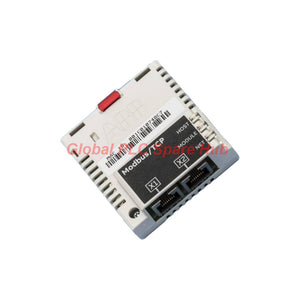
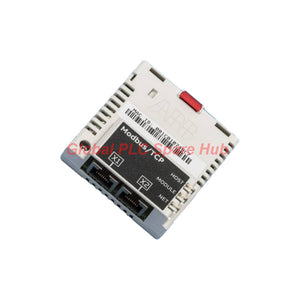
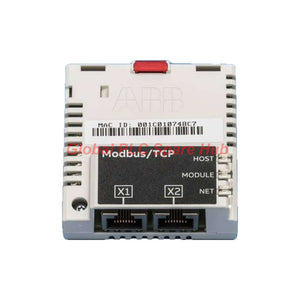
FMBT-21 ABB Drive Communication Adapter | Modbus TCP Network Connectivity
Manufacturer: ABB
Product No.: FMBT-21
Condition: In stock
Product Type: Communication Adapter
Product Origin: SE
Payment: T/T, Western Union
Weight: 500g
Shipping port: Xiamen
Warranty: 12 months
Estimate delivery times: 12-26 days (International), 3-6 days (United States).
Return within 30 days of purchase. Duties & taxes are non-refundable.
Guaranteed Safe Checkout
ABB FMBT-21 Modbus TCP Adapter Module for Industrial Drive Networks
The ABB FMBT-21 is a plug-in communication adapter that connects compatible ABB drives to an Ethernet network using the Modbus TCP protocol. It supports remote drive monitoring, control-command exchange, and integration with industrial automation systems that use standard Ethernet infrastructure.
Designed for straightforward network integration, the FMBT-21 supports 10 Mbps and 100 Mbps Ethernet, automatic negotiation, and Auto-MDIX. Engineers can use a bus or star topology, or connect additional adapter modules through the X2 RJ-45 port where the network design permits.
For replacement projects, confirm the target drive model, supported adapter configuration, firmware requirements, and drive-side communication settings before ordering. The FMBT-21 is a communication interface, not a standalone drive controller or Ethernet switch.
At a Glance: Network and Hardware Profile
| Parameter | Specification |
|---|---|
| Manufacturer | ABB |
| Model | FMBT-21 |
| Product type | Modbus TCP adapter module |
| Primary function | Connect compatible ABB drives to Modbus TCP Ethernet networks |
| Communication protocol | Modbus TCP |
| Ethernet standards | IEEE 802.3 and IEEE 802.3u |
| Ethernet speed | 10 Mbps or 100 Mbps |
| Duplex modes | Half-duplex or full-duplex |
| Connection capacity | Two connections |
| Drive interface | 20-pin connector |
| Network interfaces | RJ-45 X1 Ethernet port and RJ-45 X2 chaining port |
| Network topology | Bus or star |
| Recommended chain size | Maximum recommended amount of 50 nodes in a chain |
| Maximum Ethernet segment length | 100 m (328 ft) |
| Protection rating | IP20 |
| Power supply | +3.3 V DC ±5%, maximum 400 mA, supplied by the drive |
| Status indicators | Three bicolor LEDs: HOST, MODULE, NETWORK/NET |
| EMC standard | EN 61800-3:2004 |
| PCB protection | Conformal-coated printed circuit board |
How the FMBT-21 Fits into a Drive Control Architecture
The adapter provides the communication path between the drive and the supervisory control network. The PLC, HMI, SCADA system, or industrial computer communicates with the drive through Modbus TCP, subject to the drive's supported registers and configured control functions.
- Control system: A PLC, HMI, SCADA platform, or compatible Modbus TCP client initiates communication.
- Ethernet infrastructure: Standard industrial Ethernet cabling connects the control system to the drive network.
- FMBT-21 adapter: The module handles the communication interface between the Ethernet network and the compatible ABB drive.
- Drive application: The drive processes supported commands and provides available status or monitoring data according to its configuration.
Successful integration requires more than physical connectivity. The engineer must also configure the IP address, Modbus TCP client settings, control-word mapping, status-word interpretation, and process-data assignments supported by the target drive.
Ethernet Interface: Cabling, Ports, and Topology
| Interface item | Engineering detail | Selection or installation consideration |
|---|---|---|
| X1 | RJ-45 Ethernet connector | Connects the adapter to the Ethernet network. |
| X2 | RJ-45 connector for chaining another adapter module | Use only within the supported connection arrangement and network design. |
| Cable type | CAT5e/6 S/FTP, S/STP, or SF/FTP | Select suitable shielded cabling and follow the installation requirements for the drive and plant network. |
| Termination | Internal | No separate external termination component is specified for this interface. |
| Auto-negotiation | Supported | Allows compatible Ethernet devices to negotiate link parameters. |
| Auto-MDIX | Supported | Provides automatic crossover handling on supported connections. |
| Segment length | Up to 100 m | Observe Ethernet segment limits; use suitable network equipment when the route exceeds the limit. |
| Topology | Bus or star | Choose a layout that supports the required availability, maintenance access, and fault isolation. |
Network planning note: The recommended 50-node chain limit is not a guarantee that every installation can support 50 nodes without performance or configuration issues. Validate the complete network architecture, addressing plan, traffic load, and supported connection limits before commissioning.
Communication Status and Fault Isolation
The FMBT-21 has three bicolor status indicators: HOST, MODULE, and NETWORK/NET. These indicators provide a first-line way to assess the adapter's host-side, module, and network status. Interpret each LED's color and flashing pattern using the applicable ABB manual; do not diagnose a specific fault from the indicator name alone.
| Observed condition | Checks to perform | Recommended next step |
|---|---|---|
| Ethernet link is not established | Inspect the X1 cable, RJ-45 connection, network switch port, and link indicators. | Replace or reseat the cable as appropriate, then confirm that the physical link returns. |
| Link is active, but the Modbus TCP client cannot communicate | Check IP addressing, subnet settings, client configuration, and any network access restrictions. | Test basic network reachability, then verify Modbus TCP communication using approved diagnostic tools. |
| Communication works intermittently | Inspect connectors, cable routing, switch-port counters, network congestion, and duplicate IP addresses. | Isolate the affected segment and compare behavior with other devices on the same network. |
| PLC communicates, but the drive does not respond as expected | Review the drive's communication settings, command source, control-word mapping, and operating permissives. | Compare requested commands with drive status feedback and the applicable drive documentation. |
| Adapter indicators show an abnormal state | Record the HOST, MODULE, and NETWORK/NET LED colors and flashing patterns. | Match the observed pattern to the ABB troubleshooting instructions before replacing hardware. |
| Fault appears after adapter replacement | Verify adapter seating, drive compatibility, network settings, and parameter or configuration differences. | Compare the replacement setup with the documented configuration of the original installation. |
Diagnostic limitation: The FMBT-21's LEDs help identify the general area of a communication problem. They do not replace PLC diagnostics, Ethernet switch logs, Modbus TCP client monitoring, or drive fault analysis. A healthy Ethernet link alone does not prove that application-level communication is functioning correctly.
Suitable Equipment and Industrial Applications
- ABB variable-frequency drives: Integrate compatible drive models into supervisory control networks for operating commands and available status feedback.
- PLC-controlled motor systems: Exchange supported drive commands and process values between a Modbus TCP client and a compatible ABB drive.
- Pump and fan control: Support networked monitoring and control where the drive application and control architecture permit Ethernet-based integration.
- Conveyor and material-handling systems: Connect compatible drives to a plant network for centralized operating control and status collection.
- Water and process utilities: Integrate drive communication into pump stations, ventilation equipment, and other process-support systems.
- Drive retrofit and maintenance: Replace an adapter in an existing installation after confirming the exact module type, supported drive family, and required configuration.
Application suitability depends on the target drive's supported communication options and the system's control requirements. Do not assume that the FMBT-21 provides safety-rated communication, deterministic motion synchronization, or compatibility with every ABB drive.
Installation and Commissioning: Field Checklist
- Confirm hardware compatibility. Check the drive model, supported adapter list, installation position, and relevant hardware or firmware requirements in ABB documentation.
- Isolate the equipment. Follow the drive manufacturer's electrical isolation, stored-energy discharge, and electrostatic-discharge precautions before installing or removing the module.
- Inspect the interfaces. Check the 20-pin drive connector, module seating, RJ-45 sockets, and cable condition before energizing the system.
- Plan the network. Assign unique IP addresses, verify subnet settings, select the topology, and keep Ethernet segments within the specified length.
- Configure Modbus TCP. Set the client and drive communication parameters, then confirm the register or process-data mapping against the relevant manuals.
- Verify command ownership. Ensure the drive uses the intended control source and that interlocks, permissives, and local operating restrictions remain effective.
- Test before release. Check read and write operations, status feedback, communication recovery, and expected behavior after a network interruption.
The FMBT-21 has an IP20 enclosure rating. Install it within an appropriate protected drive enclosure and observe the ambient conditions specified in the applicable drive manuals.
Global PLC Spare HUB's Insight
When troubleshooting an ABB drive connected through the FMBT-21, separate the problem into three layers: physical Ethernet connectivity, Modbus TCP communication, and drive control behavior. This approach reduces unnecessary module replacement and helps identify whether the fault lies in the cable, network configuration, client application, or drive parameters.
For replacement orders, the adapter's exact model is only the starting point. Check the original hardware configuration and retain the existing IP plan, register mapping, and control strategy where applicable. A replacement may establish an Ethernet link successfully while still failing to reproduce the original drive behavior if its communication settings differ.
Global PLC Spare HUB Review
The ABB FMBT-21 is a practical option for compatible ABB drives that require Modbus TCP connectivity over standard Ethernet. Its 10/100 Mbps interface, automatic link negotiation, two RJ-45 ports, and three bicolor indicators support straightforward integration and first-line troubleshooting.
Its main selection advantage is protocol-specific integration rather than broad multi-protocol conversion. Before purchasing, confirm drive compatibility, required control functions, available connection capacity, and the network topology. These checks help maintenance teams reduce commissioning delays and avoid ordering a module that does not match the installed drive configuration.
Product Handling, Warranty, and Shipping
- Warranty: 12-month warranty, subject to the seller's applicable warranty terms and conditions.
- Shipping options: FedEx, UPS, or DHL, subject to destination, service availability, and shipment requirements.
- Packaging reference: Cardboard packaging with antistatic polyethylene air-bubble wrapping.
- Before ordering: Provide the complete model number, target ABB drive model, and any available nameplate or existing module details to help verify compatibility.
Frequently Asked Questions
Q1: What information should I provide when requesting a replacement FMBT-21?
Provide the full adapter model, the ABB drive model and type code, the existing network configuration, and the required control functions. Photos of the module label and drive identification plate can help clarify the hardware configuration. Confirm any firmware or compatibility requirements against ABB documentation before purchase.
Q2: Can I connect the FMBT-21 directly to a plant Ethernet switch?
The X1 RJ-45 interface supports Ethernet connectivity, so a compatible Ethernet switch can be part of the network architecture. Confirm the network addressing, cable specification, switch configuration, and drive communication settings. Physical connection alone does not establish successful Modbus TCP data exchange.
Q3: How should I choose between a bus topology and a star topology?
Choose based on the installation's cable routes, number of nodes, maintenance access, and fault-isolation requirements. A star arrangement can make individual links easier to isolate, while a supported chain arrangement may reduce cabling in suitable layouts. Verify the actual supported arrangement and node limits for the complete installation.
Q4: What should I check if monitoring works but remote start commands fail?
First, confirm that the PLC is writing to the correct supported control data. Then inspect the drive's command-source selection, control-word mapping, operating mode, permissives, and active faults. If monitoring remains normal, do not assume the adapter has failed; the issue may be in the control configuration or drive operating conditions.
Q5: Does the FMBT-21 support every Modbus TCP function and every ABB drive?
No universal compatibility should be assumed. The usable functions depend on the adapter implementation, the target drive's supported data mapping, and the control system configuration. Verify the applicable ABB documentation for supported drives, available registers or process data, connection limits, and any firmware prerequisites before finalizing the selection.
Request a Quote for ABB FMBT-21
Looking for an ABB FMBT-21 Modbus TCP Adapter Module for drive integration, maintenance, or replacement? Contact Global PLC Spare HUB with your drive model and application requirements to request pricing and compatibility assistance.

Tags
Q: Are these parts 100% original and new?
A: Yes. Every component is guaranteed to be 100% original, brand-new, and factory-sealed. We also provide a 12-month comprehensive warranty for your peace of mind.
Q: How fast is the shipping to my country?
A: For in-stock items, we offer same-day dispatch. International express shipping (DHL/FedEx/UPS) typically delivers within 3–5 business days worldwide.
Q: Can I get a formal quotation with shipping costs?
A: Absolutely. Our sales team is ready to provide a detailed Proforma Invoice (PI) including the most competitive shipping rates for your location.
Q: Do you offer discounts for bulk orders?
A: We provide volume-based pricing for large projects or multiple-item orders. Please contact us to get our Best Price Guarantee.
12-Month Comprehensive Warranty
Every part supplied by Global PLC Spare Hub is covered by a 12-month warranty from the date of invoice.
- Coverage: Functional defects and hardware failures under normal operating conditions.
- Commitment: We provide immediate repair, replacement, or a full refund for any verified defective components to minimize your operational downtime.
Returns & Exchange Policy
We offer a 30-day return policy to ensure you receive the exact part your system requires.
- Eligibility: Returns are accepted for uninstalled items in their original, factory-sealed packaging.
- RMA Process: Please contact our support team to obtain a Return Merchandise Authorization (RMA) number before shipping.
- Fast Processing: Refunds or exchanges are processed within 3–5 business days after the returned item passes our technical inspection.
Need Technical Assistance?Not sure if this part is compatible with your system? [Consult our Engineers] before purchasing to ensure 100% compatibility.
People Also Bought


