


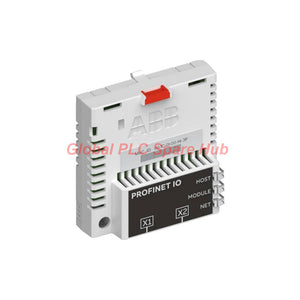
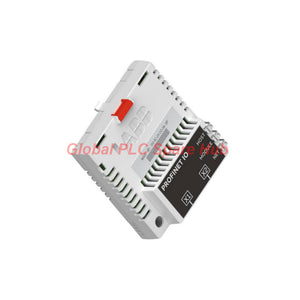
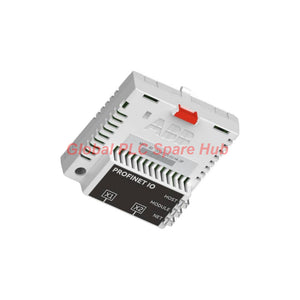
FPNO-21 PROFINET Adapter by ABB | Advanced Drive Connectivity
Manufacturer: ABB
Product No.: FPNO-21
Condition: In stock
Product Type: PROFINET Adapter
Product Origin: SE
Payment: T/T, Western Union
Weight: 500g
Shipping port: Xiamen
Warranty: 12 months
Estimate delivery times: 12-26 days (International), 3-6 days (United States).
Return within 30 days of purchase. Duties & taxes are non-refundable.
Guaranteed Safe Checkout
FPNO-21 ABB PROFINET IO Fieldbus Adapter – Product Overview
The ABB FPNO-21 is a plug-in fieldbus adapter that connects compatible ABB drives to PROFINET IO industrial Ethernet networks. It provides a communication interface between drive control functions and PLC-based automation systems. Engineers can exchange operating commands, speed references, torque references, process values, status information, and drive parameters through the network.
The adapter supports 10 Mbps and 100 Mbps Ethernet with automatic transfer-rate detection. Its integrated Ethernet switch supports network chaining and ring or star configurations. Three bicolor indicators help maintenance teams assess drive communication, module operation, and network activity.
Product positioning: This module suits drive-control integration, centralized parameter access, and network-based maintenance. Confirm the target drive's option-slot support and firmware requirements before ordering.
01 | Engineering Specification Profile
| Specification | Technical Details |
|---|---|
| Manufacturer | ABB |
| Model | FPNO-21 |
| Product Series | ABB drive fieldbus adapter modules |
| Module Type | PROFINET IO fieldbus adapter |
| Primary Function | Drive control, process-data exchange, and parameter communication |
| Installation | Option slot on a compatible drive control unit |
| Protection Rating | IP20 |
| Power Supply | +3.3 V DC ±5%, maximum 400 mA, supplied by the drive |
| Drive Interface | 20-pin connector |
| Ethernet Interface X1 | RJ-45 network connector |
| Ethernet Interface X2 | RJ-45 connector for chaining another adapter module |
| Network Standard | IEEE 802.3 and IEEE 802.3u compatible Ethernet devices |
| Supported Media | 10BASE-TX and 100BASE-TX |
| Transfer Rate | 10 Mbps or 100 Mbps, automatically detected |
| Communication Mode | Half-duplex or full-duplex |
| Protocol | PROFINET IO |
| Number of Connections | Three |
| Network Topology | Bus, star, or ring |
| Maximum Segment Length | 100 m / 328 ft |
| Indicators | HOST, MODULE, and NETWORK/NET bicolor LEDs |
| PCB Protection | Conformal-coated printed circuit board |
| EMC Compliance | EN 61800-3:2004, as specified by ABB |
| Operating Environment | Follow the ambient conditions specified in the connected drive manual |
02 | Control Functions and Process-Data Exchange
The adapter provides network access to supported drive functions. The actual available data depends on the drive model, firmware, and communication configuration.
- Drive commands: Transfer supported Start, Stop, and Run Enable commands from the controller.
- Speed and torque references: Send the required motor reference values through configured cyclic process data.
- PID process integration: Supply process actual values or reference values to the drive's PID controller.
- Operating feedback: Read drive status information and available actual values for PLC logic and HMI displays.
- Fault handling: Issue supported drive fault-reset commands through the control system.
- Parameter access: Read or write supported drive parameters through the configured communication services.
- Engineering access: Connect the Drive Composer pro tool through the supported adapter communication path.
- Clock synchronization: Support real-time clock synchronization where the drive and system configuration provide the required functionality.
Integration note: Network connectivity alone does not guarantee that every function is available. Verify the process-data mapping, parameter settings, and supported services in the applicable ABB documentation.
03 | Ethernet Architecture and Network Design
The FPNO-21 integrates Ethernet switching into the adapter. This design supports flexible machine layouts without requiring a separate external switch at every drive connection.
| Design Item | Requirement or Capability |
|---|---|
| Cable Specification | CAT5e or CAT6 S/FTP, S/STP, or SF/FTP |
| Connector | RJ-45 |
| Termination | Internal Ethernet termination |
| Auto-Negotiation | Supported |
| Auto-MDIX | Supported, including automatic crossover |
| Integrated Switch | For network forwarding and adapter chaining |
| Minimum Ethernet Frame Forwarding Delay | 19 μs per adapter switch, according to the supplied specifications |
| Recommended Chain Length | Up to 50 nodes |
| Ring Topology Limit | Up to 50 FPNO-21 modules in a ring |
Network planning example: A chain containing 50 adapters adds approximately 0.95 ms of forwarding delay for the minimum Ethernet frame, based on 19 μs per adapter. ABB's supplied guidance describes this as approximately 1 ms of additional delay.
Longer chains may be possible, but engineers should evaluate the PROFINET cycle time and total network delay. The correct design also depends on controller performance, configured update times, topology, and traffic conditions.
- Use industrial Ethernet cable that meets the specified cable categories and shielding requirements.
- Keep cable routing away from high-interference motor power conductors where practical.
- Inspect connector seating and cable condition during commissioning and preventive maintenance.
- Validate ring recovery behavior and controller support before using a ring topology.
- Measure actual communication performance after changing the number of chained devices.
04 | Installation and Commissioning Workflow
Step 1 – Verify the hardware. Confirm the complete model designation and the target drive's support for this option module.
Step 2 – Isolate the drive. Follow ABB's safety instructions before accessing the control unit or installing the adapter.
Step 3 – Install the module. Fit the adapter into the designated option slot and secure it according to the drive manual.
Step 4 – Connect the network. Connect the PROFINET cable to X1. Use X2 when the network design requires another chained adapter.
Step 5 – Configure the controller. Set the PROFINET station name, IP configuration, device configuration, and cyclic process-data layout.
Step 6 – Validate data exchange. Confirm drive communication, correct process-data mapping, and expected control-word and status-word behavior.
Step 7 – Test operating functions. Verify commands, reference values, feedback values, and supported fault-reset behavior under approved commissioning conditions.
Step 8 – Record the baseline. Save the final configuration, parameter settings, LED states, and communication test results for future maintenance.
05 | LED Diagnostics and Fault Isolation
The three bicolor indicators provide a first-level diagnostic view. Interpret them together with controller diagnostics and drive fault records.
| LED | Indication | Engineering Interpretation | Recommended Check |
|---|---|---|---|
| HOST | Flashing green | Drive communication is being established. | Check option installation and drive startup status. |
| HOST | Steady green | Communication with the drive is OK. | Proceed to verify network configuration and process data. |
| HOST | Flashing red | Drive communication has been temporarily lost. | Inspect module seating, drive status, and connection integrity. |
| HOST and MODULE | Alternating flashing orange | An internal file-system error has occurred. | Cycle drive power as ABB advises. Contact ABB if the error persists. |
| MODULE | Off | The device has no applied power. | Check drive power and the option interface. |
| MODULE | Flashing orange | The master has activated device identification. | Confirm the selected device during identification. |
| MODULE | Flashing green | The module is waiting for a PROFINET connection. | Check the station name and confirm that the PLC is running. |
| MODULE | Steady green | The module is operating normally. | Check controller diagnostics if the application still lacks data. |
| MODULE | Flashing red twice per second | The network link is down. | Inspect Ethernet cables, connectors, and the connected switch port. |
| MODULE | Flashing red once per second | Mapped data does not match the selected cyclic message type. | Review Group B and Group C parameter settings. |
| MODULE | Steady red | The Ethernet interface is disabled. Duplicate Address Detection may have found a duplicate address. | Check IP settings. Refresh fieldbus adapter parameters or cycle drive power as specified by ABB. |
| MODULE | Flashing red and green | The module is performing a self-test. | Allow the test to complete and review the final indicator state. |
| NETWORK/NET | Off | The device is offline or has not completed Duplicate Address Detection. Power may also be absent. | Check MODULE status, network initialization, and IP configuration. |
| NETWORK/NET | Flashing green | The device is transmitting or receiving Ethernet traffic. | Confirm that the controller exchanges the expected process data. |
Field diagnostic example: If the HOST LED is green but the MODULE LED flashes red once per second, prioritize cyclic message configuration. Check the selected message type and Group B or Group C parameters before replacing the adapter.
Second diagnostic example: If the MODULE LED stays red, investigate the IP configuration and duplicate-address conditions. Confirm the assigned address against the controller project and other network devices.
These checks help maintenance teams separate drive-side communication problems, PROFINET configuration mismatches, and Ethernet link faults. Always confirm the final diagnosis against the drive and adapter manuals.
06 | Compatible Equipment and Application Scenarios
- ABB variable-frequency drives: Network integration where the specific drive supports the FPNO-21 option.
- PLC-controlled motor systems: Exchange operating commands, references, and feedback with a compatible PROFINET IO controller.
- Conveyor and material-handling equipment: Coordinate motor operation and monitor drive status through centralized automation.
- Pumps, fans, and process machinery: Integrate supported drive references and process values into supervisory control.
- Packaging and production lines: Connect distributed drive control to a PROFINET-based machine network.
- Maintenance and engineering systems: Access supported drive parameters and use diagnostic information to troubleshoot communication issues.
Compatibility boundary: PROFINET support at the controller does not automatically make every ABB drive compatible. Verify the drive model, option-slot design, firmware, device configuration, and required process-data functions before purchasing.
07 | Standards, Environmental Protection, and Interference Control
- Ethernet standards: IEEE 802.3 and IEEE 802.3u compatibility, as specified for the adapter.
- EMC: The supplied product specifications state compliance with EN 61800-3:2004.
- Enclosure rating: IP20. The module requires an installation environment that meets the rating's limitations.
- Circuit-board protection: Conformal coating helps protect the PCB against specified environmental influences.
- Ambient conditions: Follow the applicable temperature, humidity, and environmental limits in the drive manual.
- Interference mitigation: Use the specified shielded Ethernet cables and sound industrial wiring practices.
The supplied information does not specify an independent operating-temperature range or a separate safety certification. Check the applicable ABB documentation for project-specific requirements.
08 | Global PLC Spare HUB Review
From an integration perspective, the ABB FPNO-21 combines drive communication with Ethernet switching. This design helps engineers build distributed drive networks with fewer external switching devices.
Its most important engineering consideration is communication timing. Each integrated switch introduces a forwarding delay, so long chains require careful cycle-time validation. A network that connects successfully may still miss application timing requirements if engineers overlook accumulated delays.
For example, a production line may use several ABB drives in a chained arrangement. After adding more drives, the engineering team may observe delayed status updates or inconsistent cyclic-data timing. Reviewing the number of nodes, configured update time, and total forwarding delay provides a practical starting point.
Our selection approach focuses on the actual drive model, controller platform, network topology, and required process-data functions. This information helps buyers identify configuration risks before replacing hardware or expanding a machine network.
09 | Packaging, Shipping, and Warranty
- Product supplied: ABB FPNO-21 PROFINET IO fieldbus adapter module.
- Packaging: Cardboard packaging with antistatic polyethylene air-bubble wrapping, according to the supplied packaging specification.
- Shipping carriers: FedEx, UPS, and DHL, subject to destination and service availability.
- Dispatch arrangement: Typically within 24–48 hours after order confirmation and stock verification.
- Warranty period: 12 months, subject to the seller's written warranty terms.
- Before ordering: Confirm stock status, required quantity, destination, and compatibility requirements with Global PLC Spare HUB.
10 | Frequently Asked Questions
Q1: How should engineers evaluate the FPNO-21 in a machine retrofit?
Start with the existing drive model, PLC platform, network architecture, and required control functions. Compare the current process-data layout with the proposed configuration before scheduling commissioning. This reduces unexpected changes to control logic and operator displays.
Q2: What information helps estimate PROFINET cycle-time performance?
Provide the number of adapters, network topology, requested update time, controller type, and expected cyclic-data load. Engineers should include the integrated switch's forwarding delay and validate the complete system under actual operating conditions.
Q3: Can a replacement module use the same network configuration automatically?
Do not assume automatic configuration recovery. Confirm the station name, IP assignment method, controller device configuration, and drive parameters. Follow the approved replacement procedure and verify communication before returning the machine to production.
Q4: Which spare-parts details should maintenance teams record before a planned shutdown?
Record the full module designation, connected drive model, controller project version, station name, IP address, firmware information where available, and existing LED states. Also document the network connections and parameter settings required for restoration.
Q5: How can buyers reduce the risk of selecting the wrong adapter?
Submit the drive nameplate details, installed option-module information, controller model, and a clear photograph of the existing hardware. Ask the supplier to verify the exact model and intended application before confirming the order.
Request a Quote for ABB FPNO-21
Need the ABB FPNO-21 PROFINET IO fieldbus adapter for a drive retrofit, spare-parts inventory, or planned maintenance? Contact Global PLC Spare HUB for pricing, availability confirmation, compatibility assistance, and shipping options.

Tags
Q: Are these parts 100% original and new?
A: Yes. Every component is guaranteed to be 100% original, brand-new, and factory-sealed. We also provide a 12-month comprehensive warranty for your peace of mind.
Q: How fast is the shipping to my country?
A: For in-stock items, we offer same-day dispatch. International express shipping (DHL/FedEx/UPS) typically delivers within 3–5 business days worldwide.
Q: Can I get a formal quotation with shipping costs?
A: Absolutely. Our sales team is ready to provide a detailed Proforma Invoice (PI) including the most competitive shipping rates for your location.
Q: Do you offer discounts for bulk orders?
A: We provide volume-based pricing for large projects or multiple-item orders. Please contact us to get our Best Price Guarantee.
12-Month Comprehensive Warranty
Every part supplied by Global PLC Spare Hub is covered by a 12-month warranty from the date of invoice.
- Coverage: Functional defects and hardware failures under normal operating conditions.
- Commitment: We provide immediate repair, replacement, or a full refund for any verified defective components to minimize your operational downtime.
Returns & Exchange Policy
We offer a 30-day return policy to ensure you receive the exact part your system requires.
- Eligibility: Returns are accepted for uninstalled items in their original, factory-sealed packaging.
- RMA Process: Please contact our support team to obtain a Return Merchandise Authorization (RMA) number before shipping.
- Fast Processing: Refunds or exchanges are processed within 3–5 business days after the returned item passes our technical inspection.
Need Technical Assistance?Not sure if this part is compatible with your system? [Consult our Engineers] before purchasing to ensure 100% compatibility.
People Also Bought


