


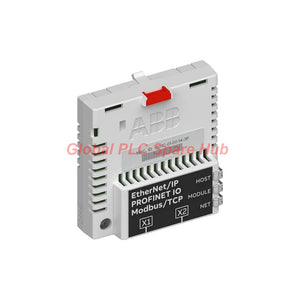
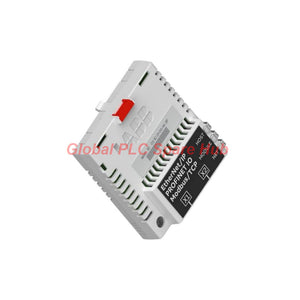
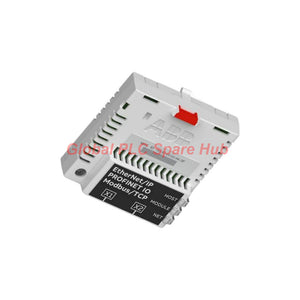
3AUA0000089107 FENA-11 ABB FieldBus Kit Ethernet Interface
Manufacturer: ABB
Product No.: FENA-11
Condition: In stock
Product Type: Ethernet Interface Module
Product Origin: SE
Payment: T/T, Western Union
Weight: 350g
Shipping port: Xiamen
Warranty: 12 months
Estimate delivery times: 12-26 days (International), 3-6 days (United States).
Return within 30 days of purchase. Duties & taxes are non-refundable.
Guaranteed Safe Checkout
3AUA0000089107 ABB FENA-11 ACS880 Ethernet Adapter
Product Brief | Three Industrial Protocols, One Drive Interface
The ABB FENA-11 is a single-port Ethernet adapter for compatible ABB drives, including supported ACS880 configurations.
It connects drive control units to industrial Ethernet networks. The module supports PROFINET IO, EtherNet/IP, and Modbus TCP.
Engineers select the communication protocol through a drive parameter. This approach supports integration with different PLC and automation platforms without changing the adapter's physical Ethernet interface.
The FENA-11 exchanges drive commands, references, status information, and process data. Its protocol-specific profiles support standardized drive communication or transparent data mapping.
- Manufacturer: ABB
- Product model: FENA-11
- Product ID: 3AUA0000089107
- Product family: ABB FieldBus Kit
- Catalog description: Ethernet Adapter for Modbus TCP, EtherNet/IP, and PROFINET IO
- EAN: 6438177287445
- Intended platform: Compatible ABB drives, including supported ACS880 models
- Condition: New and original factory packing
Communication Architecture | Select the Protocol for Your Control System
The adapter provides one RJ-45 Ethernet port. The selected protocol determines how the PLC or controller exchanges data with the drive.
| Protocol | Adapter role | Supported communication features |
|---|---|---|
| PROFINET IO | PROFINET IO device | DP-V1 communication, PROFIdrive and ABB drive profiles, plus 16-bit and 32-bit transparent modes |
| EtherNet/IP | EtherNet/IP server | ODVA AC/DC Drive, ABB drive, and transparent profiles; explicit and implicit messaging |
| Modbus TCP | Modbus TCP server | ABB drive and transparent profiles; single-register and multiple-register read/write functions |
Engineering distinction: The FENA-11 supports these protocols, but it does not operate all three simultaneously. Configure the required protocol through the drive's applicable parameter.
Drive Data Exchange | Control, Reference, and Feedback
The controller can use the adapter to exchange information with the drive.
- Command channel: Transfer supported drive control commands from the PLC.
- Reference channel: Send configured speed, torque, or other supported reference values.
- Feedback channel: Read drive status and selected actual values.
- Parameter access: Use supported protocol services to access drive parameters.
- Application data: Configure profile-based or transparent data exchange for the control application.
Available signals and control functions depend on the drive firmware, selected profile, and parameter configuration. Confirm the required data mapping in the applicable ABB documentation.
Technical Specifications | Hardware at a Glance
| Parameter | Specification |
|---|---|
| Brand | ABB |
| Model | FENA-11 |
| Ordering number | 3AUA0000089107 |
| Module type | Single-port industrial Ethernet adapter |
| Drive interface | 20-pin connector |
| Ethernet interface | RJ-45, connector X1 |
| Supported Ethernet standards | IEEE 802.3 and IEEE 802.3u |
| Physical media | 10BASE-TX or 100BASE-TX |
| Transfer rates | 10 Mbps or 100 Mbps |
| Duplex mode | Half-duplex or full-duplex |
| Link functions | Autonegotiation and Auto-MDIX |
| Maximum segment length | 100 m (328 ft) |
| Topology | Bus or star |
| Power supply | +3.3 V ±5%, supplied by the drive |
| Maximum current consumption | 400 mA |
| Protection rating | IP20 |
| Product net width | 115 mm |
| Product net height | 5 mm, as listed in the supplied product data |
| Product net weight | 0.18 kg |
| EMC compliance | EN 61800-3:2004 |
| PCB construction | Conformal-coated printed circuit board |
Dimension note: The supplied data lists a net height of 5 mm. Verify the complete mechanical drawing before checking enclosure clearance or replacement fit.
Network Installation | Cable, Connector, and Topology
The FENA-11 uses standard industrial Ethernet cabling and an RJ-45 connection. Select cable construction according to the installation environment.
- Supported cable: CAT5 or CAT6 UTP, FTP, or STP.
- Connector: RJ-45 Ethernet port X1.
- Termination: Internal.
- Maximum cable segment: 100 m.
- Topology: Bus or star, subject to the selected protocol and network equipment.
- Daisy-chain note: The supplied documentation identifies a 50-node daisy-chain limit for FENA-21. Do not apply this limit to FENA-11 without confirmation.
Use suitable Ethernet switches when the control architecture requires multiple network branches. Keep communication cabling away from high-noise power conductors where practical.
Drive Compatibility | Confirm the Option Slot Before Ordering
The FENA-11 installs into an option slot on a compatible ABB drive control unit. The drive supplies the module's power and connects through its 20-pin interface.
For an ACS880 application, verify the exact drive variant, control unit, firmware, and approved fieldbus options. The ACS880 family name alone does not confirm compatibility with every hardware revision.
Also confirm the PLC's supported protocol and configuration method. A PROFINET project, EtherNet/IP project, and Modbus TCP project require different controller-side setup.
Installation and Commissioning | Practical Sequence
- Identify the drive model and locate its approved Ethernet adapter option slot.
- Isolate drive power and follow the manufacturer's electrical safety procedure.
- Insert the adapter into the designated slot and secure it as instructed by the drive manual.
- Connect the Ethernet cable to the RJ-45 port.
- Set the required protocol using the applicable drive parameter.
- Configure the PLC or controller using the correct protocol profile and device configuration.
- Verify network communication before enabling remote drive control.
- Test command, reference, feedback, and fault-handling functions under approved commissioning conditions.
Follow the drive-specific installation instructions. Do not insert or remove the module while the drive remains energized unless ABB explicitly permits that procedure.
LED Diagnostics | Interpreting Communication Conditions
The adapter has three bicolor LED indicators: HOST, MODULE, and NETWORK/NET. They provide visual information about the host connection, module condition, and network communication.
| Indicator | Diagnostic focus | Recommended check |
|---|---|---|
| HOST | Drive-side interface | Check option-slot seating and the drive's recognition of the adapter. |
| MODULE | Adapter operating condition | Consult the relevant ABB manual for the observed color and flashing pattern. |
| NETWORK/NET | Ethernet link and network activity | Check cable connection, switch port, protocol configuration, and controller communication. |
The exact LED meanings depend on the documented indicator patterns. Use the ABB manual to interpret specific colors and flash sequences rather than assuming a universal code.
Commissioning example: A drive appears offline after a controller change. Check the NET indicator and physical link first. Then verify the selected protocol and controller configuration. Finally, inspect drive-side recognition and profile settings.
This sequence separates physical connectivity issues from configuration errors. The adapter does not independently diagnose motor, bearing, or mechanical faults.
Application Fit | Where FENA-11 Adds Value
- ACS880 motor drives: Connect compatible drive installations to industrial Ethernet controllers.
- Conveyors and material handling: Exchange drive commands and speed feedback with PLC-controlled lines.
- Pumps and fans: Integrate supported drive references and operating feedback into process automation.
- Industrial process systems: Use Modbus TCP, PROFINET IO, or EtherNet/IP according to the control-system architecture.
- Machine-building projects: Standardize drive communication when the selected controller supports the required protocol.
- Drive modernization: Replace or add a communication interface after verifying the drive's approved option configuration.
Global PLC Spare HUB's Insight | Engineering Selection Advice
Choose the communication protocol based on the controller architecture, not simply the available Ethernet port.
For example, a machine using a PROFINET-based PLC may require the PROFIdrive profile. A system using EtherNet/IP may need the ODVA AC/DC Drive profile. Transparent modes may suit applications with custom data mapping.
Before ordering, confirm three interfaces: the adapter's drive-side connector, the controller's protocol support, and the application's required process-data layout. This review reduces configuration changes during commissioning.
Packaging, Shipping, and Warranty
- Package contents: One ABB FENA-11 Ethernet adapter. Confirm included accessories against the order and supplier packing list.
- Factory packaging: The supplied product information specifies cardboard packaging and antistatic PE bubble wrapping.
- Warranty: 12 months, subject to the seller's applicable warranty terms.
- Shipping carriers: FedEx, UPS, and DHL.
- Dispatch target: 24–48 hours after order confirmation and stock verification.
- Ordering support: Provide the complete product ID and drive model for compatibility review.
Frequently Asked Questions | Selection and Field Experience
1. Can the FENA-11 connect directly to a standard office Ethernet network?
It uses standard Ethernet physical media, but the control network requires suitable protocol support and configuration. Follow the plant's network-security and segmentation requirements before connecting it to an enterprise network.
2. How do I choose between the ABB drive profile and transparent mode?
Use a drive profile when the controller supports its defined drive data structure. Consider transparent mode when the application requires custom word-based mapping. Confirm the supported format and data size in the relevant manuals.
3. What information helps identify a suitable replacement for an installed FENA module?
Record the product ID, module type, drive control unit, firmware revision, and active protocol. Compare the replacement against ABB's approved option list for that drive configuration.
4. Can I use a long Ethernet cable at 100 Mbps in a drive cabinet?
The stated maximum segment length is 100 m. Check cable quality, routing, connector integrity, and the network equipment. Electrical noise and poor installation can still affect communication within the specified distance.
5. What should I test after changing the communication protocol?
Verify controller recognition, profile selection, data mapping, command authority, reference scaling, and feedback values. Test the application's permitted operating states before returning the drive to normal production.

Tags
Q: Are these parts 100% original and new?
A: Yes. Every component is guaranteed to be 100% original, brand-new, and factory-sealed. We also provide a 12-month comprehensive warranty for your peace of mind.
Q: How fast is the shipping to my country?
A: For in-stock items, we offer same-day dispatch. International express shipping (DHL/FedEx/UPS) typically delivers within 3–5 business days worldwide.
Q: Can I get a formal quotation with shipping costs?
A: Absolutely. Our sales team is ready to provide a detailed Proforma Invoice (PI) including the most competitive shipping rates for your location.
Q: Do you offer discounts for bulk orders?
A: We provide volume-based pricing for large projects or multiple-item orders. Please contact us to get our Best Price Guarantee.
12-Month Comprehensive Warranty
Every part supplied by Global PLC Spare Hub is covered by a 12-month warranty from the date of invoice.
- Coverage: Functional defects and hardware failures under normal operating conditions.
- Commitment: We provide immediate repair, replacement, or a full refund for any verified defective components to minimize your operational downtime.
Returns & Exchange Policy
We offer a 30-day return policy to ensure you receive the exact part your system requires.
- Eligibility: Returns are accepted for uninstalled items in their original, factory-sealed packaging.
- RMA Process: Please contact our support team to obtain a Return Merchandise Authorization (RMA) number before shipping.
- Fast Processing: Refunds or exchanges are processed within 3–5 business days after the returned item passes our technical inspection.
Need Technical Assistance?Not sure if this part is compatible with your system? [Consult our Engineers] before purchasing to ensure 100% compatibility.
People Also Bought


