


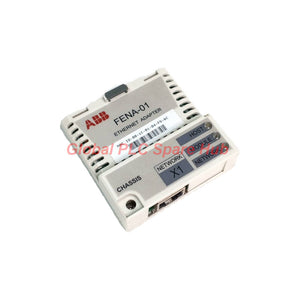
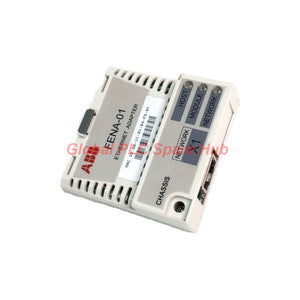
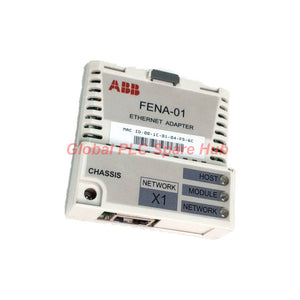
FENA-01 ABB Ethernet Fieldbus Module
Manufacturer: ABB
Product No.: FENA-01
Condition: In stock
Product Type: Ethernet Fieldbus Module
Product Origin: SE
Payment: T/T, Western Union
Weight: 350g
Shipping port: Xiamen
Warranty: 12 months
Estimate delivery times: 12-26 days (International), 3-6 days (United States).
Return within 30 days of purchase. Duties & taxes are non-refundable.
Guaranteed Safe Checkout
FENA-01 | ABB Ethernet Adapter for Drive-Level Network Integration
The ABB FENA-01 is a single-port Ethernet adapter for compatible ABB drives. It connects drive control and operating data to industrial Ethernet networks.
Engineers can use this module to exchange drive commands, motor references, status information, and diagnostic data with a PLC. It supports three industrial communication protocols: PROFINET IO, EtherNet/IP, and Modbus TCP.
The adapter occupies the drive's designated option slot. A 20-pin interface connects it to the drive, while an RJ-45 port connects it to the Ethernet network. Three bicolor LEDs help technicians identify host, module, and network conditions.
01 | Choose the Ethernet Protocol for Your Control System
The FENA-01 supports several communication protocols. Select the protocol that matches the PLC architecture and configure it through the applicable drive parameters.
| Protocol | Integration Role | Engineering Consideration |
| PROFINET IO | Connects compatible drives to a PROFINET controller. | Verify the device description, controller configuration, and supported drive profile. |
| EtherNet/IP | Exchanges drive data with an EtherNet/IP scanner. | Confirm the required EDS file, connection type, and data instances. |
| Modbus TCP | Provides Ethernet-based register communication with a PLC or supervisory system. | Check the drive's supported register mapping and communication settings. |
Protocol selection matters: The adapter does not operate all three protocols simultaneously. Select and configure the required protocol for the application.
02 | Technical Specification Snapshot
| Manufacturer | ABB |
| Model | FENA-01 |
| Product ID | 3ABD68469422 |
| Product Type | Ethernet adapter module |
| Network Standards | IEEE 802.3 and IEEE 802.3u |
| Ethernet Media | 10BASE-TX and 100BASE-TX |
| Data Rate | 10 Mbps or 100 Mbps |
| Negotiation | Auto-negotiation and Auto-MDIX |
| Duplex Mode | Half duplex or full duplex |
| Connector | RJ-45 Ethernet port |
| Drive Interface | 20-pin connector |
| Supported Cable Types | CAT5 UTP, CAT5 FTP, or CAT5 STP |
| Maximum Segment Length | 100 m (328 ft) |
| Network Topology | Star |
| Termination | Internal |
| Supply Voltage | +3.3 V ±5%, supplied by the drive |
| Maximum Current | 400 mA |
| Protection Rating | IP20 |
| Mounting | Designated drive option slot |
| Ambient Conditions | Follow the applicable drive hardware manual. |
| Estimated Minimum Lifetime | 100,000 hours, according to the supplied specification |
| EMC Reference | EN 61000-6-4:2001 and EN 61800-3, as stated in the supplied specification |
Network design note: The 100-meter segment limit applies to the documented Ethernet connection. Longer routes require suitable network infrastructure, such as properly designed switches or fiber links.
03 | Diagnostic LED Guide
The three bicolor LEDs provide a quick view of communication and module conditions. Read them together before changing parameters or replacing hardware.
| LED | Indication | Meaning and Recommended Check |
| HOST | Blinking green | The adapter is establishing communication with the drive host. |
| Green | Communication with the host is established. | |
| Blinking red | Host communication was temporarily lost. Inspect the drive-side connection and relevant configuration. | |
| MODULE | Off | No power is applied. Check the drive and module power conditions. |
| Green | The module is operating normally. | |
| Flashing green | Commissioning or configuration remains incomplete. Check IP configuration and address-detection status. | |
| Flashing red | A recoverable module fault is present. Review the drive and adapter diagnostic information. | |
| Red | An unrecoverable module fault is reported. Check for duplicate MAC or IP addresses and follow the applicable recovery procedure. | |
| Flashing red-green | The module is performing a self-test. | |
| NETWORK | Off | The device is not online, or it has not completed duplicate-address detection. Check module power and network connection. |
| Flashing green | The device is online, but network connections are not established. | |
| Green | The device is online, and connections are established. | |
| Flashing red | One or more I/O connections have timed out. Check the controller and connection configuration. | |
| Red | The device cannot communicate due to a detected network fault, such as a duplicate MAC or IP address. |
Diagnostic caution: LED behavior can depend on the selected protocol and firmware. Use the matching FENA-01 manual when interpreting detailed fault states.
04 | Drive Compatibility and Selection
ABB's FENA-01 product information identifies the ACS355 as a compatible drive. Other drive families may support FENA-01, but engineers must verify the exact model and option-slot requirements.
- Confirm the drive's complete type code and control-board configuration.
- Check whether the drive supports the FENA-01 option.
- Verify the required Ethernet protocol and drive firmware.
- Confirm the PLC's communication method and configuration files.
- Review the drive manual for installation and environmental requirements.
Selection warning: Do not substitute FENA-01 for another ABB Ethernet adapter solely because both use an RJ-45 connector. Verify the drive interface, supported protocols, and intended network architecture.
05 | Installation and Commissioning Sequence
- Isolate the drive: Follow the drive manufacturer's electrical isolation and discharge procedure.
- Identify the option slot: Confirm that the control unit supports the FENA-01 installation.
- Install the adapter: Align and seat the 20-pin connector according to the drive manual.
- Connect Ethernet: Use a suitable CAT5 cable and secure the RJ-45 connection.
- Configure the protocol: Select PROFINET IO, EtherNet/IP, or Modbus TCP through the supported drive configuration.
- Set network parameters: Confirm the required IP address and applicable network settings.
- Configure the PLC: Apply the correct device description, connection settings, and data mapping.
- Verify communication: Check the HOST, MODULE, and NETWORK LEDs.
- Test drive operation: Validate commands, feedback, and fault handling under controlled conditions.
06 | Field Diagnostics and Troubleshooting
When a drive loses Ethernet communication, identify whether the problem involves the host interface, adapter configuration, or network connection.
| Observed Condition | Practical Investigation |
| HOST LED remains blinking green | Check the drive-side connection, option-slot seating, and host communication status. |
| MODULE LED flashes green | Review incomplete configuration, IP assignment, and duplicate-address detection. |
| NETWORK LED flashes green | Check whether the PLC has established the required communication connections. |
| NETWORK LED flashes red | Inspect connection timeouts, controller status, and network stability. |
| NETWORK LED turns red | Check duplicate addressing and network interface faults before attempting recovery. |
| Communication drops intermittently | Inspect cable condition, RJ-45 contacts, switch ports, and network loading. |
Field example: A drive appears on the Ethernet network, but the PLC cannot exchange process data. Check the NETWORK LED first, then verify the PLC connection configuration and selected protocol. An online device does not necessarily have an established I/O connection.
Before resetting the drive, record the LED states and available diagnostic messages. This evidence can help distinguish a configuration fault from a physical connection problem.
07 | Equipment and Application Fit
The FENA-01 suits compatible ABB drives that require Ethernet-based control or monitoring.
- Conveyors: Exchange speed references, operating commands, and drive status with a PLC.
- Pumps: Integrate compatible drives into process-control and supervisory systems.
- Industrial fans: Support network-based speed control and operating feedback.
- Production machinery: Coordinate drive operation through PROFINET, EtherNet/IP, or Modbus TCP.
- Drive retrofits: Add supported Ethernet connectivity to an existing compatible ABB drive.
Application suitability depends on the drive's supported control functions, communication profile, and system-level safety design.
08 | Global PLC Spare HUB's Insight
During field replacement, technicians should verify both the adapter's identity and the drive's communication configuration. A matching module number does not automatically restore the original PLC connection.
For example, after replacing an Ethernet adapter, the drive may appear online while the PLC still reports an I/O connection fault. Check the protocol selection, IP settings, controller configuration, and connection parameters before replacing additional hardware.
Record the working configuration before removing the original module. After installation, confirm stable communication and test the intended drive commands and feedback.
09 | Package Contents
- 1 × ABB FENA-01 Ethernet Adapter Module
The supplied product information does not specify additional cables or mounting accessories. Confirm the order contents before purchase.
10 | Warranty and Shipping
- Warranty: 12 months, subject to Global PLC Spare HUB's written warranty terms.
- Shipping options: FedEx, UPS, and DHL, subject to destination and service availability.
- Dispatch target: 24–48 hours after order confirmation and stock verification.
- Technical assistance: Request a compatibility review before ordering.
11 | Frequently Asked Questions
Q1: How can I determine which protocol the installed FENA-01 uses?
Check the drive's fieldbus configuration parameters and the PLC project. Confirm the selected protocol before loading device files or changing controller settings.
Q2: Does a green NETWORK LED prove that the PLC is exchanging the correct drive data?
No. It indicates established network connections. Verify the PLC data mapping, command words, references, and feedback values separately.
Q3: What should I check before changing the drive's IP address?
Review the PLC configuration, address allocation plan, and duplicate-address risks. Record the current settings and follow the drive's documented IP configuration procedure.
Q4: Can a standard Ethernet switch be used with this adapter?
The adapter supports IEEE 802.3 and IEEE 802.3u Ethernet devices. Select suitable industrial network equipment and follow the topology, cable-distance, and environmental requirements of the installation.
Q5: What information should I send when requesting a replacement quote?
Provide the FENA-01 model, product ID, ABB drive type code, PLC model, required protocol, and existing network configuration. These details help assess the correct replacement and commissioning needs.
Request a Quote | ABB FENA-01
Contact Global PLC Spare HUB for pricing, availability, and compatibility assistance for the ABB FENA-01 Ethernet Adapter. Share your drive model and communication requirements to help confirm the correct option.

Tags
Q: Are these parts 100% original and new?
A: Yes. Every component is guaranteed to be 100% original, brand-new, and factory-sealed. We also provide a 12-month comprehensive warranty for your peace of mind.
Q: How fast is the shipping to my country?
A: For in-stock items, we offer same-day dispatch. International express shipping (DHL/FedEx/UPS) typically delivers within 3–5 business days worldwide.
Q: Can I get a formal quotation with shipping costs?
A: Absolutely. Our sales team is ready to provide a detailed Proforma Invoice (PI) including the most competitive shipping rates for your location.
Q: Do you offer discounts for bulk orders?
A: We provide volume-based pricing for large projects or multiple-item orders. Please contact us to get our Best Price Guarantee.
12-Month Comprehensive Warranty
Every part supplied by Global PLC Spare Hub is covered by a 12-month warranty from the date of invoice.
- Coverage: Functional defects and hardware failures under normal operating conditions.
- Commitment: We provide immediate repair, replacement, or a full refund for any verified defective components to minimize your operational downtime.
Returns & Exchange Policy
We offer a 30-day return policy to ensure you receive the exact part your system requires.
- Eligibility: Returns are accepted for uninstalled items in their original, factory-sealed packaging.
- RMA Process: Please contact our support team to obtain a Return Merchandise Authorization (RMA) number before shipping.
- Fast Processing: Refunds or exchanges are processed within 3–5 business days after the returned item passes our technical inspection.
Need Technical Assistance?Not sure if this part is compatible with your system? [Consult our Engineers] before purchasing to ensure 100% compatibility.
People Also Bought


