


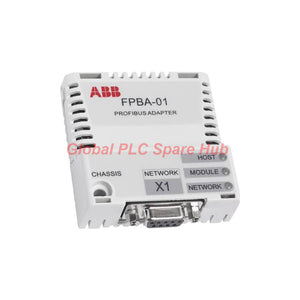
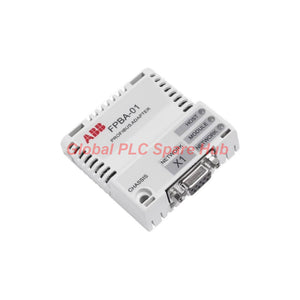
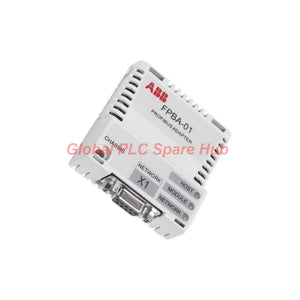
ABB FPBA-01 PROFIBUS DP Communication Interface Module
Manufacturer: ABB
Product No.: FPBA-01
Condition: In stock
Product Type: Communication Interface Module
Product Origin: SE
Payment: T/T, Western Union
Weight: 350g
Shipping port: Xiamen
Warranty: 12 months
Estimate delivery times: 12-26 days (International), 3-6 days (United States).
Return within 30 days of purchase. Duties & taxes are non-refundable.
Guaranteed Safe Checkout
ABB FPBA-01 PROFIBUS DP Adapter Module – Product Overview
The ABB FPBA-01 is a PROFIBUS DP adapter module designed to connect compatible ABB drives to industrial PROFIBUS networks. It enables cyclic process data exchange between the drive and a PROFIBUS DP master. The module installs directly into the drive's dedicated option slot and receives its primary power supply from the drive.
The FPBA-01 supports communication speeds up to 12 Mbit/s. It automatically detects the network transfer rate. Three bicolor LEDs help engineers identify module status, host communication, and network conditions.
Technical Specifications
| Brand | ABB |
| Model | FPBA-01 |
| Module Type | PROFIBUS DP communication adapter |
| Primary Function | Drive-to-PROFIBUS DP network communication |
| Mounting | Dedicated option slot on a compatible ABB drive |
| Protection Rating | IP20 |
| Drive Supply | +3.3 V DC ±5%, maximum 450 mA |
| Isolated Termination Supply | +5 V DC, maximum 30 mA, available at X1 pins 5 and 6 |
| Drive Connector | 20-pin connector, X2 |
| Bus Connector | 9-pin D-sub connector, X1 |
| Network Protocol | PROFIBUS DP |
| Physical Interface | Asynchronous, half-duplex RS-485 |
| Maximum Transfer Rate | 12 Mbit/s, automatically detected |
| Status Indicators | Three bicolor LEDs: HOST, MODULE, and NETWORK |
| Electrical Isolation | Functional isolation between the bus interface and drive |
| PCB Protection | Coated circuit board |
| EMC Standard | EN 61800-3:2004 compliance |
| Ambient Conditions | Follow the applicable limits specified in the connected drive's manuals |
Engineering note: The FPBA-01 is a communication adapter, not a measuring instrument. Measurement range, sensitivity, linearity, resolution, and frequency response do not apply to its primary function.
PROFIBUS Network and Cable Specifications
The ABB FPBA-01 uses shielded twisted-pair RS-485 cabling. ABB recommends PROFIBUS-approved cable to maintain signal integrity and reliable communication.
| Network Topology | Trunk line with permitted drop lines |
| Maximum Network Nodes | Up to 126 nodes with repeaters; typically 31 nodes per segment before adding a repeater |
| Termination | 220-ohm termination or suitable active termination circuitry at both trunk ends |
| Built-in Termination | The adapter does not include built-in bus termination |
| Cable Type | Shielded twisted-pair RS-485 cable |
Specified cable characteristics:
| Parameter | Line A: PROFIBUS DP | Line B: DIN 19245 Part 1 |
|---|---|---|
| Impedance | 35–165 Ω at 3–20 MHz | 100–130 Ω above 100 kHz |
| Capacitance | Below 30 pF/m | Below 60 pF/m |
| Resistance | Below 110 Ω/km | Not specified |
| Wire Diameter | Above 0.64 mm | Above 0.53 mm |
| Conductor Cross-Section | Above 0.34 mm² | Above 0.22 mm² |
Maximum bus length by transfer rate:
| Transfer Rate | Line A | Line B |
|---|---|---|
| 9.6–93.75 kbit/s | 1200 m | 1200 m |
| 187.5 kbit/s | 1000 m | 600 m |
| 500 kbit/s | 400 m | 200 m |
| 1.5 Mbit/s | 200 m | Not applicable |
| 3 Mbit/s | 100 m | Not applicable |
| 6 Mbit/s | 100 m | Not applicable |
| 12 Mbit/s | 100 m | Not applicable |
Note: Actual cable limits depend on the selected cable specification, network configuration, and installation conditions. Verify the applicable ABB documentation before commissioning.
Installation Guide
- Confirm that the target ABB drive supports the FPBA-01 option module.
- Isolate drive power and follow the manufacturer's electrical safety procedures.
- Insert the adapter into the designated option slot and secure it according to the drive manual.
- Connect the 9-pin D-sub bus connector to the PROFIBUS cable.
- Check cable shielding, polarity, connector condition, and grounding arrangements.
- Install suitable termination at both physical ends of the trunk line.
- Configure the PROFIBUS master using the correct device description file and the required drive parameters.
- Restore power and inspect the HOST, MODULE, and NETWORK indicators.
Important: Never insert or remove the adapter while the drive remains energized unless the specific drive documentation explicitly permits that procedure.
Commissioning and Maintenance
The three bicolor LEDs provide practical diagnostic information during startup and troubleshooting.
| Indicator | LED Condition | Meaning and Recommended Action |
|---|---|---|
| MODULE | Steady green | Module status is OK. |
| MODULE | Blinking red | Check the configured module settings and drive-side configuration. |
| MODULE and HOST | Blinking red together | The adapter is establishing communication with the host drive. |
| MODULE and NETWORK | MODULE blinks green; NETWORK blinks red | The network connection has been lost. Check the bus cable and master status. |
| MODULE and NETWORK | MODULE blinks green once per second; NETWORK stays green | No communication exists with this node. Inspect master configuration and node addressing. |
| MODULE and NETWORK | MODULE blinks green three times per second; NETWORK stays green | Only a Class 2 master connection exists. Cyclic communication has not started. |
| MODULE | Steady red | A module fault exists. Check drive compatibility and adapter condition. |
| MODULE and HOST | Alternating flashing orange | An internal file-system error exists. Cycle drive power as ABB advises. Contact ABB if the error persists. |
| NETWORK | Blinking green | The adapter is establishing a network connection. |
| NETWORK | Steady green | The network connection is OK. Confirm cyclic data exchange separately. |
| NETWORK | Blinking red | The network connection has been lost. Check cabling, termination, and master operation. |
Field troubleshooting example: A drive may show a healthy network LED but fail to exchange cyclic process data. Check whether the master established the required Class 1 connection and whether the node configuration matches the drive setup.
For intermittent communication faults, inspect connector seating, cable shielding, termination, and segment length. Record LED states before restarting equipment. This evidence helps engineers distinguish configuration faults from physical-layer problems.
Typical Applications
- Motor control systems: Connect compatible ABB drives to PLC-based PROFIBUS DP networks.
- Conveyor equipment: Exchange drive commands and operating status with a central controller.
- Pump and fan systems: Integrate drive communication into plant-wide automation architectures.
- Production machinery: Support coordinated drive control through a PROFIBUS DP master.
- Maintenance and diagnostics: Use LED indications and master diagnostics to investigate communication interruptions.
Compatibility and Selection Guidance
- Verify the exact ABB drive model and its supported option modules before ordering.
- Confirm that the control system supports PROFIBUS DP and the required communication mode.
- Check the master configuration, node address, device description file, and expected process-data mapping.
- Confirm the required bus connector, cable type, termination arrangement, and network baud rate.
- For replacement projects, compare the installed adapter's complete model designation and hardware requirements.
Selection advice: Do not choose an adapter based only on its PROFIBUS interface. Confirm drive compatibility and firmware or configuration requirements with the applicable ABB documentation.
Standards and Environmental Considerations
- EMC: The supplied specifications state compliance with EN 61800-3:2004.
- Protection: IP20 protects against access to hazardous parts and solid objects within the rating's defined limits. It does not provide water protection.
- Electrical isolation: The bus interface is functionally isolated from the drive.
- Environmental limits: Follow the connected drive's manuals for temperature, humidity, vibration, and other operating conditions.
- Interference control: Use approved shielded twisted-pair cable, correct grounding, and appropriate termination to reduce communication disturbances.
The specifications provided do not establish a separate operating temperature range or an independent safety certification for this adapter. Consult ABB documentation for the exact drive combination and installation requirements.
Global PLC Spare HUB's Insight
In practical drive integration, communication faults often originate from network configuration rather than adapter hardware. Engineers should verify the physical bus first, then review the master configuration and cyclic data mapping.
For example, a replacement ABB FPBA-01 may establish a physical network connection but still fail to exchange process data. A mismatch between the configured node and the master project can prevent normal cyclic communication.
Our selection process focuses on the drive model, option-slot compatibility, PROFIBUS master requirements, and installation details. These checks help reduce commissioning delays and avoid ordering incompatible communication hardware.
Packaging, Shipping, and Warranty
- Product: ABB FPBA-01 PROFIBUS DP adapter module.
- Packaging: Supplied with appropriate protective packaging. Confirm included accessories before ordering.
- Shipping methods: FedEx, UPS, or DHL, subject to destination and service availability.
- Dispatch time: Typically arranged within 24–48 hours after order confirmation and stock verification.
- Warranty: 12-month warranty, subject to the seller's written warranty terms.
- Order support: Contact Global PLC Spare HUB to confirm stock, delivery arrangements, and drive compatibility.
Frequently Asked Questions
Q1: What does the ABB FPBA-01 adapter do?
The FPBA-01 connects compatible ABB drives to PROFIBUS DP networks. It enables the drive to exchange control and status data with a supported master.
Q2: Does the FPBA-01 support 12 Mbit/s communication?
Yes. The adapter supports transfer rates up to 12 Mbit/s and automatically detects the network rate. Cable length limits depend on the selected rate and cable specification.
Q3: Why does the NETWORK LED stay green when cyclic communication fails?
A green NETWORK LED indicates an established network connection, but it does not prove that cyclic data exchange is active. Check the master connection type, node configuration, and process-data mapping.
Q4: What should engineers check before replacing an FPBA-01?
Record the drive model, existing adapter designation, node address, master configuration, and LED states. Verify the replacement's compatibility and save the original drive parameters before changing hardware.
Q5: Does the FPBA-01 include bus termination?
No. The adapter does not include built-in termination. Install suitable termination at both physical ends of the PROFIBUS trunk line, following the network design and equipment documentation.
Q6: Can the FPBA-01 connect to any ABB drive?
Not necessarily. The drive must support the adapter and its option-slot interface. Confirm compatibility using the specific drive manual before purchasing.
Q7: What information should I provide when requesting a quotation?
Provide the complete model number, target drive model, required quantity, delivery destination, and any existing communication fault details. These details help our team verify compatibility and prepare a suitable quotation.
Request a Quote for ABB FPBA-01
Need an ABB FPBA-01 PROFIBUS DP adapter module for drive integration or maintenance? Contact Global PLC Spare HUB for pricing, availability, compatibility assistance, and shipping options.
Tags
Q: Are these parts 100% original and new?
A: Yes. Every component is guaranteed to be 100% original, brand-new, and factory-sealed. We also provide a 12-month comprehensive warranty for your peace of mind.
Q: How fast is the shipping to my country?
A: For in-stock items, we offer same-day dispatch. International express shipping (DHL/FedEx/UPS) typically delivers within 3–5 business days worldwide.
Q: Can I get a formal quotation with shipping costs?
A: Absolutely. Our sales team is ready to provide a detailed Proforma Invoice (PI) including the most competitive shipping rates for your location.
Q: Do you offer discounts for bulk orders?
A: We provide volume-based pricing for large projects or multiple-item orders. Please contact us to get our Best Price Guarantee.
12-Month Comprehensive Warranty
Every part supplied by Global PLC Spare Hub is covered by a 12-month warranty from the date of invoice.
- Coverage: Functional defects and hardware failures under normal operating conditions.
- Commitment: We provide immediate repair, replacement, or a full refund for any verified defective components to minimize your operational downtime.
Returns & Exchange Policy
We offer a 30-day return policy to ensure you receive the exact part your system requires.
- Eligibility: Returns are accepted for uninstalled items in their original, factory-sealed packaging.
- RMA Process: Please contact our support team to obtain a Return Merchandise Authorization (RMA) number before shipping.
- Fast Processing: Refunds or exchanges are processed within 3–5 business days after the returned item passes our technical inspection.
Need Technical Assistance?Not sure if this part is compatible with your system? [Consult our Engineers] before purchasing to ensure 100% compatibility.
People Also Bought


