


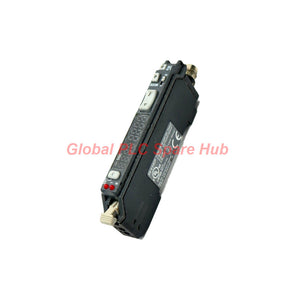
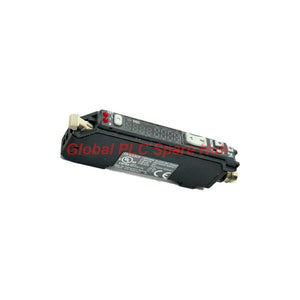
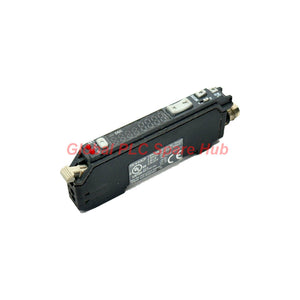
FS-V33CP KEYENCE Fiber Amplifier - M8 Connector PNP Main Unit Sensor
Manufacturer: Keyence
Product No.: FS-V33CP
Condition: In stock
Product Type: Fiber Amplifier
Product Origin: USA
Payment: T/T, Western Union
Weight: 22g
Shipping port: Xiamen
Warranty: 12 months
Estimate delivery times: 12-26 days (International), 3-6 days (United States).
Return within 30 days of purchase. Duties & taxes are non-refundable.
Guaranteed Safe Checkout
Engineering Overview
The FS-V33CP KEYENCE Fiber Amplifier is engineered for high-speed precision sensing across automated production lines. Built as a dual-output main unit with an M8 connector interface, this FS-V33CP device features a high-intensity red LED light source and dual digital displays for real-time threshold monitoring.
Core Technical Architecture
| Technical Parameter | Operational Specification |
|---|---|
| Manufacturer & Model | KEYENCE FS-V33CP |
| Device Type & Series | Fiber Optic Sensor Amplifier / FS-V30 Series Main Unit |
| Output Configuration | PNP Open-Collector, 2 Outputs (24 V, 100 mA max) |
| Electrical Connection | M8 Connector Type |
| Light Source | Red 4-element LED (640 nm wavelength) |
| Response Time Modes | Selectable from 33 µs (High Speed) up to 16 ms (Mega Turbo) |
| Display System | Dual 7-segment display (Preset green LED, Current red LED) + Bar LED |
| Power Supply Rating | 12 to 24 VDC ±10% (Power consumption max 830 mW) |
| Physical Dimensions & Weight | 30.3 mm x 9.8 mm x 71.8 mm; Weight approx. 22 g |
Installation & DIN Rail Mounting Guidelines
- Mount the unit securely onto a standard 35 mm DIN rail or directly via back-mounting brackets.
- Plug the M8 connector firmly into the wiring harness, ensuring the locking ring is fully threaded.
- Connect expansion units (up to 16 additional amplifiers) while maintaining clean bus communication terminals.
- Ensure power supply voltage remains strictly within the 12 to 24 VDC threshold to prevent internal logic errors.
- Route fiber-optic cables away from high-voltage power conduits to eliminate optical cross-talk.
Commissioning & Parameter Optimization
- Execute automatic sensitivity-tracking calibration during stationary and moving target cycles.
- Select appropriate response time modes (e.g., 33 µs for high-speed sorting or 1 ms for standard precision).
- Configure timer functions (ON-delay, OFF-delay, or one-shot) to match downstream PLC trigger requirements.
- Set light-on or dark-on output logic directly through the digital interface keys.
Built-In Diagnostic Capabilities
- Excess gain tracking displayed via 7-segment and 7-step bar LED indicators (0P to 999P).
- Peak and bottom hold value visualization for irregular target profile analysis.
- Interference prevention settings (up to 8 units in Turbo mode) to stop optical cross-talk between adjacent amplifiers.
Commercial Terms, Fulfillment & Warranty
- Expedited international shipping fulfilled within 24 to 48 hours.
- Trusted courier networks: FedEx, UPS, and DHL.
- Protected by a standard 12-month operational warranty.
Global PLC Spare HUB's Insight
In high-speed semiconductor component packaging lines, optical cross-talk between adjacent fiber amplifiers frequently causes false triggers. Field engineers can resolve this by activating the built-in interference prevention function across connected FS-V33CP units and ensuring fiber-optic tips are cut cleanly using a dedicated precision cutter.
Frequently Asked Questions
What factors should guide my selection of response time modes?
Use the 33 µs High-Speed mode for ultra-fast part ejection sorting, and select Turbo or Mega Turbo modes when detecting low-contrast targets that require higher light accumulation.
How many expansion units can be linked to this main unit?
You can connect up to 16 expansion units (totaling 17 units), keeping in mind that 2-output variants count as two units toward the total bus limit.
What is the purpose of the excess gain display function?
It provides real-time feedback on optical margin, allowing technicians to spot dust accumulation on the fiber lens before it causes operational failure.
Why does the digital display blink an error code during startup?
Blinking indicators usually signal an out-of-range power supply voltage or an unsecured connection on the expansion bus terminal.
How do I handle maintenance cleaning for dusty optical fiber tips?
Wipe the fiber tip gently with an isopropyl alcohol-impregnated lint-free swab to restore optimal light transmission levels.
```eof
Tags
Q: Are these parts 100% original and new?
A: Yes. Every component is guaranteed to be 100% original, brand-new, and factory-sealed. We also provide a 12-month comprehensive warranty for your peace of mind.
Q: How fast is the shipping to my country?
A: For in-stock items, we offer same-day dispatch. International express shipping (DHL/FedEx/UPS) typically delivers within 3–5 business days worldwide.
Q: Can I get a formal quotation with shipping costs?
A: Absolutely. Our sales team is ready to provide a detailed Proforma Invoice (PI) including the most competitive shipping rates for your location.
Q: Do you offer discounts for bulk orders?
A: We provide volume-based pricing for large projects or multiple-item orders. Please contact us to get our Best Price Guarantee.
12-Month Comprehensive Warranty
Every part supplied by Global PLC Spare Hub is covered by a 12-month warranty from the date of invoice.
- Coverage: Functional defects and hardware failures under normal operating conditions.
- Commitment: We provide immediate repair, replacement, or a full refund for any verified defective components to minimize your operational downtime.
Returns & Exchange Policy
We offer a 30-day return policy to ensure you receive the exact part your system requires.
- Eligibility: Returns are accepted for uninstalled items in their original, factory-sealed packaging.
- RMA Process: Please contact our support team to obtain a Return Merchandise Authorization (RMA) number before shipping.
- Fast Processing: Refunds or exchanges are processed within 3–5 business days after the returned item passes our technical inspection.
Need Technical Assistance?Not sure if this part is compatible with your system? [Consult our Engineers] before purchasing to ensure 100% compatibility.
People Also Bought


