


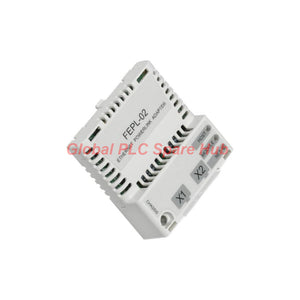
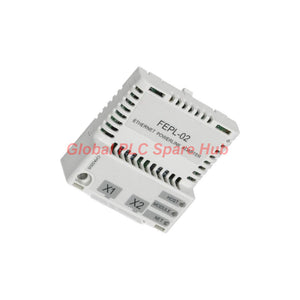
FEPL-02 ABB POWERLINK Drive Adapter Network Module
Manufacturer: ABB
Product No.: FEPL-02
Condition: En stock
Product Type: Adapter Module
Product Origin: SE
Payment: T/T, Western Union
Weight: 300g
Shipping port: Xiamen
Warranty: 12 months
Tiempo estimado de entrega: 12-26 días (Internacional), 3-6 días (Estados Unidos).
Devolución dentro de los 30 días siguientes a la compra. Los aranceles e impuestos no son reembolsables.
Pago Seguro Garantizado
ABB FEPL-02 | Ethernet POWERLINK Adapter Module
The ABB FEPL-02 is a drive communication adapter that connects compatible ABB drive control units to an Ethernet POWERLINK network. It installs into an option slot and provides two RJ-45 network connectors for industrial communication.
Designed for 100 Mbit/s Ethernet POWERLINK communication, the module supports star, tree, and daisy-chain network topologies. Three bicolor LEDs indicate HOST, MODULE, and NET status, helping engineers assess module operation and network connectivity.
- Communication protocol: Ethernet POWERLINK.
- Network speed: 100 Mbit/s over 100Base-TX.
- Network interfaces: Two RJ-45 connectors, X1 and X2.
- Drive interface: 20-pin connector, X3.
- Power supply: 3.3 V DC, ±5%, with a maximum current of 450 mA.
- Installation: Internal drive option slot.
- Protection rating: IP20.
01 | Hardware Architecture and Electrical Data
| Parameter | Specification |
|---|---|
| Manufacturer | ABB |
| Model | FEPL-02 |
| Product Category | Ethernet POWERLINK drive communication adapter |
| Installation Location | Option slot on the drive control unit |
| Degree of Protection | IP20 |
| Drive-Side Connector | 20-pin connector, X3 |
| Network Connectors | Two RJ-45 connectors, X1 and X2 |
| Supply Voltage | 3.3 V DC ±5% |
| Maximum Supply Current | 450 mA |
| Power Source | Drive control unit |
| Status Indicators | Three bicolor LEDs: HOST, MODULE, NET |
| PCB Protection | Conformal-coated printed circuit board |
| Materials | UL/CSA-approved materials, as specified |
| EMC Standard | EN 61800-3:2004 |
| Environmental Conditions | Follow the applicable drive hardware manual |
Engineering note: The adapter receives its power from the drive. Do not apply an independent 3.3 V supply unless the manufacturer explicitly specifies that connection.
02 | Ethernet POWERLINK Communication Profile
The FEPL-02 uses 100Base-TX Ethernet physical-layer communication. Its POWERLINK protocol supports deterministic communication within a compatible industrial control architecture.
| Network Characteristic | Technical Details |
|---|---|
| Protocol | Ethernet POWERLINK |
| Transmission Medium | 100Base-TX |
| Transfer Rate | 100 Mbit/s |
| Communication Type | Half-duplex, as specified |
| Supported Devices | Ethernet POWERLINK-compliant devices |
| Recommended Cable Types | CAT 5 FTP or CAT 5 STP |
| Other Listed Cable Type | CAT 5 UTP |
| Connector Type | RJ-45 |
| Termination | Internal |
| Maximum Segment Length | 100 m |
| Supported Topologies | Star, tree, and daisy chain |
Cabling recommendation: Use suitable industrial Ethernet cable with appropriate shielding for the installation environment. Confirm cable specifications, grounding practices, and connector requirements against the drive documentation.
03 | Network Topology: Select the Right Layout
The adapter's two network ports provide connection options for different machine architectures. Choose the topology according to the network design and the capabilities of the connected devices.
- Star topology: Connect devices through compatible network infrastructure. Verify that the selected switches support the intended POWERLINK architecture.
- Tree topology: Organize devices into branches where the network design permits. Check each branch's wiring and communication requirements.
- Daisy-chain topology: Connect compatible devices sequentially through available network ports. Verify port functionality and the prescribed POWERLINK connection order.
The presence of two RJ-45 connectors does not guarantee that every Ethernet switch or topology will support deterministic POWERLINK operation. Follow the network architecture specified for the application.
04 | Status Indicators and Fault Isolation
The three bicolor LEDs provide useful visual checkpoints during startup and maintenance. Their exact color meanings and flash patterns must be checked against the applicable ABB documentation.
| Indicator | Diagnostic Focus | Recommended Check |
|---|---|---|
| HOST | Drive-side communication or host interface status | Check option recognition, drive configuration, and applicable host status indications. |
| MODULE | Adapter module status | Review the documented LED pattern and investigate any reported module fault. |
| NET | Network communication status | Inspect network cabling, link conditions, POWERLINK configuration, and master status. |
Important: These diagnostic categories are intended as troubleshooting guides, not a definitive LED code table. Confirm each indicator's exact meaning before diagnosing a fault.
05 | Installation and Commissioning Procedure
- Identify the drive: Record the complete drive type code and control-unit revision.
- Confirm compatibility: Check the drive hardware manual for explicit FEPL-02 support.
- Isolate electrical power: Follow the manufacturer's shutdown and discharge procedures before accessing the control unit.
- Install the module: Fit the adapter into the designated option slot and secure the connection as specified.
- Connect the network: Use X1 and X2 according to the approved topology and connection plan.
- Verify cabling: Inspect cable type, connector condition, shielding, and routing.
- Configure the network: Apply the required POWERLINK master and device settings.
- Check status indicators: Observe HOST, MODULE, and NET during startup.
- Validate operation: Confirm node communication, drive availability, and expected process-data exchange.
Keep communication wiring away from high-interference power cables where practical. Follow the drive manufacturer's grounding and EMC recommendations to reduce electrical noise risks.
06 | Suitable Equipment and Industrial Applications
| Equipment or System | Application | Engineering Value |
|---|---|---|
| Compatible ABB variable-speed drives | Drive integration into a POWERLINK control network | Provides a network communication interface for supported drive functions. |
| PLC-based machine controllers | Drive command and status exchange | Supports coordinated control through a compatible POWERLINK master. |
| Automated conveyor systems | Motor-drive integration across machine sections | Helps coordinate networked drive functions. |
| Packaging machinery | Integration of drive equipment into machine communication | Supports communication between compatible automation components. |
| Production-line equipment | Drive networking and operational status monitoring | Provides network access to supported drive data. |
| Industrial handling systems | Integration of compatible motor drives and control devices | Supports coordinated operation within the designed network. |
Compatibility boundary: These are typical application categories for a POWERLINK drive adapter. Confirm the actual drive model, firmware requirements, master compatibility, and supported process data before purchase.
07 | Global PLC Spare HUB Review
In drive-network maintenance, engineers should separate physical-layer faults from protocol configuration faults. Replacing the adapter before checking both areas can increase downtime without resolving the underlying problem.
Field scenario: The drive is missing from the POWERLINK network.
Start by checking the NET indicator and the network master. Inspect the RJ-45 cable, connector seating, and the selected topology. Then verify that the master configuration matches the intended network. Finally, check whether the drive recognizes the installed option module.
Field scenario: Communication fails after cabinet maintenance.
Inspect the network connections at X1 and X2. Confirm that the technician restored the original port arrangement and cable routing. Review grounding and shielding if communication becomes unstable after nearby power wiring changes.
Field scenario: The adapter appears powered but does not communicate correctly.
Check the HOST, MODULE, and NET indications against the documented LED definitions. Confirm the network master's configuration and the drive's option settings. If the fault persists, compare the adapter and drive revisions with the applicable compatibility documentation.
Diagnostic capability: The FEPL-02 provides the communication interface and status indicators needed to support drive-network troubleshooting. Engineers can investigate module recognition, network connectivity, and process-data exchange through the drive and POWERLINK master.
The supplied specifications do not establish independent packet capture, onboard event logging, or a built-in diagnostic history. Use compatible network diagnostic tools when deeper protocol analysis is necessary.
08 | Compatibility and Replacement Selection
Before ordering a replacement, compare the complete installation requirements rather than relying on the model name alone.
- Drive compatibility: Confirm explicit support for FEPL-02 in the host drive documentation.
- Option interface: Verify the control-unit option slot and 20-pin X3 connection.
- Protocol: Confirm Ethernet POWERLINK support at the controller and device level.
- Network hardware: Check RJ-45 connections, cable specifications, and topology requirements.
- Power requirements: Confirm that the drive control unit supports the module's specified power consumption.
- Firmware and configuration: Verify applicable software, firmware, and parameter requirements.
- Physical installation: Check available space, mounting arrangements, and environmental conditions.
Do not substitute a standard Ethernet adapter or another fieldbus module based only on connector similarity. Protocol compatibility and drive support determine whether a replacement will operate correctly.
09 | Standards, Protection, and Environmental Requirements
- Protection rating: IP20.
- EMC reference: EN 61800-3:2004, as listed in the supplied specifications.
- Material approvals: UL/CSA-approved materials, as specified.
- PCB construction: Conformal-coated printed circuit board.
- Environmental conditions: Governed by the applicable drive hardware manual.
Verify the applicable declaration and certification scope for the exact product revision. IP20 does not provide protection against water ingress, and the module requires a suitable enclosure for the installation environment.
10 | Packaging, Shipping, and Warranty
| Item | Details |
|---|---|
| Product | ABB FEPL-02 Ethernet POWERLINK adapter module |
| Packaging Reference | Cardboard carton with antistatic polyethylene air-bubble wrapping, as specified |
| Package Contents | One adapter module; additional accessories depend on the confirmed order |
| Warranty | 12 months, subject to the seller's applicable warranty terms |
| Shipping Options | FedEx, UPS, or DHL, subject to destination and service availability |
| Dispatch | Confirm current stock and estimated dispatch time with our sales team |
Contact Global PLC Spare HUB to verify product availability, drive compatibility, warranty coverage, and shipping arrangements before placing an order.
11 | Frequently Asked Questions
Q1: What information helps identify the correct FEPL-02 hardware revision?
Provide clear photographs of the module label, connector layout, and any visible revision markings. Include the host drive's complete type code and control-unit details. These records help establish whether the module matches the existing installation.
Q2: Why should engineers verify the POWERLINK master configuration before replacing the adapter?
The master configuration determines how network devices participate in communication. An incorrect device configuration or connection order can prevent successful operation even when the hardware is functional. Verify the configuration against the approved machine network design first.
Q3: What should be checked when a drive communicates correctly at startup but fails under operating conditions?
Inspect cable integrity, connector retention, electromagnetic interference, and network stability during operation. Review available master diagnostics and compare fault timing with drive activity. This approach helps distinguish intermittent physical-layer problems from configuration or application issues.
Q4: Is a 100 Mbit/s link sufficient to confirm successful POWERLINK communication?
No. The physical link rate alone does not establish correct protocol operation. Confirm that the master recognizes the device and that cyclic communication and required process data operate as intended.
Q5: What should procurement teams provide when requesting an FEPL-02 quotation?
Provide the exact model, host drive type code, quantity, delivery destination, and any available revision details. State whether the order requires compatibility confirmation or specific packaging documentation. This information helps suppliers assess the request before confirming availability and shipping.
Request an ABB FEPL-02 Quotation
Looking for an ABB FEPL-02 Ethernet POWERLINK adapter for drive integration, maintenance, or replacement? Contact Global PLC Spare HUB for product identification, pricing, availability, and delivery options.
- Request a quotation based on your required quantity.
- Confirm host-drive and network compatibility before ordering.
- Discuss FedEx, UPS, or DHL shipping options.
- Obtain product and replacement-planning support for your application.

Tags
P: ¿Son estas piezas 100% originales y nuevas?
R: Sí. Cada componente está garantizado como 100% original, completamente nuevo y sellado de fábrica. También ofrecemos una garantía integral de 12 meses para su tranquilidad.
P: ¿Qué tan rápido es el envío a mi país?
R: Para artículos en stock, ofrecemos envío el mismo día. El envío exprés internacional (DHL/FedEx/UPS) generalmente entrega en un plazo de 3 a 5 días hábiles en todo el mundo.
P: ¿Puedo obtener una cotización formal con los costos de envío?
R: Absolutamente. Nuestro equipo de ventas está listo para proporcionar una factura proforma (PI) detallada que incluya las tarifas de envío más competitivas para su ubicación.
P: ¿Ofrecen descuentos por pedidos al por mayor?
R: Ofrecemos precios basados en el volumen para proyectos grandes o pedidos de varios artículos. Póngase en contacto con nosotros para obtener nuestra Garantía de Mejor Precio.
Garantía Integral de 12 Meses
Cada pieza suministrada por Global PLC Spare Hub está cubierta por una garantía de 12 meses a partir de la fecha de la factura.
- Cobertura: Defectos funcionales y fallos de hardware bajo condiciones normales de funcionamiento.
- Compromiso: Ofrecemos reparación, reemplazo o un reembolso completo inmediato para cualquier componente defectuoso verificado, para minimizar su tiempo de ininactividad operativa.
Política de Devoluciones y Cambios
Ofrecemos una política de devolución de 30 días para asegurar que reciba la pieza exacta que su sistema requiere.
- Elegibilidad: Se aceptan devoluciones de artículos sin instalar en su embalaje original sellado de fábrica.
- Proceso de RMA: Póngase en contacto con nuestro equipo de soporte para obtener un número de Autorización de Devolución de Mercancía (RMA) antes del envío.
- Procesamiento Rápido: Los reembolsos o cambios se procesan dentro de 3 a 5 días hábiles después de que el artículo devuelto pasa nuestra inspección técnica.
¿Necesita Asistencia Técnica? ¿No está seguro de si esta pieza es compatible con su sistema? [Consulte a nuestros Ingenieros] antes de comprar para asegurar una compatibilidad del 100%.
La gente también compró


