


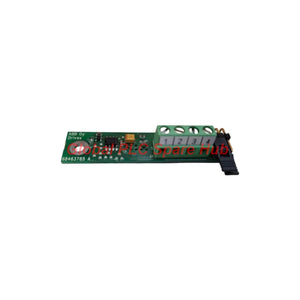
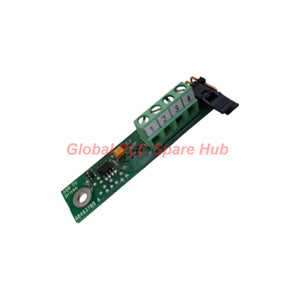

FRSA-00 ABB Drive Communication Adapter | RS-485 Interface
Manufacturer: ABB
Product No.: FRSA-00
Condition: In stock
Product Type: Adapter Board
Product Origin: SE
Payment: T/T, Western Union
Weight: 500g
Shipping port: Xiamen
Warranty: 12 months
Estimate delivery times: 12-26 days (International), 3-6 days (United States).
Return within 30 days of purchase. Duties & taxes are non-refundable.
Guaranteed Safe Checkout
FRSA-00 ABB RS-485 Adapter Board | Product Overview
The FRSA-00 is an ABB RS-485 Adapter Board designed to support Modbus RTU communication with compatible ACS350 drives. It provides a physical interface for two-wire, half-duplex serial communication across a multidrop network.
The board supports shielded twisted-pair cabling and includes a built-in 120-ohm termination resistor. Engineers can use these features when designing or maintaining an RS-485 communication link.
The FRSA-00 and the FMBA-01 Modbus RTU Adapter Module both support the ACS350 Modbus RTU communication protocol. However, they are different products and should not be treated as interchangeable without checking the drive documentation and hardware configuration.
- Primary function: RS-485 serial communication interface.
- Supported protocol: Modbus RTU.
- Communication mode: Asynchronous, half-duplex.
- Maximum transfer rate: 115.2 kb/s.
- Network connection: Two-wire RS-485 with a common signal-ground reference.
- Integrated termination: 120 Ω.
Technical Specifications
| Parameter | Specification |
|---|---|
| Brand | ABB |
| Model | FRSA-00 |
| Product Type | RS-485 Adapter Board |
| Compatible Drive Family | ABB ACS350, subject to the applicable hardware documentation |
| Related Communication Product | FMBA-01 Modbus RTU Adapter Module |
| Communication Protocol | Modbus RTU |
| Physical Interface | Two-wire, half-duplex RS-485 with signal ground |
| Communication Method | Asynchronous serial communication |
| Maximum Transfer Rate | 115.2 kb/s |
| Recommended Cable Type | Shielded twisted pair |
| Cable Impedance | 100–150 Ω |
| Built-In Termination | 120 Ω |
| Network Topology | Trunk line with permitted drop lines |
| Specified RS-485 Applied Voltage Range | −7 V to +12 V DC |
| Network Design Reference | TIA/EIA-485-A application guidance, including TSB-89 |
Communication Architecture and Bus Design
The FRSA-00 supports a two-wire, half-duplex RS-485 physical layer. Multiple compatible nodes can share the same bus when the network follows the applicable electrical and protocol requirements.
Recommended network arrangement:
- Main trunk: Use a continuous bus cable as the primary communication path.
- Drop lines: Keep branch connections short and within the limits of the network design.
- Cable selection: Use shielded twisted pair with a characteristic impedance of 100–150 Ω.
- Termination: Account for the built-in 120 Ω resistor when designing the bus termination arrangement.
- Signal reference: Connect the signal-ground reference according to the system grounding plan.
- Network loading: Consider the number of nodes, cable capacitance, transfer rate, and total cable length.
RS-485 signal integrity depends on the complete network, not only the adapter board. Excessive drop lengths, unsuitable cable, incorrect termination, or poor grounding can cause communication errors.
Termination and Signal Grounding
The built-in 120 Ω termination helps match the communication line when the board occupies a suitable termination position. Do not enable or add termination without checking the entire bus arrangement.
The RS-485 network also requires a common signal-ground reference. Long cable runs can produce voltage differences between node grounds. If ground-potential differences combine with the differential signal beyond the specified operating range, communication loss or hardware damage may occur.
- Follow the approved grounding and shielding design.
- Check for unintended ground loops and large potential differences.
- Verify that the differential signal remains within the interface's permitted voltage range.
- Keep communication wiring away from high-noise power cables where practical.
- Use appropriate isolation or grounding measures when the installation design requires them.
Do not assume that the cable shield and signal-ground conductor serve the same function. Follow the drive and system documentation for their connection points.
Supported Equipment and Applications
The FRSA-00 is intended for compatible ABB ACS350 communication arrangements using Modbus RTU. Typical system-level applications include:
- Variable frequency drives: Connect supported ACS350 drives to a Modbus RTU control network.
- PLC integration: Exchange drive commands and operating data with a compatible PLC master.
- HMI monitoring: Support drive status and parameter monitoring through a compatible Modbus RTU system.
- Production machinery: Integrate supported drive communications into machine control architectures.
- Building and utility equipment: Support serial monitoring of compatible drive installations.
- Maintenance and retrofit projects: Restore or maintain an existing RS-485 communication interface after hardware verification.
Actual functions depend on the drive model, firmware, communication settings, register map, and host controller. Confirm the required functions before specifying the adapter.
Installation and Commissioning Checklist
- Confirm compatibility: Check the ACS350 documentation and the required adapter-board configuration.
- Isolate the equipment: Disconnect power and follow the drive's electrical safety procedures.
- Inspect the board: Check connectors, contacts, and visible components before installation.
- Install the adapter: Follow the approved mounting and connection instructions.
- Prepare the bus: Use suitable shielded twisted-pair cable with the specified impedance range.
- Verify polarity: Check the RS-485 signal connections against the manufacturer's terminal assignments.
- Review termination: Confirm that the built-in resistor suits the board's position on the bus.
- Check signal ground: Verify the common reference and grounding arrangement.
- Configure Modbus RTU: Match the baud rate, parity, stop bits, and device address across the network.
- Test communication: Confirm valid requests and responses before returning the drive to normal operation.
Use the correct ABB documentation for connector identification and mounting details. Do not infer terminal numbers or board orientation from the model designation alone.
Diagnostics and Troubleshooting
The supplied information does not specify dedicated diagnostic LEDs or onboard fault codes for the FRSA-00. Engineers should diagnose communication problems through the drive, Modbus master, wiring, and network measurements.
| Observed Symptom | Recommended Investigation |
|---|---|
| No Modbus response | Check adapter compatibility, drive configuration, node address, baud rate, parity, and wiring polarity. |
| Intermittent communication | Inspect cable routing, shielding, drop lengths, termination, and signal-ground differences. |
| Errors increase at higher baud rates | Review cable quality, total bus length, branch lengths, and network loading. |
| Communication fails after adding a node | Check the additional node's address, wiring, loading, and termination effects. |
| Drive communication port behaves abnormally | Stop testing and inspect grounding, applied voltage, and possible electrical damage before reconnecting equipment. |
Field example: A drive responds during local testing but becomes unreliable after connection to a long plant network. Check termination at the bus ends and measure signal-ground potential differences. Then inspect branch lengths and cable routing near motor power conductors.
Commissioning tip: Start with a short, known-good cable and one master with one drive. Verify the communication settings before adding other nodes. This approach helps separate adapter configuration issues from wider network faults.
Global PLC Spare HUB's Insight
For engineers maintaining ACS350 installations, the FRSA-00 should be evaluated as part of the complete Modbus RTU physical layer. A correctly selected adapter cannot compensate for incorrect bus topology, incompatible serial settings, or excessive ground-potential differences.
During a retrofit, technicians should document the existing baud rate, parity, slave address, and termination arrangement before disconnecting the old hardware. They should also record the cable route and identify the actual bus-end nodes.
For example, if communication fails immediately after adding another drive, check for duplicate Modbus addresses before replacing the adapter board. If communication becomes unstable only when the motor operates, investigate electromagnetic interference and grounding before assuming a protocol fault.
These checks improve fault isolation and reduce unnecessary replacement of functioning communication hardware.
Selection Guidance and Compatibility Notes
- Drive verification: Confirm that the intended ACS350 configuration supports the adapter.
- Protocol verification: Ensure the control system uses compatible Modbus RTU communication.
- Physical interface: Check the two-wire, half-duplex RS-485 arrangement and signal-ground requirements.
- Termination: Confirm how the built-in 120 Ω resistor fits the bus termination plan.
- Replacement checks: Compare the complete model number, connector arrangement, and drive documentation.
- Related product distinction: The FMBA-01 is a separate Modbus RTU adapter module. Verify the required hardware before ordering.
Do not select a replacement solely because it supports Modbus RTU. Confirm mechanical fit, electrical compatibility, and the intended drive interface.
Frequently Asked Questions
1. How can engineers determine whether a communication problem originates in the adapter or the network?
Test the drive using a short, known-good cable and a single Modbus master. Verify serial settings and the node address first. If the setup works locally, investigate the plant bus, termination, grounding, and cable routing.
2. Does a higher baud rate always improve drive communication?
No. A higher baud rate increases data throughput but can reduce tolerance for poor cabling and excessive branch lengths. Select a rate that meets the application requirements and remains stable across the complete installed network.
3. What should be recorded before removing an existing adapter board?
Record the drive model, adapter identification, serial settings, Modbus address, wiring polarity, grounding arrangement, and termination position. Photographs of the existing installation can help technicians restore the original configuration accurately.
4. Is the FRSA-00 interchangeable with the FMBA-01?
Do not assume direct interchangeability. Both products support ACS350 Modbus RTU applications, but their hardware roles and installation requirements may differ. Check the exact drive documentation, adapter function, connector arrangement, and required communication configuration.
5. What details should purchasing teams provide when requesting a replacement?
Provide the full FRSA-00 model number, quantity, drive model, installation photographs, and destination country. Include any known communication symptoms and system requirements. These details help confirm product identification and reduce compatibility errors.
Packaging, Shipping, and Warranty
- Product: ABB FRSA-00 RS-485 Adapter Board.
- Package contents: One adapter board, subject to the confirmed order configuration.
- Shipping methods: FedEx, UPS, or DHL, subject to destination and service availability.
- Dispatch target: 24–48 hours after order confirmation, subject to stock availability and processing.
- Warranty: 12 months, subject to the seller's written warranty terms and conditions.
- Before ordering: Confirm stock status, included accessories, dispatch timing, and warranty coverage.
Request a Quote from Global PLC Spare HUB
Contact Global PLC Spare HUB for pricing, availability, and compatibility support for the FRSA-00 ABB RS-485 Adapter Board.
Include the required quantity, ACS350 drive model, application details, and delivery destination in your inquiry. Our team can help review the product identification and order requirements before confirmation.
Tags
Q: Are these parts 100% original and new?
A: Yes. Every component is guaranteed to be 100% original, brand-new, and factory-sealed. We also provide a 12-month comprehensive warranty for your peace of mind.
Q: How fast is the shipping to my country?
A: For in-stock items, we offer same-day dispatch. International express shipping (DHL/FedEx/UPS) typically delivers within 3–5 business days worldwide.
Q: Can I get a formal quotation with shipping costs?
A: Absolutely. Our sales team is ready to provide a detailed Proforma Invoice (PI) including the most competitive shipping rates for your location.
Q: Do you offer discounts for bulk orders?
A: We provide volume-based pricing for large projects or multiple-item orders. Please contact us to get our Best Price Guarantee.
12-Month Comprehensive Warranty
Every part supplied by Global PLC Spare Hub is covered by a 12-month warranty from the date of invoice.
- Coverage: Functional defects and hardware failures under normal operating conditions.
- Commitment: We provide immediate repair, replacement, or a full refund for any verified defective components to minimize your operational downtime.
Returns & Exchange Policy
We offer a 30-day return policy to ensure you receive the exact part your system requires.
- Eligibility: Returns are accepted for uninstalled items in their original, factory-sealed packaging.
- RMA Process: Please contact our support team to obtain a Return Merchandise Authorization (RMA) number before shipping.
- Fast Processing: Refunds or exchanges are processed within 3–5 business days after the returned item passes our technical inspection.
Need Technical Assistance?Not sure if this part is compatible with your system? [Consult our Engineers] before purchasing to ensure 100% compatibility.
People Also Bought


