


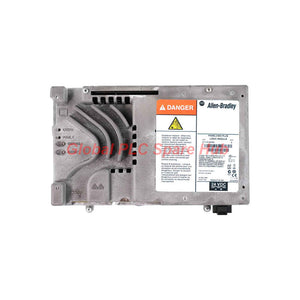
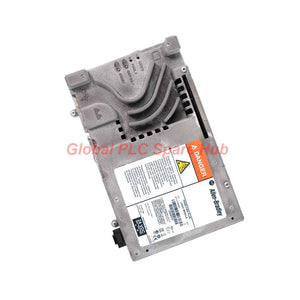
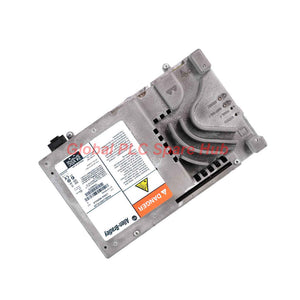
2711P-RP8D PanelView Plus 6 Allen-Bradley HMI Logic Module
Manufacturer: Allen-Bradley
Product No.: 2711P-RP8D
Condition: In stock
Product Type: HMI Logic Module
Product Origin: USA
Payment: T/T, Western Union
Weight: 500g
Shipping port: Xiamen
Warranty: 12 months
Estimate delivery times: 12-26 days (International), 3-6 days (United States).
Return within 30 days of purchase. Duties & taxes are non-refundable.
Guaranteed Safe Checkout
2711P-RP8D | PanelView Plus 6 Logic Module
Allen-Bradley 2711P-RP8D is a logic module designed for the PanelView Plus 6 operator terminal platform.
It provides the processing and communication resources required by compatible PanelView Plus 6 systems. The module combines 512 MB RAM with 512 MB non-volatile flash memory.
Its communication interfaces support Ethernet and serial connectivity. The module works with FactoryTalk View Studio Machine Edition for HMI application configuration.
The platform supports remote access, recipe management, data logging, and operator assistance functions. These capabilities help engineers manage machine interfaces and production information.
Product Identification
- Brand: Allen-Bradley
- Model: 2711P-RP8D
- Series: PanelView Plus 6
- Component Type: Logic Module
- Application Platform: PanelView Plus 6 Operator Interface
- Configuration Software: FactoryTalk View Studio Machine Edition
- Installed RAM: 512 MB
- Flash Memory: 512 MB
- Communication: Ethernet, EtherNet/IP, RS-232, DF1
01 | Hardware Architecture and System Resources
The 2711P-RP8D provides the logic and communication functions for compatible PanelView Plus 6 terminals.
| Hardware Parameter | Specification |
| Component Type | Logic Module |
| Compatible Platform | PanelView Plus 6 |
| Installed RAM | 512 MB |
| Non-Volatile Memory | 512 MB |
| Flash Storage | 512 MB |
| Available User Application Memory | Approximately 79 MB |
| Real-Time Clock | Integrated |
| Marine Certification | Yes, according to supplied specifications |
| Conformal Coating | No, according to supplied specifications |
Memory Engineering Considerations
- 512 MB RAM supports application execution and system operations.
- 512 MB flash provides non-volatile storage for system and application data.
- Approximately 79 MB is available for user applications, according to the supplied data.
- Application size depends on graphics, tags, scripts, and runtime configuration.
- Available memory should be checked before deploying complex HMI projects.
The listed user application capacity is not the same as total flash capacity. Confirm the available memory on the installed system before commissioning.
02 | Communication Interfaces and Connectivity
The module supports Ethernet and serial communication for machine control and data exchange.
| Interface | Specification |
| Ethernet Connector | RJ-45 |
| Ethernet Protocol | EtherNet/IP |
| Serial Connector | 9-pin D-shell socket |
| Serial Protocol | DF1 |
| USB Peripheral Interface | 1 × USB 2.0 |
| USB Host Interfaces | 2 × USB Host |
EtherNet/IP Integration
The Ethernet interface supports communication with compatible industrial control systems. Engineers can configure data exchange through the applicable FactoryTalk environment.
Verify the controller type, network configuration, and supported communication drivers. Correct configuration helps prevent tag communication errors.
RS-232 and DF1 Integration
The serial interface supports compatible DF1 communication. This option can support legacy controller connections and serial-based equipment integration.
Check the controller communication settings before commissioning. Baud rate, node configuration, and wiring must match the connected device.
USB Connectivity
- The USB 2.0 interface supports compatible peripheral connections.
- Two USB Host ports provide additional connection options.
- Confirm peripheral compatibility before using external devices.
03 | HMI Software Functions and Application Services
The PanelView Plus 6 platform supports several functions for operator interface development and production data management.
Application Configuration
- Software: FactoryTalk View Studio Machine Edition.
- Graphics: Supports vector-based graphics from Symbol Factory.
- ActiveX: Supports compatible ActiveX controls.
- Operator Assistance: Built-in PDF viewer supports context-sensitive documentation.
Remote Connectivity
- Supports remote connectivity through VNC.
- Supports FTP-based file access.
- Provides remote recipe and data management.
- Supports backup and restore functionality.
Recipe and Data Management
The platform supports recipe and data exchange through CSV files. This function helps engineers transfer structured production information.
CSV compatibility depends on file structure and application configuration. Validate the import and export process before using production recipes.
DataStore Plus Logging
DataStore Plus supports data logging and trending. The supplied specifications state that it removes the 300,000 data-point limit associated with the referenced logging function.
Actual storage capacity depends on available memory, logging configuration, and data retention requirements. Engineers should verify the project configuration before defining long-term logging intervals.
04 | Power Supply and Electrical Requirements
The logic module requires a suitable DC supply. Electrical design should account for the specified voltage range and maximum power consumption.
| Electrical Parameter | Specification |
| Power Supply | 18–32 V DC |
| Maximum Power Consumption | 70 W (DC) / VA (AC), as supplied |
| Real-Time Clock | Integrated |
| Power Design | Industrial DC Supply |
Power Installation Recommendations
- Verify the supply voltage before connecting the module.
- Use a suitable industrial DC power supply.
- Check power capacity against the complete terminal configuration.
- Inspect wiring and terminal connections.
- Confirm the supply remains stable during startup.
Do not size the power supply using the logic module specification alone. Consider the complete operator terminal assembly and connected peripherals.
05 | Environmental Ratings and Mechanical Durability
The module supports industrial operating conditions within the specified temperature, humidity, shock, and vibration limits.
| Environmental Parameter | Specification |
| Maximum Operating Temperature | 55°C |
| Minimum Operating Temperature | 0°C |
| Maximum Storage Temperature | 70°C |
| Minimum Storage Temperature | -25°C |
| Minimum Relative Humidity | 5% RH |
| Maximum Relative Humidity | 95% RH |
| Humidity Condition | Non-condensing |
| Maximum Shock Acceleration | 15 g |
| Maximum Shock Duration | 11 ms |
| Shock Standard | IEC 60068-2-27 |
| Maximum Vibration Acceleration | 2 g |
| Maximum Peak-to-Peak Displacement | 0.012 mm |
| Maximum Operational Vibration Frequency | 500 Hz |
| Vibration Standard | IEC 60068-2-6 |
Environmental Engineering Notes
- Maintain operating temperature within the specified range.
- Prevent condensation inside the enclosure.
- Consider cabinet ventilation during high-temperature operation.
- Check vibration exposure in machine-mounted installations.
- Verify shock conditions during transportation and equipment installation.
The module's environmental ratings do not automatically define the complete terminal's ratings. Confirm the assembled terminal requirements for the actual installation.
06 | Installation and Commissioning Guidelines
Hardware Installation
- Confirm the existing terminal belongs to the PanelView Plus 6 platform.
- Verify the replacement model is 2711P-RP8D.
- Inspect the mounting arrangement and module interfaces.
- Check the power supply rating and wiring.
- Verify Ethernet, serial, and USB connections.
- Inspect the installation environment.
Software Commissioning
- Confirm the FactoryTalk View Studio Machine Edition project version.
- Review the existing HMI application backup.
- Check controller communication settings.
- Verify EtherNet/IP or DF1 configuration.
- Confirm tag mapping and data exchange.
- Test operator screens and alarm functions.
- Validate recipe import and export operations.
- Verify data logging and trending functions.
- Confirm backup and restore procedures.
Commissioning Recommendation: Test the replacement module with a verified application backup. Confirm communication and operator functions before returning the equipment to production.
07 | Troubleshooting and Maintenance Reference
When an HMI system experiences communication or application problems, inspect the complete system before replacing the logic module.
| Observed Condition | Recommended Inspection |
| HMI Cannot Communicate with Controller | Check Ethernet settings, DF1 configuration, and controller drivers. |
| Application Fails to Load | Verify project compatibility and available application memory. |
| Recipe Import Failure | Check CSV structure, file encoding, and application configuration. |
| Remote Access Unavailable | Verify VNC or FTP configuration and network access. |
| Data Logging Stops | Review logging settings, storage capacity, and data retention configuration. |
| Unexpected HMI Restart | Inspect supply voltage, power capacity, and operating temperature. |
Maintenance Recommendations
- Maintain a verified application backup.
- Record controller communication settings.
- Review available application memory before major updates.
- Check network connections during scheduled maintenance.
- Inspect the cabinet temperature and ventilation.
- Test restore procedures before critical production changes.
08 | Compatibility and Replacement Selection
The 2711P-RP8D is designed for compatible PanelView Plus 6 systems.
Replacement selection should consider both hardware and application compatibility.
Hardware Verification
- Confirm the existing terminal belongs to the PanelView Plus 6 family.
- Verify the logic module model and mounting arrangement.
- Check power supply requirements.
- Confirm Ethernet and RS-232 interface requirements.
- Verify peripheral connections and available USB ports.
Application Verification
- Confirm the FactoryTalk View ME project environment.
- Check application memory requirements.
- Verify controller communication drivers.
- Review ActiveX control dependencies.
- Confirm VNC, FTP, and recipe management requirements.
- Check logging and trending configuration.
Legacy System Consideration: Existing applications may contain specific ActiveX controls, software dependencies, or communication settings. Review these items before changing the logic module or application project.
09 | Compliance and Package Information
Compliance Information
- Marine certified: Yes, according to the supplied specifications.
- Conformal coating: No, according to the supplied specifications.
- Shock standard: IEC 60068-2-27.
- Vibration standard: IEC 60068-2-6.
Confirm applicable certificates and declarations for the exact product configuration.
Package Contents
- 1 × Allen-Bradley 2711P-RP8D Logic Module.
- Additional accessories and documentation depend on the confirmed order.
Power cables, mounting accessories, and software licenses require separate confirmation.
10 | Warranty and International Shipping
Warranty Terms
- Warranty Period: 12 months for applicable products.
- Coverage: Product quality issues under the agreed warranty conditions.
- Support: Contact our sales team for inspection and warranty procedures.
- Order Verification: Warranty eligibility follows the confirmed order agreement.
Shipping Options
- FedEx: International express delivery.
- UPS: International parcel and express services.
- DHL: International express delivery.
Shipping methods and dispatch schedules depend on stock status and destination.
11 | Frequently Asked Questions
Q1: What should engineers check before migrating an existing PanelView Plus 6 application?
Review the FactoryTalk View ME project version and application dependencies. Check controller communication drivers, ActiveX controls, and available application memory.
Maintain a verified backup before making changes. Test the application in a controlled environment before production deployment.
Q2: How can engineers reduce the risk of recipe data errors during transfer?
Verify the CSV file structure and data format before importing recipes. Check field order, data types, and application-specific requirements.
Test the import and export process using a sample file. Confirm the resulting values before transferring production recipes.
Q3: What should be considered when using ActiveX controls in an HMI application?
ActiveX controls depend on the runtime environment and software compatibility. Confirm that the required control is supported by the installed system.
Legacy controls may introduce deployment or maintenance challenges. Review dependencies before modifying an existing project.
Q4: How should engineers plan long-term data logging and trending?
Define the required sampling interval and retention period first. Review the available storage and DataStore Plus configuration.
Frequent sampling increases data volume. Validate the logging strategy against actual process requirements and available resources.
Q5: What information should buyers provide when sourcing a replacement logic module?
Provide the complete model number and a clear nameplate photograph. Include the terminal model, application software version, and controller communication requirements.
Also confirm the required interfaces and installation conditions. These details help reduce hardware and application compatibility risks.
Tags
Q: Are these parts 100% original and new?
A: Yes. Every component is guaranteed to be 100% original, brand-new, and factory-sealed. We also provide a 12-month comprehensive warranty for your peace of mind.
Q: How fast is the shipping to my country?
A: For in-stock items, we offer same-day dispatch. International express shipping (DHL/FedEx/UPS) typically delivers within 3–5 business days worldwide.
Q: Can I get a formal quotation with shipping costs?
A: Absolutely. Our sales team is ready to provide a detailed Proforma Invoice (PI) including the most competitive shipping rates for your location.
Q: Do you offer discounts for bulk orders?
A: We provide volume-based pricing for large projects or multiple-item orders. Please contact us to get our Best Price Guarantee.
12-Month Comprehensive Warranty
Every part supplied by Global PLC Spare Hub is covered by a 12-month warranty from the date of invoice.
- Coverage: Functional defects and hardware failures under normal operating conditions.
- Commitment: We provide immediate repair, replacement, or a full refund for any verified defective components to minimize your operational downtime.
Returns & Exchange Policy
We offer a 30-day return policy to ensure you receive the exact part your system requires.
- Eligibility: Returns are accepted for uninstalled items in their original, factory-sealed packaging.
- RMA Process: Please contact our support team to obtain a Return Merchandise Authorization (RMA) number before shipping.
- Fast Processing: Refunds or exchanges are processed within 3–5 business days after the returned item passes our technical inspection.
Need Technical Assistance?Not sure if this part is compatible with your system? [Consult our Engineers] before purchasing to ensure 100% compatibility.
People Also Bought


