


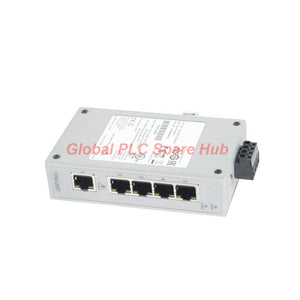
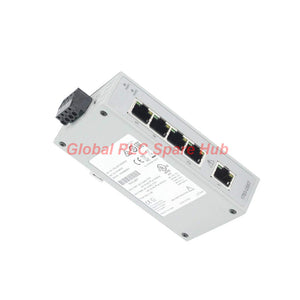
1783-US5T Allen-Bradley Stratix 2000 Unmanaged Ethernet Switch
Manufacturer: Allen-Bradley
Product No.: 1783-US5T
Condition: In stock
Product Type: Ethernet Switch
Product Origin: USA
Payment: T/T, Western Union
Weight: 300g
Shipping port: Xiamen
Warranty: 12 months
Estimate delivery times: 12-26 days (International), 3-6 days (United States).
Return within 30 days of purchase. Duties & taxes are non-refundable.
Guaranteed Safe Checkout
1783-US5T Allen-Bradley Stratix 2000 Unmanaged Ethernet Switch
The 1783-US5T is a five-port unmanaged Ethernet switch in the Allen-Bradley Stratix 2000 series. It connects compatible Ethernet devices on a local industrial network without requiring switch configuration or managed-network software.
With five 10/100 Mbps RJ45 ports, the 1783-US5T supports straightforward connections between PLCs, operator interfaces, industrial computers, and other Ethernet-enabled equipment. Its 24 V AC/DC nominal supply rating also supports integration into suitable industrial control cabinets, provided the supply stays within the specified input range.
01 | Hardware at a Glance
| Manufacturer | Allen-Bradley / Rockwell Automation |
| Catalog Number | 1783-US5T |
| Product Family | Stratix 2000 |
| Device Type | Unmanaged Ethernet switch |
| Ethernet Ports | 5 × RJ45, 10/100 Mbps |
| Nominal Supply | 24 V AC/DC |
| AC Input Range | 18–30 V AC, 50/60 Hz |
| DC Input Range | 18–60 V DC |
| Maximum Inrush Current | 2.2 A |
| Current Rating | 250 mA, as provided in the supplied specifications |
| Maximum Power Dissipation | 2 W at 24 V AC/DC |
| Continuous Isolation Voltage | 30 V, as provided in the supplied specifications |
| Insulation Type | Basic insulation |
| Isolation Description | Between power and network channels |
| Weight | 0.56 lb (0.26 kg) |
| UPC | 884951980150 |
Selection note: The stated 250 mA current rating and 2.2 A maximum inrush current describe different electrical conditions. Check the applicable product documentation when sizing the power supply and protective devices. Do not treat the listed 30 V isolation value as a substitute for the switch's full electrical safety specifications.
02 | Network Design: Five Ports, Simple Deployment
The 1783-US5T provides a simple way to connect multiple Ethernet devices within a local control network. Because it is unmanaged, technicians can add it to a compatible Ethernet segment without setting VLANs, configuring switch management addresses, or maintaining a managed-switch configuration.
- Five copper Ethernet connections: Connect up to five Ethernet devices or network links, subject to the topology and available ports.
- 10/100 Mbps interfaces: Suitable for devices with compatible 10BASE-T or 100BASE-TX Ethernet interfaces.
- Low configuration overhead: No routine managed-switch setup is required for basic switching operation.
- Industrial control cabinet integration: Supports local networking when the supply, environmental conditions, and installation requirements are met.
The switch provides network connectivity; it does not replace PLC logic, firewall functions, routing, or managed-network diagnostics. Network segmentation and traffic-control requirements should be evaluated separately.
03 | Where the 1783-US5T Fits
| Application | Example Connection Layout | Engineering Benefit |
| PLC control cabinet | PLC Ethernet port, HMI, engineering computer, and other compatible devices | Provides local Ethernet connectivity without managed-switch configuration. |
| Packaging machinery | Controller, operator panel, barcode reader, and compatible Ethernet devices | Consolidates device connections within a compact local network. |
| Material handling systems | Machine controller, local HMI, and supporting Ethernet equipment | Helps connect control devices across a machine section. |
| Test benches and assembly stations | PLC, workstation, data collection device, and operator interface | Supports a straightforward Ethernet layout for local equipment. |
| Existing industrial Ethernet installations | Compatible Ethernet devices within an established network segment | Can add local ports when network design and capacity permit. |
These examples describe possible connection arrangements, not guaranteed compatibility with every device. Confirm the network protocol, data rate, cabling, and system architecture before installation.
04 | Power and Installation Considerations
- Choose the correct supply: Use a suitable 24 V AC or DC source, or another voltage within the specified input range. Confirm polarity and terminal requirements for DC operation.
- Account for inrush current: The supply and protective device must tolerate the specified maximum inrush current without nuisance tripping.
- Check the power budget: Allow for the switch's stated power consumption and the requirements of other devices sharing the supply.
- Verify Ethernet cabling: Use compatible twisted-pair Ethernet cables and sound RJ45 terminations. Avoid routing data cables alongside high-noise power conductors where practical.
- Plan the port layout: Label connected devices and document which switch port serves each controller, HMI, or workstation.
- Review the network topology: Confirm that connecting the switch will not create an unintended Ethernet loop or conflict with existing network architecture.
Before handling power terminals or changing network wiring, follow the site's electrical isolation and maintenance procedures. Installation conditions must meet the applicable product manual and plant requirements.
05 | Practical Diagnostics for Ethernet Faults
As an unmanaged switch, the 1783-US5T does not offer the full port statistics, VLAN controls, or management interface available on managed switches. Troubleshooting therefore relies on physical inspection, link indications where provided, endpoint status, and basic network tests.
| Symptom | Likely Causes | Diagnostic Approach |
| Connected device is unreachable | Loose RJ45 connection, damaged cable, endpoint power loss, or IP configuration issue | Check the endpoint first, reseat or test the cable, then verify IP address, subnet, and network settings. |
| One device loses connectivity intermittently | Intermittent cable fault, poor termination, electromagnetic interference, or endpoint instability | Replace the suspect cable with a known-good cable and monitor the endpoint while checking nearby electrical noise sources. |
| Several connected devices lose communication | Power interruption, common upstream link failure, or a wider network fault | Verify switch supply voltage, inspect common network links, and check whether the affected devices share an upstream connection. |
| Communication is slower than expected | 10 Mbps link negotiation, cable quality problems, endpoint limitations, or network traffic | Check the interface capabilities of each endpoint, inspect cable quality, and compare performance with a known-good connection. |
| Fault appears after adding a network cable | Ethernet loop, incorrect topology, or an unintended connection between existing network paths | Disconnect the newly added link under approved procedures and review the topology before reconnecting it. |
Field troubleshooting tip: Change one variable at a time. Testing a known-good cable, a single endpoint, and a verified power source helps separate wiring and device faults from a switch or network-level problem. Avoid replacing the switch before checking these basic causes.
06 | Global PLC Spare HUB's Insight
For a small machine network, the 1783-US5T offers a practical way to connect Ethernet devices without adding switch-management tasks. Its five 10/100 ports are useful when the required number of local connections is limited and the network does not need advanced managed-switch features.
During replacement work, engineers should confirm the supply type, voltage range, port count, and speed requirements. They should also record the existing port-to-device mapping before moving cables. This makes it easier to identify incorrect connections during commissioning and reduces avoidable downtime.
Unmanaged operation does not mean that every network layout is safe or suitable. If the application needs VLAN separation, port-level monitoring, network access controls, advanced diagnostics, or managed redundancy, assess those requirements before choosing this switch. For a simple local Ethernet segment, however, the 1783-US5T can provide a straightforward connectivity option when its specifications match the installation.
07 | Replacement and Purchasing Checklist
- Match the catalog number: Confirm that the existing device is a 1783-US5T rather than another Stratix model with a different port count or feature set.
- Verify the power source: Check whether the installation uses AC or DC and confirm that the available voltage falls within the applicable input range.
- Confirm network speed: The listed interfaces support 10/100 Mbps Ethernet. Confirm that this meets the connected equipment's requirements.
- Review port capacity: Count all required connections, including any uplink or connection to the wider plant network.
- Assess managed features: If the design requires VLANs, port statistics, or configurable network controls, select a model that explicitly supports them.
- Confirm delivery scope: Check the quotation for included accessories and the exact product configuration.
08 | Warranty and Shipping
- Warranty: 12-month warranty. Contact Global PLC Spare HUB to confirm applicable coverage and claim conditions.
- Shipping options: FedEx, UPS, and DHL, subject to destination and shipping arrangements.
- Quotation support: Provide the catalog number, quantity, destination, and any power or network requirements.
- Package contents: 1783-US5T unmanaged Ethernet switch. Confirm included accessories and packaging details with the supplier before ordering.
09 | Frequently Asked Questions
Q1: How should I plan the five ports when one connection goes to the plant network?
Reserve one port for the upstream connection if the design requires it, then count the remaining ports against the local devices. This leaves fewer ports for PLCs, HMIs, or other equipment. If the layout exceeds the available ports, review the topology and consider a suitable switch with additional capacity.
Q2: Can the switch connect equipment from different manufacturers?
It can generally connect devices from different manufacturers when they use compatible Ethernet interfaces and have correctly configured network settings. The switch does not guarantee that application protocols will communicate successfully. Check the device protocol, addressing, and system configuration when connecting equipment from different vendors.
Q3: What should I check if the switch works on a test bench but fails in the cabinet?
Measure the supply voltage at the installed switch during startup and normal operation. Check for voltage drop, loose terminals, excessive electrical noise, and cable routing issues. Also verify the cabinet environment and installation conditions against the manufacturer's requirements.
Q4: Is an unmanaged switch appropriate for a network carrying critical control traffic?
Suitability depends on the control architecture, network load, and required availability. An unmanaged switch may fit a simple local segment, but it does not provide the configurable traffic controls or detailed diagnostics of a managed device. Review network-loop prevention, segmentation, redundancy, and fault-isolation requirements before selecting the switch.
Q5: Which details are most useful when requesting a replacement quotation?
Provide the full 1783-US5T catalog number, required quantity, supply type, destination, and the number and speed of connected Ethernet devices. If replacing an installed unit, include the cabinet wiring arrangement and any observed power or communication symptoms. These details help verify that the proposed switch matches the intended application.
Tags
Q: Are these parts 100% original and new?
A: Yes. Every component is guaranteed to be 100% original, brand-new, and factory-sealed. We also provide a 12-month comprehensive warranty for your peace of mind.
Q: How fast is the shipping to my country?
A: For in-stock items, we offer same-day dispatch. International express shipping (DHL/FedEx/UPS) typically delivers within 3–5 business days worldwide.
Q: Can I get a formal quotation with shipping costs?
A: Absolutely. Our sales team is ready to provide a detailed Proforma Invoice (PI) including the most competitive shipping rates for your location.
Q: Do you offer discounts for bulk orders?
A: We provide volume-based pricing for large projects or multiple-item orders. Please contact us to get our Best Price Guarantee.
12-Month Comprehensive Warranty
Every part supplied by Global PLC Spare Hub is covered by a 12-month warranty from the date of invoice.
- Coverage: Functional defects and hardware failures under normal operating conditions.
- Commitment: We provide immediate repair, replacement, or a full refund for any verified defective components to minimize your operational downtime.
Returns & Exchange Policy
We offer a 30-day return policy to ensure you receive the exact part your system requires.
- Eligibility: Returns are accepted for uninstalled items in their original, factory-sealed packaging.
- RMA Process: Please contact our support team to obtain a Return Merchandise Authorization (RMA) number before shipping.
- Fast Processing: Refunds or exchanges are processed within 3–5 business days after the returned item passes our technical inspection.
Need Technical Assistance?Not sure if this part is compatible with your system? [Consult our Engineers] before purchasing to ensure 100% compatibility.
People Also Bought


