


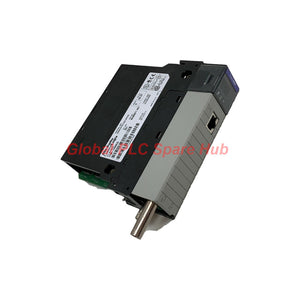
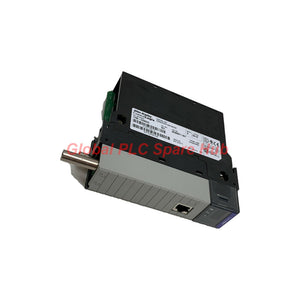
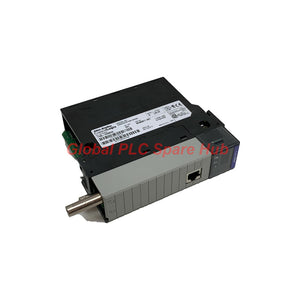
1756-CNB Allen-Bradley ControlLogix ControlNet Bridge Module | In Stock
Manufacturer: Allen-Bradley
Product No.: 1756-CNB
Condition: In stock
Product Type: ControlNet Bridge Module
Product Origin: USA
Payment: T/T, Western Union
Weight: 260g
Shipping port: Xiamen
Warranty: 12 months
Estimate delivery times: 12-26 days (International), 3-6 days (United States).
Return within 30 days of purchase. Duties & taxes are non-refundable.
Guaranteed Safe Checkout
Technical Specifications (MECE Framework)
1. Basic System Identification
- Manufacturer: Allen-Bradley / Rockwell Automation
- Model / Catalog Number: 1756-CNB
- Product Series: ControlLogix System
- Module Type: ControlNet Bridge Communication Module
- Slot Width Requirement: 1 Single Chassis Slot
- UPC Code: 10612598174079
2. Network Performance & Electrical Data
| Parameter | Technical Specification Standard |
|---|---|
| Baud Rate | 5 Megabits per second (Mbps) deterministic data rate |
| Maximum Supported Nodes | Up to 99 physical nodes per ControlNet link segment |
| Connection Capacity | 64 bidirectional connections (mix of scheduled and unscheduled) |
| Unconnected Message Buffers | Up to 20 internal buffers allocated for non-scheduled messages |
| Physical Interface Options | 1x BNC coaxial port (non-redundant) + 1x RJ-45 Network Access Port (NAP) |
| Backplane Current Draw (5.1V) | 970 mA at 5.1 VDC backplane supply logic bus |
| Backplane Current Draw (24V) | 1.7 mA at 24 VDC auxiliary power line |
| Total Power Dissipation | 5.1 Watts operational power draw |
| Thermal Dissipation Rate | 17.4 BTU per hour heat release |
3. Hardware Addressing & Multi-Vendor Interoperability
- Node Address Selection: Dual hardware rotary switches setting unique node addresses from 01 to 99.
- Platform Compatibility: Interoperates with Flex I/O, POINT I/O, SLC 500 ControlNet cards, PLC-5 ControlNet nodes, and industrial HMIs.
- Communication Modes: Supports produced/consumed tags, scheduled I/O traffic, unscheduled CIP messaging, and remote engineering upload/download.
4. Physical Properties & Environmental Specs
- Weight: 0.26 kg (0.57 lbs).
- Chassis Location: Any available slot in local or remote 1756 ControlLogix chassis.
System Diagnostics & Onboard Monitoring Capabilities
The 1756-CNB includes an active alphanumeric display on its front panel. The display cycles continuously through real-time operational metrics, including module catalog name, node address setting, network status, and active connection errors. Self-diagnostics communicate backplane health registers directly to Studio 5000 / RSLogix 5000 software, allowing engineers to audit packet retry counts, buffer usage, and media drop errors via the backplane interface.
Target Machinery & Application Scenarios
- Linking distributed ControlLogix remote I/O chassis across large manufacturing facilities.
- High-speed peer-to-peer data exchange between multiple Logix controllers using produced/consumed tags.
- Interfacing legacy ControlNet platforms (PLC-5/ControlNet, SLC 500) to modern ControlLogix networks.
- Connecting SCADA server nodes, panel display HMIs, and programming stations via the front NAP port.
Installation & Wiring Guidelines
Set the hardware rotary switches on the side of the 1756-CNB to an unassigned node address (01 to 99) prior to chassis insertion. Insert the unit into any slot of the 1756 chassis until the top and bottom latches click into place. Connect RG-6 quad-shield coaxial cable with standard BNC connectors to the front ControlNet port. Torque coaxial connections properly to avoid signal reflection, and route communication cabling away from high-voltage AC motor drives to minimize EMI exposure.
Packaging, Logistics & Warranty Terms
- Package Contents: 1x Genuine Allen-Bradley 1756-CNB ControlNet Bridge Unit, Technical Installation Leaflet.
- Warranty Terms: Standard 12-month comprehensive replacement warranty against operational defects.
- Order Handling: Fast warehouse processing with 24 to 48 hour dispatch.
- Global Carriers: Worldwide express delivery managed via FedEx, UPS, or DHL.
Global PLC Spare HUB's Insight & Field Experience
During a network commissioning project in an automotive stamping plant, our field engineers encountered recurring dropouts on a ControlNet drop driven by a 1756-CNB bridge module. System logs showed intermittent connection timeouts whenever a nearby welding robot cycled. Connecting a network analyzer via the front RJ-45 NAP port revealed high media jitter caused by a loose BNC tap connector on the coaxial trunk line. Tightening the BNC connector and verifying trunk termination resistors immediately restored full 5 Mbps scheduled packet delivery. Field Tip: Always inspect BNC tap connections and verify 75-ohm trunk terminations at both ends of the ControlNet cable segment when troubleshooting packet retry errors.
Selection & Buyer's Guide
Before ordering the 1756-CNB, confirm whether your network architecture requires media redundancy. The single-BNC port on the 1756-CNB is designed for standard non-redundant installations; if your application demands dual-path media redundancy, select the 1756-CNBR variant instead. Furthermore, calculate your connection load: a single 1756-CNB handles up to 64 connections. If your architecture demands more concurrent scheduled/unscheduled paths, install a second bridge module within the same chassis backplane.
Frequently Asked Questions (FAQ)
Q1: What is the primary operational difference between the 1756-CNB and 1756-CNBR modules?
A: The 1756-CNB features a single BNC port for non-redundant media networks, whereas the 1756-CNBR includes dual BNC connectors to support redundant media cabling paths.
Q2: How do I access local network diagnostics without disconnecting the main BNC cable?
A: Connect a diagnostic laptop using a compatible interface cable directly to the front-panel RJ-45 Network Access Port (NAP) to inspect network parameters without disrupting BNC traffic.
Q3: What steps are required when replacing an existing 1756-CNB module in a live chassis?
A: Set the rotary switches on the replacement unit to match the exact node address of the removed module before inserting it into the backplane, ensuring seamless network reintegration.
Q4: Why does the front-panel display scroll diagnostic text messages during normal operation?
A: The rolling LED text is normal hardware behavior that provides real-time status, showing the module catalog name, assigned node number, and active connection state for fast field checks.
Q5: What happens if an application exceeds the 64 connection capacity limit of the module?
A: Connection requests above 64 will be rejected by the module; resolve this by optimizing schedule NUT (Network Update Time) settings or adding an additional bridge module in the chassis.
Tags
Q: Are these parts 100% original and new?
A: Yes. Every component is guaranteed to be 100% original, brand-new, and factory-sealed. We also provide a 12-month comprehensive warranty for your peace of mind.
Q: How fast is the shipping to my country?
A: For in-stock items, we offer same-day dispatch. International express shipping (DHL/FedEx/UPS) typically delivers within 3–5 business days worldwide.
Q: Can I get a formal quotation with shipping costs?
A: Absolutely. Our sales team is ready to provide a detailed Proforma Invoice (PI) including the most competitive shipping rates for your location.
Q: Do you offer discounts for bulk orders?
A: We provide volume-based pricing for large projects or multiple-item orders. Please contact us to get our Best Price Guarantee.
12-Month Comprehensive Warranty
Every part supplied by Global PLC Spare Hub is covered by a 12-month warranty from the date of invoice.
- Coverage: Functional defects and hardware failures under normal operating conditions.
- Commitment: We provide immediate repair, replacement, or a full refund for any verified defective components to minimize your operational downtime.
Returns & Exchange Policy
We offer a 30-day return policy to ensure you receive the exact part your system requires.
- Eligibility: Returns are accepted for uninstalled items in their original, factory-sealed packaging.
- RMA Process: Please contact our support team to obtain a Return Merchandise Authorization (RMA) number before shipping.
- Fast Processing: Refunds or exchanges are processed within 3–5 business days after the returned item passes our technical inspection.
Need Technical Assistance?Not sure if this part is compatible with your system? [Consult our Engineers] before purchasing to ensure 100% compatibility.
People Also Bought


