


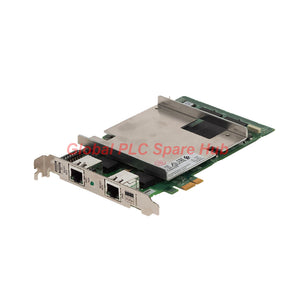
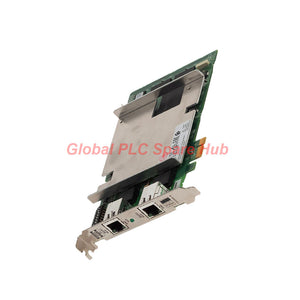

VI702 Yokogawa Vnet/IP Network Interface Card for Reliable Control Systems
Manufacturer: Yokogawa
Product No.: VI702
Condition: In stock
Product Type: Vnet/IP Interface Card
Product Origin: SG
Payment: T/T, Western Union
Weight: 500g
Shipping port: Xiamen
Warranty: 12 months
Estimate delivery times: 12-26 days (International), 3-6 days (United States).
Return within 30 days of purchase. Duties & taxes are non-refundable.
Guaranteed Safe Checkout
Yokogawa VI702 | Vnet/IP Interface Card
The VI702 is a Yokogawa Vnet/IP Interface Card that connects a PCI Express host interface to the Vnet/IP control network. It supports 1 Gbps full-duplex Ethernet communication through a CAT5e UTP cable and an RJ45 connector. The VI702 serves as a replacement for the V1701 Vnet/IP Interface Card, subject to host hardware and system compatibility verification. Its RDY, RCV, and SND indicators help engineers assess card status and network activity during commissioning and troubleshooting.
01 | Technical Specification Matrix
| Manufacturer | Yokogawa |
| Model | VI702 |
| Product Type | Vnet/IP Interface Card |
| Primary Function | Interface between PCI Express and Vnet/IP |
| Replacement Reference | V1701 Vnet/IP Interface Card; verify the applicable replacement documentation |
| Communication Speed | 1 Gbps, full duplex |
| Ethernet Standard | 1000BASE-T |
| Network Cable | CAT5e UTP |
| Network Connector | RJ45 |
| Maximum Cable Distance | 100 m between the VI702 and the Layer 2 switch |
| PCI Express Standard | PCI Express CEM Specification 1.0a, x1, 2.5 GT/s signaling |
| Supported Slot | PCI Express x1 to x16 |
| Power Supply | 3.3 V ±9% |
| Maximum Current Consumption | 2.5 A |
| Approximate Weight | 0.18 kg |
| Status Indicators | RDY, RCV, and SND |
02 | Configuration Breakdown and Interface Requirements
The VI702 uses a defined host interface and Ethernet connection. Verify each configuration element before installation.
| Configuration Element | Specification | Engineering Consideration |
| Card Model | VI702 | Match the installed system documentation. |
| Host Interface | PCI Express | Use a supported PCIe slot. |
| PCIe Link | x1, 2.5 GT/s signaling | Confirm host compatibility and slot availability. |
| Slot Size | x1 to x16 | A compatible PCIe slot is required. |
| Legacy PCI | Not supported | Do not install the card in a conventional PCI slot. |
| Network Interface | 1000BASE-T, RJ45 | Use a suitable CAT5e UTP connection. |
| Network Topology | Connection to a Layer 2 switch | Keep the cable distance within 100 m. |
| Power Interface | 3.3 V ±9% | Verify the host slot supplies the required power. |
Selection Warning: Physical fit alone does not guarantee compatibility. Confirm the host computer or controller model, operating environment, driver requirements, and Yokogawa replacement instructions.
03 | LED Diagnostics and Network Interpretation
The card provides three indicators for basic status assessment. Interpret them alongside host diagnostics and network-switch information. - RDY — Card Readiness: Lights when the card diagnoses itself as normal. - RCV — Receive Activity: Lights when the card detects signals on the control bus. - SND — Send Activity: Lights when the card sends signals to the control bus. Practical Diagnostic Interpretation - If RDY does not illuminate as expected, check card seating, host recognition, and applicable startup diagnostics. - If RDY is normal but RCV shows no activity, inspect the network cable, switch port, link status, and expected network traffic. - If receive activity appears but the control application reports communication problems, review host configuration, network settings, and controller diagnostics. - If SND activity appears without the expected system response, check the destination path, network configuration, and receiving device status. LED indications provide diagnostic clues rather than a complete fault diagnosis. Confirm the cause through the relevant system logs and network tools.
04 | Typical Equipment and Application Scenarios
The VI702 is relevant to Yokogawa control installations that require a compatible PCI Express connection to Vnet/IP. - Yokogawa Control Hosts: Provide a Vnet/IP interface where the host hardware explicitly supports the card. - Distributed Control Systems: Support communication between compatible host equipment and the Vnet/IP control network. - Process Automation: Serve in applicable control infrastructure for chemical, petrochemical, and other continuous-process facilities. - Power Generation: Support compatible control-system communication in plant automation environments. - Legacy Interface Replacement: Provide a potential replacement path for V1701 installations after compatibility verification. Actual applicability depends on the host model, system revision, network architecture, and approved hardware configuration.
05 | Installation and Commissioning Sequence
Before Installation 1. Confirm the VI702 model and the applicable replacement documentation. 2. Verify that the host provides a supported PCI Express slot. 3. Check the host power specification and required software or driver configuration. 4. Prepare a compatible CAT5e UTP cable and an appropriate Layer 2 switch port. 5. Record existing network settings and relevant fault logs before replacing hardware. During Installation 1. Shut down and isolate the equipment according to approved site procedures. 2. Follow electrostatic discharge precautions when handling the card. 3. Install the card in a compatible PCI Express slot. 4. Secure the card and connect the RJ45 network cable. 5. Route the cable away from sources of electrical interference where practical. 6. Restore power and confirm that the host recognizes the interface. After Installation 1. Check the RDY indicator and host diagnostic messages. 2. Confirm Ethernet link status and inspect switch-port diagnostics. 3. Verify communication with the intended Vnet/IP network. 4. Check application-level communication and relevant system alarms. 5. Record commissioning results and any configuration changes. Do not insert or remove the card while energized unless the manufacturer explicitly approves hot-plug operation.
06 | Network Performance and Maintenance Guidance
The specified 1 Gbps full-duplex rate defines the Ethernet interface's nominal communication capability. Actual application performance also depends on network configuration, traffic, switch behavior, and the host system. Recommended maintenance checks - Inspect the RJ45 connector for damage or loose engagement. - Check CAT5e cable condition and confirm the link distance stays within 100 m. - Review switch-port errors, link interruptions, and network event records. - Check host logs for card recognition or driver-related faults. - Compare RDY, RCV, and SND indications with expected control-network activity. - Maintain records of card replacements, network changes, and recurring communication alarms. The supplied specifications do not define packet-loss limits, latency guarantees, environmental temperature limits, or a specific cybersecurity feature set. Consult the applicable Yokogawa documentation for these requirements.
07 | Global PLC Spare HUB Review
For control-network interface replacement, engineers should verify the host interface and network path separately. A card can fit mechanically while still failing to meet the host's configuration requirements. The Yokogawa VI702 supports PCI Express and 1000BASE-T connectivity. Its RDY, RCV, and SND indicators provide useful first-line evidence during commissioning. Field Example: A host starts normally after card replacement, but the control application cannot communicate with the expected network devices. The technician checks RDY, confirms the switch-port link, inspects the CAT5e cable, and reviews network configuration. This process helps isolate the fault before replacing additional hardware. For V1701 replacement projects, confirm the approved migration path and host compatibility before ordering. This reduces installation risk and helps prevent avoidable downtime during planned maintenance.
08 | Compatibility and Purchasing Checklist
Before ordering, provide the following information for verification: - Required model: VI702. - Existing interface card model, including V1701 where applicable. - Host computer or controller model. - Available PCI Express slot configuration. - Vnet/IP network and switch arrangement. - Required quantity and delivery destination. Ask the supplier to confirm the replacement suitability against the host hardware documentation. Do not rely solely on the card's model name or connector appearance.
09 | Packaging, Shipping, and Warranty
- Product: Yokogawa Vnet/IP Interface Card. - Model: VI702. - Weight: Approximately 0.18 kg, excluding shipping packaging. - Packaging: Protective packaging suitable for transport; confirm the actual package contents with the supplier. - Warranty: 12 months, subject to the seller's written warranty terms. - Shipping Methods: FedEx, UPS, and DHL, subject to destination and service availability. - Dispatch Target: 24–48 hours after order confirmation, subject to stock availability and order processing. Contact Global PLC Spare HUB for a quotation, availability confirmation, compatibility review, and delivery options.
10 | Frequently Asked Questions
Q1. What should engineers check if the host does not recognize the interface card? Confirm the PCI Express slot, card seating, host hardware compatibility, and startup diagnostics. Review the supported driver and software requirements before considering a replacement card. Q2. Can a standard PCI card slot accept the VI702? No. The supplied specification identifies PCI Express support and explicitly excludes conventional PCI slots. Verify the host interface before purchasing. Q3. How should engineers investigate intermittent Vnet/IP communication? Review switch-port events, cable condition, connector seating, host logs, and network configuration. Correlate communication interruptions with system events to identify recurring patterns. Q4. Does a 1 Gbps interface guarantee that every control application operates at 1 Gbps? No. The figure specifies the nominal Ethernet link rate. Application throughput and response depend on the control system, network traffic, host processing, and communication requirements. Q5. What information helps confirm a VI702 replacement before purchase? Provide the existing card model, host equipment model, PCI Express slot details, and system revision. Include clear nameplate photographs and the intended application so the supplier can assess compatibility.
Tags
Q: Are these parts 100% original and new?
A: Yes. Every component is guaranteed to be 100% original, brand-new, and factory-sealed. We also provide a 12-month comprehensive warranty for your peace of mind.
Q: How fast is the shipping to my country?
A: For in-stock items, we offer same-day dispatch. International express shipping (DHL/FedEx/UPS) typically delivers within 3–5 business days worldwide.
Q: Can I get a formal quotation with shipping costs?
A: Absolutely. Our sales team is ready to provide a detailed Proforma Invoice (PI) including the most competitive shipping rates for your location.
Q: Do you offer discounts for bulk orders?
A: We provide volume-based pricing for large projects or multiple-item orders. Please contact us to get our Best Price Guarantee.
12-Month Comprehensive Warranty
Every part supplied by Global PLC Spare Hub is covered by a 12-month warranty from the date of invoice.
- Coverage: Functional defects and hardware failures under normal operating conditions.
- Commitment: We provide immediate repair, replacement, or a full refund for any verified defective components to minimize your operational downtime.
Returns & Exchange Policy
We offer a 30-day return policy to ensure you receive the exact part your system requires.
- Eligibility: Returns are accepted for uninstalled items in their original, factory-sealed packaging.
- RMA Process: Please contact our support team to obtain a Return Merchandise Authorization (RMA) number before shipping.
- Fast Processing: Refunds or exchanges are processed within 3–5 business days after the returned item passes our technical inspection.
Need Technical Assistance?Not sure if this part is compatible with your system? [Consult our Engineers] before purchasing to ensure 100% compatibility.
People Also Bought


