


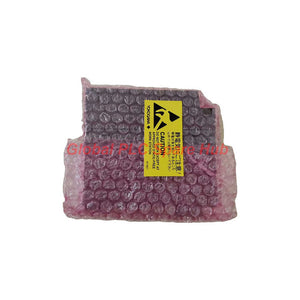
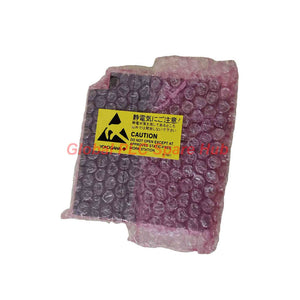
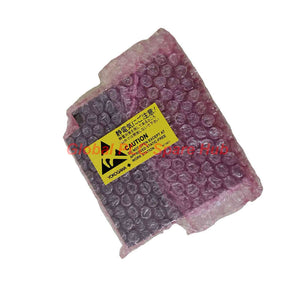
ALP121-S00 Yokogawa Communication Module PROFIBUS-DP Integration
Manufacturer: Yokogawa
Product No.: ALP121-S00
Condition: In stock
Product Type: Communication Module
Product Origin: SG
Payment: T/T, Western Union
Weight: 350g
Shipping port: Xiamen
Warranty: 12 months
Estimate delivery times: 12-26 days (International), 3-6 days (United States).
Return within 30 days of purchase. Duties & taxes are non-refundable.
Guaranteed Safe Checkout
Yokogawa ALP121-S00 | PROFIBUS-DP Communication Module
The Yokogawa ALP121-S00 is a PROFIBUS-DP communication module designed to connect compatible control-system equipment to a PROFIBUS-DP field network. It uses an EIA-RS-485-compliant interface and supports communication speeds from 9.6 kbps to 12 Mbps.
The module provides one communication port through a 9-pin female D-sub connector. Signal isolation separates the field side from the system side. Engineers can use it in compatible Yokogawa control architectures where PROFIBUS-DP communication is required and the host system supports this module.
Configuration Blueprint | Decode ALP121-S00
| Code Element | Value | Meaning |
|---|---|---|
| Model | ALP121 | PROFIBUS-DP communication module |
| Suffix 1 | S | Standard type |
| Suffix 2 | 0 | Code position specified as always 0 |
| Suffix 3 | 0 | Code position specified as always 0 |
Configuration tree
-
ALP121 — PROFIBUS-DP Communication Module
- -S — Standard type
- 0 — Fixed code value
- 0 — Fixed code value
Ordering-code note: The supplied information also identifies code 1 as the ISA Standard G3 option. Because the exact suffix position for this option is not fully established in the provided data, confirm the complete ordering code with the applicable Yokogawa documentation before substituting a G3 configuration.
Technical Data | Communication and Electrical Interface
| Parameter | Specification |
|---|---|
| Manufacturer | Yokogawa |
| Model | ALP121-S00 |
| Module Type | PROFIBUS-DP Communication Module |
| Communication Interface | PROFIBUS-DP |
| Physical Interface | EIA-RS-485 compliant |
| Signal Isolation | Isolation between field and system sides |
| Transmission Speed | 9,600 bps to 12 Mbps |
| Maximum Transmission Distance | 1.2 km at 9,600 bps |
| Communication Ports | 1 |
| Connector | 9-pin female D-sub |
| Maximum Current Consumption | 0.7 A |
| Weight | 0.3 kg |
| Condition | Listed as new and in factory packing; verify the supplied unit and packaging at purchase |
| Warranty | 12 months, subject to the seller's applicable terms |
Network Role | Where ALP121-S00 Fits
The module provides the PROFIBUS-DP communication interface for a compatible Yokogawa control-system configuration. Its RS-485 physical layer supports serial fieldbus communication between the control system and compatible PROFIBUS-DP devices.
- PLC and DCS integration: Connect compatible host-system equipment to PROFIBUS-DP devices where the control architecture supports the module.
- Distributed I/O networks: Support cyclic data exchange with compatible remote I/O stations and fieldbus devices.
- Drive and motor-control networks: Exchange process commands and status data with compatible PROFIBUS-DP drives or motor controllers.
- Process automation: Provide a communication interface for supported field devices in industrial process control networks.
- System maintenance: Replace a matching communication module when the host-system version, hardware configuration, and network requirements are compatible.
Actual device support depends on the host controller, system software, device GSD configuration, network design, and applicable Yokogawa integration documentation. Do not assume every PROFIBUS-DP device will work without configuration.
Network Design Notes | Speed, Distance, and Wiring
The stated maximum distance of 1.2 km applies at 9,600 bps. Higher transmission speeds generally require shorter cable segments under PROFIBUS-DP physical-layer rules.
- Choose the baud rate: Select a supported speed that meets the network's response-time requirements and cable conditions.
- Verify cable length: Check the total segment length against the selected baud rate and cable specification.
- Inspect termination: Apply PROFIBUS termination at the correct segment endpoints. Avoid unintended additional termination points.
- Check topology: Use a compliant bus layout and avoid unapproved star branches or excessive stub lengths.
- Confirm connector wiring: Verify the 9-pin D-sub pinout, shield continuity, and connector suitability against the manufacturer's documentation.
- Review power loading: Account for the module's maximum current consumption of 0.7 A when checking the host-system power budget.
Commissioning Sequence | From Hardware to Data Exchange
- Confirm host compatibility: Verify that the Yokogawa controller or system base supports the ALP121 model and its installed software version.
- Inspect the installation: Check module seating, connector condition, and the physical security of the communication cable.
- Validate the network plan: Confirm baud rate, station addresses, cable length, segment topology, and termination settings.
- Check device configuration: Verify that the master configuration matches the connected slave devices and their configured data structures.
- Apply power safely: Follow the system's installation instructions and verify that the available supply capacity meets the module requirements.
- Test communication: Check master diagnostics, device availability, cyclic data updates, and communication error counters where supported.
- Record baseline results: Document the baud rate, station addresses, device list, network topology, and initial diagnostic status.
Diagnostic Matrix | Symptoms and Corrective Checks
| Symptom | Potential Cause | Engineering Check |
|---|---|---|
| Master cannot detect a slave | Incorrect station address, wiring error, missing device power, or incompatible configuration | Verify the slave address, connector wiring, device power, and master configuration. |
| Communication is intermittent | Incorrect termination, poor shielding, cable damage, or excessive segment length | Inspect the physical bus, termination points, shield connections, and cable limits for the selected speed. |
| Communication errors increase at higher speeds | Marginal cable quality, excessive stubs, interference, or unsuitable topology | Test at a supported lower speed, inspect the segment layout, and verify cable compliance. |
| Module is installed but data does not update | Host configuration mismatch, slave configuration error, or network communication fault | Review controller diagnostics, configured device data, station addresses, and cyclic data status. |
| Communication fails after a replacement | Incorrect module variant, different configuration, loose seating, or changed network settings | Compare the old and new part numbers, verify host compatibility, and restore the approved network configuration. |
| Errors appear after adding a device | Duplicate station address, changed segment loading, or incorrect termination | Check address uniqueness, cable layout, segment limits, and termination at the new network endpoints. |
Diagnostic limitation: The supplied specifications do not define onboard diagnostic LEDs, supported diagnostic counters, or specific fault codes for the ALP121-S00. Use the host system's documented diagnostic tools and the connected devices' status information rather than assuming a particular LED or alarm behavior.
Global PLC Spare HUB's Insight
When commissioning a PROFIBUS-DP segment, engineers should check the physical layer before changing the controller configuration. Incorrect termination, duplicate station addresses, and cable lengths that exceed the permitted limit can produce symptoms that resemble a module fault.
For replacement projects, record the existing baud rate, station addresses, GSD files, master configuration, and termination arrangement before removing the installed unit. After installation, verify both device availability and actual cyclic data updates. A device appearing in the network scan does not necessarily prove that all process data maps correctly.
The ALP121-S00 supports speeds up to 12 Mbps, but the correct operating speed depends on the entire segment. Select the rate based on cable length, topology, device support, and required communication performance rather than choosing the highest rate by default.
Frequently Asked Questions
Q1: What information should I collect before replacing an ALP121-S00 in an operating plant?
Record the complete model code, host-system type and software version, network baud rate, station addresses, connected device list, and master configuration. Save the current diagnostics and verify the replacement procedure against the plant's maintenance requirements.
Q2: Can a PROFIBUS-DP segment operate at 12 Mbps over the full 1.2 km distance?
Do not assume so. The 1.2 km figure applies at 9,600 bps. Maximum cable length decreases as transmission speed increases, so confirm the permitted distance for the selected rate and installed cable.
Q3: How can I distinguish a physical-layer fault from a device configuration problem?
Start with cable continuity, termination, shielding, station addresses, and communication stability. If the physical network is sound and devices respond consistently, review the master configuration, device description files, and configured input/output data structures.
Q4: Does the female 9-pin D-sub connector guarantee compatibility with any PROFIBUS cable assembly?
No. Confirm the connector pinout, cable impedance and type, shielding, termination arrangement, and connector accessories against the applicable PROFIBUS and Yokogawa documentation. Matching connector shape alone does not establish electrical or protocol compatibility.
Q5: When should I select the ISA Standard G3 option instead of the standard type?
Base the choice on the installation's environmental requirements and the exact Yokogawa ordering-code definition. The supplied information identifies code 1 with the ISA Standard G3 option but does not fully establish its position in the complete suffix string. Confirm the correct model code and approval documentation before ordering.
Warranty, Shipping, and Package Details
- Product: Yokogawa ALP121-S00 PROFIBUS-DP Communication Module
- Condition: Listed as new and in factory packing; confirm packaging and condition at order confirmation.
- Warranty: 12-month warranty, subject to the seller's applicable terms and conditions.
- Shipping: FedEx, UPS, and DHL, subject to destination and shipping arrangements.
- Package contents: One ALP121-S00 module. Connectors, cables, and other accessories are included only when explicitly stated in the quotation.
- Order verification: Provide the full model code and host-system details to help confirm compatibility and availability.
Request a quotation from Global PLC Spare HUB for the Yokogawa ALP121-S00. Share your host-system model, PROFIBUS-DP network requirements, and suffix option needs to support accurate configuration checking before purchase.
Tags
Q: Are these parts 100% original and new?
A: Yes. Every component is guaranteed to be 100% original, brand-new, and factory-sealed. We also provide a 12-month comprehensive warranty for your peace of mind.
Q: How fast is the shipping to my country?
A: For in-stock items, we offer same-day dispatch. International express shipping (DHL/FedEx/UPS) typically delivers within 3–5 business days worldwide.
Q: Can I get a formal quotation with shipping costs?
A: Absolutely. Our sales team is ready to provide a detailed Proforma Invoice (PI) including the most competitive shipping rates for your location.
Q: Do you offer discounts for bulk orders?
A: We provide volume-based pricing for large projects or multiple-item orders. Please contact us to get our Best Price Guarantee.
12-Month Comprehensive Warranty
Every part supplied by Global PLC Spare Hub is covered by a 12-month warranty from the date of invoice.
- Coverage: Functional defects and hardware failures under normal operating conditions.
- Commitment: We provide immediate repair, replacement, or a full refund for any verified defective components to minimize your operational downtime.
Returns & Exchange Policy
We offer a 30-day return policy to ensure you receive the exact part your system requires.
- Eligibility: Returns are accepted for uninstalled items in their original, factory-sealed packaging.
- RMA Process: Please contact our support team to obtain a Return Merchandise Authorization (RMA) number before shipping.
- Fast Processing: Refunds or exchanges are processed within 3–5 business days after the returned item passes our technical inspection.
Need Technical Assistance?Not sure if this part is compatible with your system? [Consult our Engineers] before purchasing to ensure 100% compatibility.
People Also Bought


