


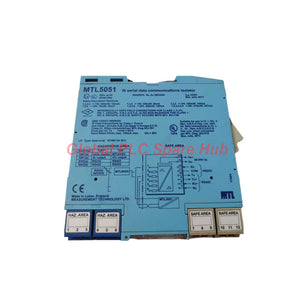
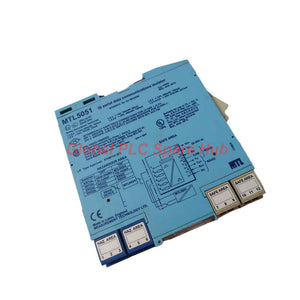
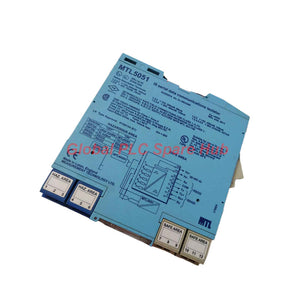
MTL5051 MTL640 Series | Intrinsically Safe Serial Data Isolator
Manufacturer: MTL
Product No.: MTL5051
Condition: In stock
Product Type: Data Isolator
Product Origin: EN
Payment: T/T, Western Union
Weight: 200g
Shipping port: Xiamen
Warranty: 12 months
Estimate delivery times: 12-26 days (International), 3-6 days (United States).
Return within 30 days of purchase. Duties & taxes are non-refundable.
Guaranteed Safe Checkout
MTL5051 | Hazardous-Area Serial Communication Interface
The MTL5051 provides bidirectional serial communication between safe-area computers and hazardous-area instrumentation. It also supplies a floating DC power source to compatible field devices.
This interface supports MTL640 Series intrinsically safe text displays, keyboards, mice, and other compatible instruments. It also enables full-duplex data transfer across hazardous areas using two interface units.
The MTL5051 accepts RS232 or RS422 signals from the safe area. Its field interface supports several communication modes. Engineers select the required mode and field supply through the module's configuration switches.
01 | Signal Architecture and Operating Modes
The module provides three principal field-interface configurations. Each configuration uses different signal levels and terminal functions.
| Operating mode | Signal toward hazardous area | Signal from hazardous area | Typical purpose |
|---|---|---|---|
| MTL640 Series mode | 3 V signal superimposed on a nominal 12 V supply | 5 mA signal superimposed on quiescent current | Communication with compatible MTL640 Series text displays |
| Hazardous-area communication mode | 10 mA current source | 10 mA current source | Full-duplex serial communication across hazardous areas |
| IS RS232/TTL device mode | RS232-compatible signal levels | TTL or RS232 signals | Connection to compatible intrinsically safe peripherals |
Communication speed: MTL640 Series mode supports 1,200 to 9,600 baud. Other modes support rates up to 19.2 kbaud.
In cross-area communication mode, engineers use two MTL5051 units. Current switching helps reduce bandwidth limitations caused by long cables.
02 | Electrical and Power Data
| Specification | Manufacturer data |
|---|---|
| Brand | MTL |
| Model | MTL5051 |
| Product family | MTL5000 Series interface module |
| Product type | Intrinsically safe serial communication and field power interface |
| Safe-area interface | RS232 or RS422 |
| Supply voltage | 20 to 35 V DC, subject to the manufacturer's common specifications |
| Maximum power dissipation | 1.7 W at 24 V, with a 25 mA load |
| Maximum supply consumption at 25 mA load | 105 mA at 20 V; 90 mA at 24 V; 70 mA at 35 V |
| Power indication | Green LED |
| Hazardous-area supply, terminal 2 | Selectable 12 V or 5 V supply modes |
Field supply settings:
- 12 V mode provides 12.0 V ±5% below 23 mA load.
- 12 V mode provides at least 8.0 V above 23 mA and below 50 mA.
- 5 V mode provides 5.6 V ±5% above 23 mA and below 50 mA.
- The top-mounted switch selects the field equipment supply configuration.
Verify the peripheral's voltage and current requirements before selecting its supply mode. The available voltage depends on the connected load.
03 | Terminal Assignment and Switch Configuration
Use the following terminal map to plan wiring. Confirm the actual module markings and applicable manufacturer wiring diagrams before energizing the installation.
| Terminal | MTL640 mode | Cross-area communication mode | Other IS devices |
|---|---|---|---|
| 1 | Common | Common | Common |
| 2 | Voltage signal / field supply | 5 V or 12 V supply | 5 V or 12 V supply |
| 3 | Current return | Rx − | — |
| 4 | — | Tx − | — |
| 5 | — | — | Tx |
| 6 | — | — | Rx |
Safe-area interface terminals:
| Terminal | RS232 mode | TTL mode | RS422 mode |
|---|---|---|---|
| 7 | — | — | Rx − |
| 8 | — | — | Rx + |
| 9 | — | Tx | Tx + |
| 10 | Tx | — | Tx − |
| 11 | Common | Common | Common |
| 12 | Rx | Rx | Rx − |
| 13 | Supply −ve | Supply −ve | Supply −ve |
| 14 | Supply +ve | Supply +ve | Supply +ve |
Switch reference:
| Switch | MTL640 mode | Communication mode | Other IS devices |
|---|---|---|---|
| 1a | ON | OFF | OFF |
| 1b | ON | ON | OFF or ON |
| 2a | OFF | ON | ON |
| 2b | ON | OFF | OFF |
Switch combinations depend on the intended interface and peripheral. Use the manufacturer's mode-specific instructions rather than applying a generic switch setting.
04 | Hazardous-Area Safety Parameters
The manufacturer lists different electrical safety limits for specific terminal combinations. These limits are configuration-dependent.
| Terminal combination | Voltage limit | Power limit | Current limit |
|---|---|---|---|
| 1, 2, 3, 4 | 14 V | 800 mW | 192 mA |
| 1, 3, 4 | 14 V | 350 mW | 88 mA |
| 1, 2, 3 | 14 V | 450 mW | 108 mA |
| 1, 5, 6 | 15 V | 70 mW | 35 mA |
| 1, 2, 5, 6 | 20 V | 460 mW | 139 mA |
| 1, 2, 3, 4, 5, 6 | 20 V | 810 mW | 227 mA |
Hazardous-area location: The supplied specification identifies Zone 0, IIC, T4–T6 and Division 1, Group A locations. Verify the unit's certification, control drawing, and complete loop parameters for the intended installation.
The values above do not replace the required intrinsic safety assessment. Do not combine terminal limits from different configurations.
05 | Compatible Equipment and Application Scenarios
The MTL5051 supports serial communication and field power for compatible intrinsically safe equipment.
- MTL643, MTL644, MTL646, and MTL647 text displays: Supports the MTL640 Series communication and supply interface.
- Intrinsically safe keyboards: Provides a serial link and configurable field supply for compatible keyboard interfaces.
- Intrinsically safe mice: Supports compatible serial pointing devices in hazardous-area operator stations.
- Other IS instrumentation: Interfaces with compatible RS232, TTL, or manufacturer-defined serial devices.
- Cross-area data links: Two units can provide bidirectional full-duplex communication across a hazardous area.
Typical installations include hazardous-area operator stations, remote text displays, process equipment interfaces, and serial peripheral connections.
Compatibility depends on signal mode, baud rate, supply requirements, terminal configuration, and the device's intrinsic safety parameters. Confirm these details before ordering.
06 | Commissioning and Field Diagnostics
The green LED provides a basic indication of power. It does not confirm successful serial communication or correct field-device operation.
Practical diagnostic sequence:
- Check the DC supply at terminals 13 and 14.
- Confirm the green power indicator illuminates.
- Verify the selected RS232 or RS422 interface matches the computer or controller.
- Check transmitter and receiver wiring against the selected mode.
- Confirm the field device receives its required 5 V or 12 V supply.
- Match the baud rate and serial communication settings at both ends.
- Test communication locally before troubleshooting the hazardous-area cable route.
Field insight: A powered display that does not respond may have a communication configuration fault. Check baud rate, transmit and receive connections, and switch settings before replacing the interface module.
For a long hazardous-area link, test each section separately. This helps identify cable-related signal loss or wiring faults without changing several variables at once.
07 | Global PLC Spare HUB's Insight
Engineers should treat the MTL5051 as both a communication interface and a field power source. A peripheral can communicate incorrectly when its supply configuration does not match its requirements.
Example: An MTL640 Series text display receives power but fails to update its process data. The engineer first confirms the selected MTL640 mode. Next, the engineer checks the serial baud rate and signal wiring. Finally, the engineer verifies the field supply under the connected load.
This sequence separates power problems from communication problems. It also reduces unnecessary module replacement during commissioning.
When planning a cross-area link, specify both interface units, the cable route, the required baud rate, and the receiving device. Confirm the complete loop's intrinsic safety requirements before installation.
08 | Installation, Service, and Purchasing Checklist
- Identify the peripheral model and its serial interface type.
- Determine whether the application requires MTL640 mode, cross-area communication, or another IS device mode.
- Confirm the field device's voltage and current requirements.
- Check the required baud rate and full-duplex communication needs.
- Review the terminal map and switch settings for the selected configuration.
- Confirm hazardous-area certification and loop compatibility.
- Keep the wiring diagram and commissioning results with the equipment records.
For replacement or expansion projects, compare the existing unit's configuration with the proposed module. Matching the model alone does not guarantee matching interface settings.
09 | Packaging, Warranty, and Shipping
- Product: MTL5051 serial communication interface module.
- Packaging: Protective packaging for industrial electronic equipment.
- Warranty: 12 months, subject to the seller's warranty terms.
- Shipping options: FedEx, UPS, and DHL.
Contact Global PLC Spare HUB to confirm availability, delivery estimates, warranty conditions, and the supplied package contents.
10 | Frequently Asked Questions
1. Can one MTL5051 establish full-duplex communication between two hazardous-area devices?
The specified cross-area mode uses two MTL5051 units. Each unit serves one side of the communication link. Confirm the required terminal configuration and cable arrangement for the complete connection.
2. How should engineers select between RS232 and RS422?
Start with the host computer's physical interface and the peripheral's documented requirements. RS422 uses differential signal connections. Check the applicable terminal assignments and ensure both endpoints support compatible signaling.
3. What should a buyer verify when replacing an installed interface?
Check the complete part number, operating mode, switch positions, terminal wiring, field supply, and hazardous-area documentation. Record the existing configuration before removing the original unit.
4. Can a higher baud rate improve communication over a long cable?
Not necessarily. Cable characteristics and interface configuration affect reliable data transfer. The specification identifies current switching as a way to reduce bandwidth limitations in cross-area communication. Test the actual cable and device combination at the required rate.
5. What information should an inquiry include for a new hazardous-area serial link?
Provide the host interface, field-device model, hazardous-area classification, cable length, required baud rate, and field supply requirements. Include the intended communication mode. These details help verify compatibility and identify the correct configuration.
Request Technical Support and Pricing
Contact Global PLC Spare HUB for a quotation, compatibility review, and delivery information for the MTL5051. Provide your device model and interface requirements to support accurate selection.

Tags
Q: Are these parts 100% original and new?
A: Yes. Every component is guaranteed to be 100% original, brand-new, and factory-sealed. We also provide a 12-month comprehensive warranty for your peace of mind.
Q: How fast is the shipping to my country?
A: For in-stock items, we offer same-day dispatch. International express shipping (DHL/FedEx/UPS) typically delivers within 3–5 business days worldwide.
Q: Can I get a formal quotation with shipping costs?
A: Absolutely. Our sales team is ready to provide a detailed Proforma Invoice (PI) including the most competitive shipping rates for your location.
Q: Do you offer discounts for bulk orders?
A: We provide volume-based pricing for large projects or multiple-item orders. Please contact us to get our Best Price Guarantee.
12-Month Comprehensive Warranty
Every part supplied by Global PLC Spare Hub is covered by a 12-month warranty from the date of invoice.
- Coverage: Functional defects and hardware failures under normal operating conditions.
- Commitment: We provide immediate repair, replacement, or a full refund for any verified defective components to minimize your operational downtime.
Returns & Exchange Policy
We offer a 30-day return policy to ensure you receive the exact part your system requires.
- Eligibility: Returns are accepted for uninstalled items in their original, factory-sealed packaging.
- RMA Process: Please contact our support team to obtain a Return Merchandise Authorization (RMA) number before shipping.
- Fast Processing: Refunds or exchanges are processed within 3–5 business days after the returned item passes our technical inspection.
Need Technical Assistance?Not sure if this part is compatible with your system? [Consult our Engineers] before purchasing to ensure 100% compatibility.
People Also Bought


