


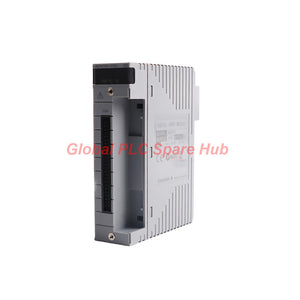
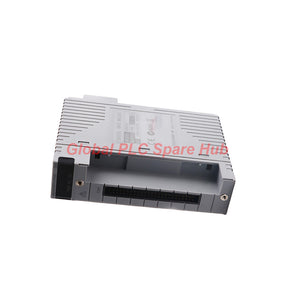

ADV151-P50/D5A00 Yokogawa ADV151 Series Digital Input Module
Manufacturer: Yokogawa
Product No.: ADV151-P50/D5A00
Condition: In stock
Product Type: Digital Input Module
Product Origin: SG
Payment: T/T, Western Union
Weight: 500g
Shipping port: Xiamen
Warranty: 12 months
Estimate delivery times: 12-26 days (International), 3-6 days (United States).
Return within 30 days of purchase. Duties & taxes are non-refundable.
Guaranteed Safe Checkout
ADV151-P50/D5A00 | Yokogawa 32-Channel Digital Input Module
The Yokogawa ADV151-P50/D5A00 is a 32-channel digital input module designed for industrial control and distributed control system applications. It accepts 24 V DC sink/source signals and supports status monitoring, pushbutton edge counting, and sequence of events (SOE) data capture. The ADV151 series provides an input response time of 8 ms or less for status signals. Its pushbutton input function supports a minimum ON detection time of 20 ms and a maximum ON/OFF cycle of 25 Hz. This configuration includes a KS cable interface adapter, model ATD5A-00, for 32-channel digital input connections. Engineers should verify the host system, cable arrangement, and input logic before installation.
01 | Engineering Specifications at a Glance
| Manufacturer | Yokogawa |
| Complete Model | ADV151-P50/D5A00 |
| Series | ADV151 |
| Product Type | Digital Input Module |
| Input Channels | 32 |
| Rated Input Voltage | 24 V DC, sink/source |
| Input ON Voltage | 18–26.4 V DC |
| Input OFF Voltage | 5.0 V DC or less |
| Input Current | 4.1 mA ±20% per channel at rated input voltage |
| Maximum Allowable Input Voltage | 30.0 V DC |
| Input-to-System Withstand Voltage | 2 kV AC for 1 minute |
| Common-to-Common Withstand Voltage | 500 V AC for 1 minute; one common per 16 channels |
| Status Input Response Time | 8 ms maximum |
| Minimum Pushbutton ON Detection Time | 20 ms |
| Maximum Pushbutton ON/OFF Cycle | 25 Hz |
| Maximum Current Consumption | 500 mA at 5 V DC |
| External Connections | Pressure clamp terminal, dedicated AKB331 cable, or MIL connector cable |
| Interface Adapter | KS cable interface adapter, model ATD5A-00 |
| Approximate Weight | 0.30 kg |
Specification note: The supplied data does not state analog measurement range, frequency response, linearity, or resolution. These parameters do not directly apply to this discrete digital input module.
02 | Model Configuration and Suffix Breakdown
| Code Segment | Definition | Engineering Significance |
| ADV151 | Digital Input Module | Identifies the 32-channel digital input module family. |
| P | With pushbutton input | Supports pushbutton edge counting in addition to status input functions. |
| 5 | Without status display; without explosion protection | Identifies the specified display and protection configuration. |
| 0 | Basic type | Identifies the basic configuration. |
| /D5A00 | KS cable interface adapter for 32-channel digital input | Specifies the ATD5A-00 interface adapter configuration. |
| Complete Code | ADV151-P50/D5A00 | Identifies the full module and interface configuration for ordering and replacement. |
Ordering recommendation: Verify the complete model code and adapter requirement against the installed hardware. Do not assume another ADV151 configuration includes the same interface accessories.
03 | Three Input Functions for Control and Event Acquisition
- Status input The module detects ON/OFF states from connected field contacts or compatible 24 V DC signals. Its maximum response time is 8 ms for status input.
- Pushbutton input The module supports pushbutton edge counting. The specified minimum ON detection time is 20 ms, with a maximum ON/OFF cycle of 25 Hz.
- Sequence of Events input The module supports SOE data capture for applications that require event records. Confirm timestamp handling, time resolution, synchronization, and system-level SOE behavior in the applicable Yokogawa documentation.
These functions serve different engineering purposes. Status input monitors operating conditions, pushbutton input counts transitions, and SOE input supports event analysis.
04 | Typical Equipment and Application Scenarios
| Application | Practical Use |
| DCS field status acquisition | Collects discrete signals from auxiliary contacts, relays, and limit switches. |
| Valve and actuator feedback | Monitors open/closed indications and operating-state contacts. |
| Pump and motor systems | Acquires running, stopped, and auxiliary contact signals. |
| Operator pushbutton stations | Counts pushbutton transitions within the supported timing limits. |
| Process event monitoring | Supports SOE data capture for event investigation and sequence analysis. |
| Industrial interlock systems | Provides discrete input states for controller-based permissive logic. |
The module does not independently execute all control logic or guarantee safety-rated protection. Confirm the host system's supported functions and applicable safety requirements before assigning it to critical interlocks.
05 | Wiring and Installation Planning
- Confirm input logic: Check whether the field device and circuit require sink or source wiring.
- Verify signal voltage: Ensure ON signals meet the 18–26.4 V DC range and OFF signals meet the 5.0 V DC maximum.
- Respect voltage limits: Do not exceed the 30.0 V DC maximum allowable input voltage.
- Select the correct interface: Confirm the ATD5A-00 adapter and the required pressure clamp, AKB331, or MIL cable connection.
- Check common grouping: Account for the specified common arrangement, with one common per 16 channels.
- Inspect wiring: Check terminal security, conductor condition, labeling, and separation from noise-producing circuits.
- Verify channel mapping: Compare field terminal assignments with the control-system configuration before energizing the circuit.
Follow the approved Yokogawa installation manual for terminal assignments, mounting procedures, and connection restrictions. Isolate power according to site procedures before handling field wiring.
06 | Commissioning and Diagnostic Workflow
The ADV151-P50/D5A00 supports structured input verification through its status, pushbutton, and SOE functions.
- Establish a baseline: Record the expected state of each connected field contact.
- Test status signals: Operate field devices and confirm that the controller reports the corresponding input state.
- Check voltage thresholds: Measure the field signal when an input fails to change state.
- Verify pushbutton timing: Confirm that ON duration and switching frequency remain within the specified limits.
- Review SOE records: Compare recorded events with the actual test sequence and available system time references.
- Inspect wiring and configuration: Check channel mapping, common connections, adapter installation, and controller settings.
Field example: A pushbutton press fails to register during a commissioning test. The engineer measures the contact pulse and finds an ON duration shorter than 20 ms. The engineer then checks the pushbutton mechanism and test setup before investigating module hardware. Diagnostic limitation: The specifications confirm input functions and timing limits, but they do not define onboard fault codes or independent wire-break detection. Use the host system's documented diagnostics for additional fault isolation.
07 | Compatibility and Replacement Guidance
Before purchasing this configuration, verify the following:
- The target Yokogawa system supports the ADV151 module and its intended application.
- The system accepts the specified 32-channel input arrangement.
- The field circuit supports 24 V DC sink/source input requirements.
- The installed interface uses the correct ATD5A-00 adapter or an approved alternative.
- The application requires the pushbutton input and SOE capabilities provided by the selected configuration.
- The installation does not require explosion protection from this configuration.
Replacement tip: Record the full model code, adapter designation, terminal arrangement, and controller channel mapping before removing the existing unit. This information helps prevent wiring errors and configuration mismatches during recommissioning.
08 | Global PLC Spare HUB Review
From an engineering perspective, the key advantage of the ADV151-P50/D5A00 is its combination of 32-channel status acquisition, pushbutton edge counting, and SOE support. These functions serve different operational needs. A valve limit switch requires reliable state acquisition, while an operator pushbutton may require transition counting. An event-analysis application may also need SOE records to reconstruct the order of field changes. During troubleshooting, engineers should verify electrical thresholds and timing requirements before replacing the module. A short pushbutton pulse, incorrect sink/source wiring, or mismatched channel assignment can create symptoms that resemble hardware failure. For replacement projects, confirm the ATD5A-00 interface adapter and complete suffix code. This check reduces procurement errors and helps preserve the intended wiring arrangement.
09 | Environmental and Compliance Considerations
The suffix code 5 identifies a configuration without status display and without explosion protection, according to the supplied model description. The provided specifications do not establish a separate operating temperature range, ingress-protection rating, EMC certification, or hazardous-area approval. Verify the manufacturer's documentation against the site's environmental and regulatory requirements.
10 | Packaging, Shipping, and Warranty
- Product: Yokogawa ADV151-P50/D5A00 digital input module.
- Specified interface adapter: KS cable interface adapter, model ATD5A-00.
- Other accessories: Confirm cables, terminals, and mounting hardware against the order confirmation.
- Shipping methods: FedEx, UPS, and DHL, subject to destination and service availability.
- Dispatch target: Typically 24–48 hours after order confirmation, subject to stock and payment verification.
- Warranty: 12 months, subject to the seller's written warranty terms.
Contact Global PLC Spare HUB to verify stock, included accessories, delivery arrangements, and warranty coverage before ordering.
11 | Frequently Asked Questions
Q1. How do I determine whether a field signal meets the module's ON threshold?
Measure the voltage at the relevant input under operating conditions. The specified ON range is 18–26.4 V DC. Also check common wiring and the field device's output behavior.
Q2. Why can a pushbutton counter miss rapid operator actions?
The input function specifies a minimum ON detection time of 20 ms and a maximum ON/OFF cycle of 25 Hz. Shorter pulses or faster transitions may fall outside the stated operating limits.
Q3. What should I verify when replacing an ADV151 module with an existing cable assembly?
Confirm the complete suffix code, ATD5A-00 adapter requirement, connector type, channel assignments, and wiring diagram. Check that the replacement configuration matches the existing hardware and intended functions.
Q4. How can SOE functionality help investigate intermittent process trips?
SOE records can help engineers compare event sequences and identify which input changes occurred before a trip. Reliable conclusions also depend on system time synchronization, event resolution, and the controller's diagnostic capabilities.
Q5. Is this configuration suitable for a hazardous industrial area?
The supplied suffix definition states that code 5 provides no explosion protection. Verify area classification and required approvals before selecting the module for hazardous locations.
Request a Quote for ADV151-P50/D5A00
Need a Yokogawa ADV151-P50/D5A00 for a DCS upgrade, maintenance project, or replacement requirement? Contact Global PLC Spare HUB with the full model code, required quantity, host-system details, and delivery destination. Our team can help review configuration requirements and confirm shipping options through FedEx, UPS, or DHL.
Tags
Q: Are these parts 100% original and new?
A: Yes. Every component is guaranteed to be 100% original, brand-new, and factory-sealed. We also provide a 12-month comprehensive warranty for your peace of mind.
Q: How fast is the shipping to my country?
A: For in-stock items, we offer same-day dispatch. International express shipping (DHL/FedEx/UPS) typically delivers within 3–5 business days worldwide.
Q: Can I get a formal quotation with shipping costs?
A: Absolutely. Our sales team is ready to provide a detailed Proforma Invoice (PI) including the most competitive shipping rates for your location.
Q: Do you offer discounts for bulk orders?
A: We provide volume-based pricing for large projects or multiple-item orders. Please contact us to get our Best Price Guarantee.
12-Month Comprehensive Warranty
Every part supplied by Global PLC Spare Hub is covered by a 12-month warranty from the date of invoice.
- Coverage: Functional defects and hardware failures under normal operating conditions.
- Commitment: We provide immediate repair, replacement, or a full refund for any verified defective components to minimize your operational downtime.
Returns & Exchange Policy
We offer a 30-day return policy to ensure you receive the exact part your system requires.
- Eligibility: Returns are accepted for uninstalled items in their original, factory-sealed packaging.
- RMA Process: Please contact our support team to obtain a Return Merchandise Authorization (RMA) number before shipping.
- Fast Processing: Refunds or exchanges are processed within 3–5 business days after the returned item passes our technical inspection.
Need Technical Assistance?Not sure if this part is compatible with your system? [Consult our Engineers] before purchasing to ensure 100% compatibility.
People Also Bought


