


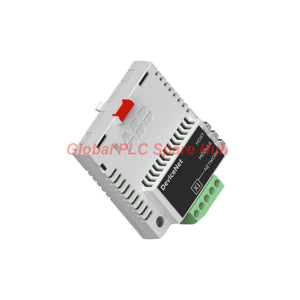


ABB FDNA-01 DeviceNet Communication Module | Drive Interface
Manufacturer: ABB
Product No.: FDNA-01
Condition: In stock
Product Type: DeviceNet adapter module
Product Origin: SE
Payment: T/T, Western Union
Weight: 0g
Shipping port: Xiamen
Warranty: 12 months
Estimate delivery times: 12-26 days (International), 3-6 days (United States).
Return within 30 days of purchase. Duties & taxes are non-refundable.
Guaranteed Safe Checkout
Product Overview
The ABB FDNA-01 DeviceNet adapter connects compatible ABB drives to industrial DeviceNet networks. It enables drive communication with PLCs, DeviceNet scanners, and higher-level automation systems.
Manufactured by ABB, this fieldbus adapter supports network-based drive control, parameter access, and status monitoring. Its compact design fits the designated communication option slot of a compatible drive.
- Brand: ABB
- Model: FDNA-01
- Product ID: 68469341
- Product Type: DeviceNet adapter module
- Communication Protocol: DeviceNet
- Primary Function: Drive-to-PLC fieldbus communication
- Installation: Compatible ABB drive option slot
- Network Topology: Multi-drop
Technical Specifications
| Parameter | Specification |
|---|---|
| Manufacturer | ABB |
| Model | FDNA-01 |
| Product ID | 68469341 |
| Communication Protocol | DeviceNet |
| Serial Communication | Asynchronous, half duplex |
| Supported Data Rates | 125, 250, or 500 kbit/s |
| Network Input Voltage | +24 V DC nominal; +11 V to +30 V DC |
| Drive Input Voltage | +3.3 V DC, ±5% |
| Drive Input Current | 180 mA typical; 300 mA maximum |
| Network Input Current | 20 mA typical; 50 mA maximum at +24 V DC |
| Bus Isolation | Functionally isolated from the drive |
| Network Topology | Multi-drop |
| Maximum Bus Length | Up to 1,200 m, subject to network data rate and installation conditions |
| Termination | 121 ohms, 1% tolerance, metal film, 1/4 W |
| Drive Interface | 20-pin connector |
| Network Connector | Removable five-pole screw terminal |
| Maximum Terminal Conductor Cross-Section | 2.5 mm² |
| Degree of Protection | IP20 |
| PCB Protection | Conformal-coated printed circuit board |
| Diagnostic Indicators | Three bicolor LEDs: HOST, MODULE, NETWORK |
| EMC Reference | EN 61800-3:2004, as specified in the supplied product data |
| Measurement Range | Not applicable; this module provides communication rather than physical measurement |
| Frequency Response | Not specified as an analog measurement parameter |
| Measurement Sensitivity | Not applicable to this communication adapter |
| Linearity and Resolution | Not applicable to this communication adapter |
| Operating Temperature | Follow the applicable drive manual; a separate module range requires verification |
| Environmental Conditions | Use the ambient conditions specified in the compatible drive documentation |
| Electromagnetic Immunity | Designed for the specified industrial drive environment; verify installation requirements against ABB documentation |
Communication Functions and Core Benefits
- PLC Integration: Connect compatible ABB drives to DeviceNet-based control systems.
- Drive Command Exchange: Transfer supported control commands and reference values through the configured fieldbus.
- Operating Feedback: Retrieve supported drive status information and parameter data.
- Network Diagnostics: Use the three onboard LEDs to identify communication and module status conditions.
- Flexible Network Design: Select from three supported data rates according to network requirements.
- Industrial Installation: Mount the adapter inside the designated drive option slot.
- Electrical Separation: Functional isolation separates the bus interface from the drive interface.
The actual control functions depend on the drive firmware, adapter configuration, scanner capabilities, and selected communication profile.
Compatible Drives and Network Requirements
The ABB FDNA-01 supports selected ABB drive families. Verify the exact drive model, hardware revision, and option-slot requirements before ordering.
| Compatibility Item | Guidance |
|---|---|
| ABB Drive Families | ACS355, ACS380, ACS480, ACS580, ACH580, ACQ580, ACS880, and DCS880; confirm the exact model and supported configuration |
| PLC or Scanner | Use a compatible DeviceNet scanner with the required slave connection support |
| Scanner Communication | Confirm support for the required Poll-Response connection and applicable Group 2 Only slave behavior |
| Electronic Data Sheet | Use the correct FDNA-01 EDS file for scanner configuration |
| Network Cable | Use suitable DeviceNet thick or thin cable |
| Network Termination | Install suitable 121-ohm resistors at both ends of the trunk line |
| Drive Firmware | Check compatibility and fieldbus parameter availability in the relevant drive manual |
Compatibility can vary by drive generation and firmware. Contact us with your complete drive model and controller details for a configuration check.
Installation Guide
- Verify the Equipment: Confirm the adapter model, drive compatibility, option slot, and network requirements.
- Isolate Power: Disconnect the drive supply and follow all applicable electrical safety procedures.
- Install the Adapter: Insert the module into the designated option slot according to the drive hardware manual.
- Secure the Module: Engage the retaining mechanism and tighten the mounting screw to the specified torque.
- Connect the Network: Wire the five-pole terminal according to the module installation guide.
- Check Termination: Fit 121-ohm, 1%, 1/4 W resistors at both ends of the DeviceNet trunk.
- Inspect the Wiring: Verify CAN_H, CAN_L, shield, network supply, and ground connections.
- Configure the Scanner: Load the correct EDS file and assign a unique DeviceNet node address.
- Configure the Drive: Enable the fieldbus adapter and select the required command and reference sources.
- Validate the Setup: Refresh the relevant adapter parameters and confirm normal LED indications.
Follow the latest ABB installation guide for the exact terminal assignment, screw torque, and drive parameter settings. Never install or remove the module while the drive remains energized.
Commissioning and Maintenance
Commissioning requires checks across the drive, adapter, network wiring, and PLC scanner. Use a structured sequence to isolate communication problems efficiently.
- Confirm the correct DeviceNet node address and data rate.
- Verify the network supply voltage under operating conditions.
- Check both trunk-line terminators and inspect the cable shield connections.
- Confirm that the PLC scanner recognizes the adapter and establishes the required I/O connection.
- Review drive fieldbus parameters and refresh configuration changes when required.
- Record LED states, scanner error codes, and drive fault messages before resetting faults.
- Inspect terminals and connectors during scheduled maintenance.
The module provides diagnostic indicators rather than an independent measurement system. It does not replace drive fault analysis or network-level diagnostic tools.
LED Diagnostics and Troubleshooting
| Indicator | Typical Indication | Recommended Check |
|---|---|---|
| HOST | Green indicates normal host communication | Check the drive interface and adapter configuration if communication fails |
| HOST | Green flashing indicates communication establishment | Allow startup to complete and inspect the drive interface if the state persists |
| HOST | Red flashing indicates temporary host communication loss | Check the drive connection, configuration, and power stability |
| MODULE | Green indicates normal module operation | Continue normal status monitoring |
| MODULE | Green flashing can indicate incomplete configuration or standby | Verify required parameters and commissioning status |
| MODULE | Red flashing indicates a recoverable fault | Review the manual and follow the specified recovery procedure |
| MODULE | Steady red indicates an unrecoverable fault | Record the condition and follow ABB troubleshooting guidance |
| NETWORK | Off indicates the device is not online | Check network power, wiring, node address, and duplicate-address conditions |
| NETWORK | Green flashing indicates online status without established connections | Check scanner allocation and connection configuration |
| NETWORK | Steady green indicates established network connections | Confirm that the PLC exchanges the expected process data |
| NETWORK | Red flashing indicates an I/O connection timeout | Inspect scanner status, cable integrity, and communication timing |
| NETWORK | Steady red indicates a communication failure | Check duplicate node addresses, bus-off conditions, and network wiring |
LED interpretations can depend on the operating state and manual revision. Consult the applicable ABB FDNA-01 manual before taking corrective action.
Typical Industrial Applications
- Manufacturing Lines: Connect compatible ABB drives to PLC-controlled conveyors and production equipment.
- Material Handling: Exchange speed references and operating status for compatible motor-drive systems.
- Pumping Systems: Integrate supported ABB drives into centralized process control networks.
- Ventilation Systems: Exchange drive commands and operating feedback in industrial air-handling installations.
- Process Automation: Provide fieldbus communication between supported drives and DeviceNet-based control systems.
- Machine Retrofits: Add DeviceNet connectivity when the existing drive and control architecture support this adapter.
Application suitability depends on the drive model, control requirements, network architecture, and machine safety design.
Global PLC Spare HUB's Insight
Our engineering-focused approach starts with network architecture rather than part-number matching alone. A compatible adapter still requires correct scanner configuration, node addressing, termination, and drive parameters.
Field Example 1: Scanner Cannot Establish an I/O Connection
An installation team fits an FDNA-01 to a compatible ABB drive. The HOST indicator shows normal communication, but the PLC scanner does not establish the expected connection.
- Check whether the scanner recognizes the correct EDS configuration.
- Verify the node address and confirm that no other device uses it.
- Confirm scanner allocation and the required connection type.
- Check the NETWORK indicator before changing drive parameters.
This sequence separates drive-interface issues from network configuration problems. It also reduces unnecessary module replacement.
Field Example 2: Intermittent Network Communication
A conveyor drive periodically loses communication during production. The network status indicates a connection timeout.
- Inspect trunk-line termination and cable routing.
- Measure the network supply at the adapter during operation.
- Check cable connectors, shield continuity, and grounding practices.
- Compare the selected data rate with the cable length and network design.
Correcting a wiring or termination problem can restore communication without replacing the adapter. Confirm the root cause through measurements and scanner diagnostics.
Engineering Note: These examples illustrate troubleshooting methods. They do not represent a verified repair history for a specific unit.
Packaging, Shipping, and Warranty
| Item | Details |
|---|---|
| Product Supplied | ABB FDNA-01 DeviceNet adapter, subject to the confirmed order configuration |
| Accessories | Confirm the removable bus connector and other accessories with the seller before purchase |
| Documentation | Applicable product documentation may be supplied or provided electronically, subject to availability |
| Packaging | Protective packaging suitable for the confirmed shipment configuration |
| Dispatch Time | Typically 24–48 hours after order and stock confirmation |
| Shipping Carriers | FedEx, UPS, or DHL, subject to destination and service availability |
| Warranty | 12-month seller warranty, subject to the seller's written terms |
Confirm stock, shipping time, included accessories, and warranty coverage before placing an order. Delivery times depend on destination, customs clearance, and carrier operations.
Frequently Asked Questions
Q1: What does the ABB FDNA-01 do?
The FDNA-01 connects compatible ABB drives to DeviceNet networks. It supports drive communication with compatible PLC scanners.
Q2: Is the FDNA-01 compatible with every ABB drive?
No. Compatibility depends on the drive family, hardware configuration, option slot, and firmware. Verify the complete drive model before ordering.
Q3: Which network speeds does this adapter support?
It supports 125, 250, and 500 kbit/s. The network configuration must use a supported data rate.
Q4: Can I use a third-party PLC scanner?
Yes, provided the scanner supports the required DeviceNet communication services and slave connection behavior. Confirm the scanner's EDS and connection requirements.
Q5: What does a flashing NETWORK LED usually mean?
A flashing green NETWORK LED typically indicates online status without established connections. Check scanner allocation and connection configuration.
Q6: Why does the scanner detect the adapter but fail to exchange I/O data?
Possible causes include incorrect EDS settings, unallocated connections, mismatched data configurations, or drive parameter errors. Review the scanner diagnostics before replacing hardware.
Q7: Does the FDNA-01 measure temperature, pressure, or vibration?
No. It is a communication adapter, not a dedicated measurement module. It can transfer supported drive data through the configured fieldbus.
Q8: Does the adapter include network termination?
The adapter does not provide the required bus termination. Install suitable 121-ohm resistors at both ends of the DeviceNet trunk.
Q9: What should I check before replacing a faulty adapter?
First, verify network voltage, cable polarity, node addressing, termination, and scanner configuration. Compare all three LED states with the applicable manual.
Q10: What information helps confirm compatibility before purchase?
Provide the complete ABB drive model, firmware version, existing communication hardware, PLC scanner model, and required network data rate.
Q11: What are the shipping and warranty terms?
Dispatch typically takes 24–48 hours after stock and order confirmation. FedEx, UPS, and DHL options depend on destination. The stated seller warranty is 12 months, subject to written terms.
Q12: How can I reduce commissioning time?
Prepare the correct EDS file, node address, data rate, wiring diagram, and drive parameter list before installation. Record the LED states during startup to simplify fault isolation.
Ordering Guidance
Before requesting a quotation, confirm the required adapter model and the target drive configuration.
- Required Model: ABB FDNA-01
- Product ID: 68469341
- Drive Details: Complete model number and firmware version
- Control System: PLC manufacturer and DeviceNet scanner model
- Network Details: Data rate, cable type, and existing topology
- Commercial Details: Quantity, destination country, and required delivery date
Contact Global PLC Spare HUB for pricing, availability, compatibility verification, and shipping options. Our team can help review the application details before you place your order.

Tags
Q: Are these parts 100% original and new?
A: Yes. Every component is guaranteed to be 100% original, brand-new, and factory-sealed. We also provide a 12-month comprehensive warranty for your peace of mind.
Q: How fast is the shipping to my country?
A: For in-stock items, we offer same-day dispatch. International express shipping (DHL/FedEx/UPS) typically delivers within 3–5 business days worldwide.
Q: Can I get a formal quotation with shipping costs?
A: Absolutely. Our sales team is ready to provide a detailed Proforma Invoice (PI) including the most competitive shipping rates for your location.
Q: Do you offer discounts for bulk orders?
A: We provide volume-based pricing for large projects or multiple-item orders. Please contact us to get our Best Price Guarantee.
12-Month Comprehensive Warranty
Every part supplied by Global PLC Spare Hub is covered by a 12-month warranty from the date of invoice.
- Coverage: Functional defects and hardware failures under normal operating conditions.
- Commitment: We provide immediate repair, replacement, or a full refund for any verified defective components to minimize your operational downtime.
Returns & Exchange Policy
We offer a 30-day return policy to ensure you receive the exact part your system requires.
- Eligibility: Returns are accepted for uninstalled items in their original, factory-sealed packaging.
- RMA Process: Please contact our support team to obtain a Return Merchandise Authorization (RMA) number before shipping.
- Fast Processing: Refunds or exchanges are processed within 3–5 business days after the returned item passes our technical inspection.
Need Technical Assistance?Not sure if this part is compatible with your system? [Consult our Engineers] before purchasing to ensure 100% compatibility.
People Also Bought


