


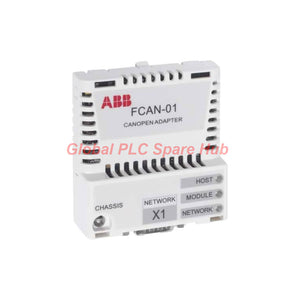
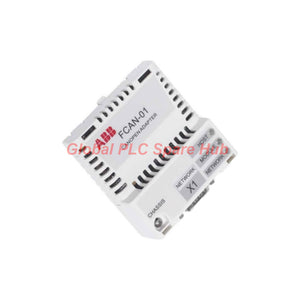
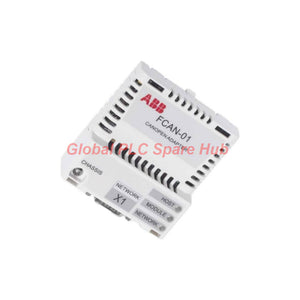
ABB FCAN-01 Drive Communication Adapter | CANopen Network Integration
Manufacturer: ABB
Product No.: FCAN-01
Condition: In stock
Product Type: Communication Adapter
Product Origin: SE
Payment: T/T, Western Union
Weight: 500g
Shipping port: Xiamen
Warranty: 12 months
Estimate delivery times: 12-26 days (International), 3-6 days (United States).
Return within 30 days of purchase. Duties & taxes are non-refundable.
Guaranteed Safe Checkout
ABB FCAN-01 | CANopen Drive Communication Adapter
The ABB FCAN-01 is a CANopen communication adapter designed for compatible ABB drives. It installs directly into the drive's option slot and connects the drive to a CANopen fieldbus network. The adapter enables communication between the drive and CANopen-compatible controllers, PLCs, and automation devices. It uses an asynchronous, half-duplex CAN communication interface. Three bicolor LEDs provide diagnostic information about the host, module, and network. The FCAN-01 supports network integration in industrial drive systems. Its compact design helps engineers add fieldbus communication without installing a separate communication interface enclosure.
01 | Technical Identity and Hardware Specifications
| Manufacturer | ABB |
| Model | FCAN-01 |
| Product Type | CANopen communication adapter module |
| Application | Drive-to-fieldbus communication |
| Mounting Method | Installation into the drive option slot |
| Degree of Protection | IP20 |
| Power Supply | +3.3 V DC ±5%, supplied by the drive |
| Maximum Current Consumption | 300 mA |
| Drive Connector | X2, 20-pin connector |
| Network Connector | X1, 9-pin male D-SUB connector |
| Status Indicators | Three bicolor LEDs: HOST, MODULE, NETWORK |
| Bus Isolation | Functionally isolated from the drive |
| PCB Protection | Conformal-coated printed circuit board |
| EMC Compliance | EN 61800-3:2004 |
| Ambient Conditions | Follow the applicable drive manual |
Engineering note: The FCAN-01 receives its operating power from the drive. It does not require a separate external 3.3 V supply. Confirm drive compatibility and the permitted ambient conditions before installation.
02 | CANopen Network Performance
The ABB FCAN-01 uses a CAN-based serial communication interface. Its supported transfer rates allow engineers to balance network speed and cable length.
| Parameter | Specification |
| Communication Protocol | CANopen |
| Serial Communication | Asynchronous, half-duplex CAN |
| Compatible Devices | CANopen-compliant devices, subject to network configuration |
| Maximum Transfer Rate | 1 Mbit/s |
| Supported Transfer Rates | 1 Mbit/s, 500 kbit/s, 250 kbit/s, 125 kbit/s, 100 kbit/s, 50 kbit/s |
| Recommended Cable | Shielded twisted pair with nominal 120 Ω impedance |
| Bus Termination | 120 Ω resistor or active termination at each trunk end |
| Built-in Termination | Not provided by the adapter |
03 | Bus Length and Baud Rate Selection
Choose the network transfer rate according to the required response time and total trunk cable length.
| Transfer Rate | Maximum Bus Length | Engineering Consideration |
| 1 Mbit/s | 25 m | Short networks requiring higher communication speed |
| 500 kbit/s | 100 m | Compact machine networks |
| 250 kbit/s | 250 m | Medium-length industrial networks |
| 125 kbit/s | 500 m | Extended networks with moderate data rates |
| 50 kbit/s | 1000 m | Longer networks with lower transfer rates |
The supplied specifications do not state maximum bus lengths for 100 kbit/s. Confirm that value against the applicable ABB documentation before designing a network at that rate.
Practical selection example: A machine network with a 70 m trunk may exceed the specified 25 m limit at 1 Mbit/s. A 500 kbit/s setting supports up to 100 m under the listed specification. Engineers must still check the complete network layout, cable quality, topology, and termination.
04 | Installation Architecture and Wiring
The adapter connects the drive internally through X2 and communicates externally through X1.
- X2 — Drive interface: The 20-pin connector connects the adapter to the compatible drive.
- X1 — CANopen interface: The 9-pin male D-SUB connector connects to the network bus.
- Power source: The drive supplies the adapter's 3.3 V operating power.
- Network cable: Use a suitable shielded twisted-pair cable with nominal 120 Ω impedance.
- Bus termination: Install appropriate termination at both ends of the trunk cable.
- Mounting: Install the module in the designated drive option slot.
Installation precautions:
- Isolate the drive from its power source and follow the manufacturer's discharge instructions.
- Verify the drive model and its supported communication options.
- Inspect the option slot and connectors for damage or contamination.
- Install the adapter according to the drive-specific instructions.
- Connect the CANopen cable using the approved pin assignment.
- Check network polarity, shielding, topology, and termination.
- Configure the required node address and communication parameters using the supported drive configuration procedure.
- Restore power and verify the LED indications and network communication.
Do not assume a universal D-SUB pin assignment. Consult the FCAN-01 manual for the correct CAN_H, CAN_L, and reference connections.
05 | Diagnostic Indicators and Troubleshooting
The three bicolor LEDs help technicians assess the adapter and its communication state. Interpret each color and flashing pattern using the applicable ABB manual.
| Indicator | Diagnostic Focus | Recommended Check |
| HOST | Communication or interaction with the drive host | Check option-slot seating, drive compatibility, and host-side configuration. |
| MODULE | Adapter module operating status | Check startup behavior, configuration, and the documented LED code. |
| NETWORK | CANopen network communication | Check the bus cable, node settings, termination, and network activity. |
Field troubleshooting example: A PLC cannot exchange data with an ABB drive after installation. First, check the HOST and MODULE indicators against the manual. Next, inspect the NETWORK LED, verify the node address and baud rate, and confirm the trunk termination. If communication remains unavailable, inspect the CAN_H and CAN_L wiring and verify that all nodes use compatible network settings.
Diagnostic limitation: The FCAN-01 provides status indicators, but it does not replace a CANopen protocol analyzer or a detailed network diagnostic tool. The supplied specifications do not define individual LED color sequences or error codes.
06 | Compatible Equipment and Industrial Applications
The FCAN-01 suits compatible ABB drives that support this option module. Its purpose is to connect drive control and status data to a CANopen network.
- PLC-based drive control: Exchange supported drive commands and status information with a CANopen-capable controller.
- Conveyor systems: Integrate compatible drive units into coordinated material handling equipment.
- Pumping stations: Connect supported drive installations to a central automation network.
- Fans and ventilation: Integrate drive communication into industrial building and process control systems.
- Packaging machinery: Support fieldbus communication between drive equipment and the machine controller.
- Manufacturing lines: Connect compatible drives to a shared CANopen control network.
- Machine retrofits: Add CANopen connectivity where the existing drive and control architecture support this adapter.
CANopen compliance alone does not guarantee complete interoperability. Verify the supported device profile, process data mapping, node configuration, and drive firmware requirements.
07 | Global PLC Spare HUB's Insight
From a drive integration perspective, the ABB FCAN-01 helps connect compatible drive hardware to a CANopen control architecture. Correct network design matters as much as correct module installation. Consider a conveyor upgrade that connects several drives to one PLC. If engineers select a transfer rate without checking the trunk length, the network may exceed the documented cable limit. Incorrect termination or inconsistent node settings can also prevent reliable communication. A sound commissioning process starts with three checks: confirm the drive supports the adapter, standardize the CANopen communication settings, and verify the physical bus. Engineers should then check the HOST, MODULE, and NETWORK indicators and test data exchange with the controller. For replacement purchases, match the complete part number and confirm the drive model, supported option slot, and required CANopen functions. This reduces the risk of ordering a physically compatible module that does not meet the system's communication requirements.
08 | Selection and Replacement Checklist
Before ordering the FCAN-01, verify these details:
- Drive compatibility: Confirm that the exact ABB drive model supports FCAN-01.
- Communication protocol: Confirm that the control system uses CANopen.
- Network speed: Select a supported baud rate for the complete network.
- Cable distance: Check the trunk length against the selected transfer rate.
- Physical interface: Confirm the 9-pin male D-SUB bus connector and required cable assembly.
- Termination: Ensure suitable termination exists at both ends of the trunk.
- Configuration: Check node addressing, drive parameters, and process data requirements.
- Environmental conditions: Follow the drive manual because the adapter uses the drive's applicable ambient limits.
09 | Packaging, Warranty, and Shipping
| Product | ABB FCAN-01 CANopen adapter module |
| Packaging | Protective packaging for transport |
| Package Contents | One adapter module; additional accessories and documentation depend on order confirmation |
| Warranty | 12-month warranty, subject to the seller's applicable terms |
| Shipping Carriers | FedEx, UPS, and DHL |
| Dispatch Time | Target shipment within 24–48 hours, subject to stock confirmation and order processing |
| Order Verification | Confirm availability, product condition, packaging, and delivery options before purchase |
10 | Frequently Asked Questions
Q1: Can the FCAN-01 communicate with any CANopen controller?
It can connect to CANopen-compliant devices, but successful integration depends on compatible drive functions, node settings, device profiles, and process data configuration. Check the applicable ABB documentation before commissioning.
Q2: Why does the selected baud rate affect network reliability?
Higher transfer rates require shorter bus lengths under the specified limits. Cable characteristics, topology, termination, and electrical noise also affect communication quality. Select the rate based on the complete network layout.
Q3: Can I use the adapter without a separate power supply?
Yes. The drive supplies the adapter with 3.3 V DC within the specified tolerance. Verify that the host drive supports the module and provides the required power.
Q4: What information should I collect before troubleshooting intermittent CANopen communication?
Record the selected baud rate, trunk length, node addresses, LED states, termination locations, and any controller error messages. Check whether the issue affects one node or the entire network. These observations help narrow the fault to configuration, cabling, or a specific device.
Q5: What is the safest way to select an FCAN-01 replacement?
Provide the complete adapter model number, ABB drive model, existing network baud rate, connector requirements, and application details. Ask the supplier to verify compatibility before ordering. Do not rely on connector appearance alone.
Request a Quote from Global PLC Spare HUB
Need the ABB FCAN-01 for a drive retrofit, network expansion, or maintenance spare? Contact Global PLC Spare HUB for pricing, stock confirmation, warranty details, and shipping options through FedEx, UPS, or DHL.

Tags
Q: Are these parts 100% original and new?
A: Yes. Every component is guaranteed to be 100% original, brand-new, and factory-sealed. We also provide a 12-month comprehensive warranty for your peace of mind.
Q: How fast is the shipping to my country?
A: For in-stock items, we offer same-day dispatch. International express shipping (DHL/FedEx/UPS) typically delivers within 3–5 business days worldwide.
Q: Can I get a formal quotation with shipping costs?
A: Absolutely. Our sales team is ready to provide a detailed Proforma Invoice (PI) including the most competitive shipping rates for your location.
Q: Do you offer discounts for bulk orders?
A: We provide volume-based pricing for large projects or multiple-item orders. Please contact us to get our Best Price Guarantee.
12-Month Comprehensive Warranty
Every part supplied by Global PLC Spare Hub is covered by a 12-month warranty from the date of invoice.
- Coverage: Functional defects and hardware failures under normal operating conditions.
- Commitment: We provide immediate repair, replacement, or a full refund for any verified defective components to minimize your operational downtime.
Returns & Exchange Policy
We offer a 30-day return policy to ensure you receive the exact part your system requires.
- Eligibility: Returns are accepted for uninstalled items in their original, factory-sealed packaging.
- RMA Process: Please contact our support team to obtain a Return Merchandise Authorization (RMA) number before shipping.
- Fast Processing: Refunds or exchanges are processed within 3–5 business days after the returned item passes our technical inspection.
Need Technical Assistance?Not sure if this part is compatible with your system? [Consult our Engineers] before purchasing to ensure 100% compatibility.
People Also Bought


