


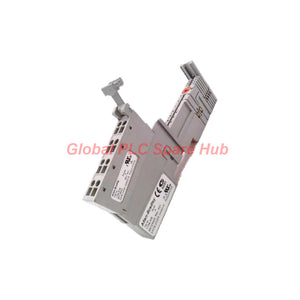
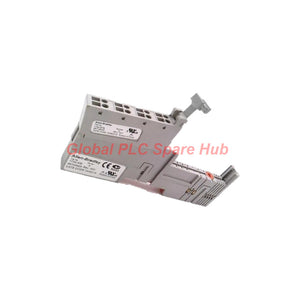
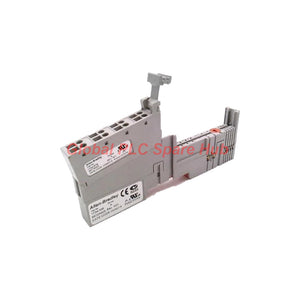
1734-TB Allen-Bradley Terminal Base – POINT I/O Wiring Solution
Manufacturer: Allen-Bradley
Product No.: 1734-TB
Condition: In stock
Product Type: Terminal Base
Product Origin: USA
Payment: T/T, Western Union
Weight: 500g
Shipping port: Xiamen
Warranty: 12 months
Estimate delivery times: 12-26 days (International), 3-6 days (United States).
Return within 30 days of purchase. Duties & taxes are non-refundable.
Guaranteed Safe Checkout
Allen-Bradley 1734-TB | POINT I/O Terminal Base
The Allen-Bradley 1734-TB is a terminal base for the POINT I/O 1734 series. It provides the physical mounting and electrical connection interface between a compatible I/O module, the PointBus backplane, and field wiring.
Its two-piece design combines a mounting base with a removable terminal block (RTB). The base mounts on a DIN rail, while eight screw-clamp terminals support field connection. This arrangement helps technicians manage wiring and replace compatible modules during maintenance without redesigning the entire mounting layout.
Engineering distinction: The 1734-TB is a terminal base, not a standalone I/O module. Confirm the required base type for the specific POINT I/O module before ordering or installation.
01 | Component Architecture
The 1734-TB can be understood as three connected interfaces within the POINT I/O assembly:
-
Mechanical interface
- DIN-rail mounting
- Snap-on installation
- Mounting base with removable terminal block
-
Field wiring interface
- Eight screw-clamp terminals
- Field conductors terminate at the terminal block
- Terminal access supports wiring inspection and maintenance
-
System interface
- PointBus backplane connection
- Supports the electrical connection between a compatible POINT I/O module and the I/O system
- Field power distribution is listed as an integrated feature; verify the applicable module wiring diagram for actual power routing
02 | Technical Specification Register
| Parameter | Specification |
|---|---|
| Manufacturer | Allen-Bradley |
| Product model | 1734-TB |
| Product series | POINT I/O 1734 |
| Product type | Terminal base |
| Enclosure style | Open-style |
| Assembly structure | Two-piece design: mounting base and removable terminal block (RTB) |
| Number of terminals | 8 |
| Terminal type | Screw clamp |
| Mounting method | DIN rail, snap-on installation |
| Removal method | Tool-assisted |
| Backplane interface | PointBus |
| Field power distribution | Listed as integrated; confirm the exact circuit arrangement in the applicable wiring documentation |
| Grounding method | DIN-rail grounding, subject to correct installation and system requirements |
| Weight | Approximately 0.25 lb (0.11 kg) |
| UPC | 612598206100 |
| GTIN | 10612598206107, as supplied; verify against product packaging before using for inventory or barcode records |
03 | Installation Sequence
- Verify the assembly: Confirm the terminal base part number and its compatibility with the intended POINT I/O module.
- Prepare the DIN rail: Ensure the rail is correctly installed, securely mounted, and grounded according to the system design.
- Install the base: Snap the terminal base onto the rail using the manufacturer's installation procedure.
- Connect field wiring: Terminate each conductor at the correct screw-clamp terminal. Follow the module's wiring diagram and specified torque requirements.
- Install the compatible module: Confirm its seating, keying, and locking arrangement according to the applicable documentation.
- Inspect before energizing: Check terminal tightness, conductor routing, grounding, and the separation of power and signal circuits where required.
Safety requirement: Isolate power and follow the plant's lockout/tagout procedure before installing, removing, or rewiring the assembly. Do not remove a module or terminal block under power unless the complete system and procedure explicitly permit it.
04 | Compatibility and Replacement Checklist
Use the following checks when specifying the 1734-TB for a new installation or as a replacement component.
- Module fit: Verify that the target POINT I/O module accepts the 1734-TB terminal base. Do not assume all 1734-series modules use the same base.
- Terminal requirements: Confirm the required terminal count, conductor range, and connection method against the product documentation.
- Electrical arrangement: Check the field power, signal common, and wiring layout required by the connected I/O module.
- Mechanical condition: Inspect the DIN-rail latch, terminal block, contact surfaces, and module retention features.
- System design: Confirm the POINT I/O adapter, rack arrangement, and PointBus configuration where relevant.
- Identification: Match the complete catalog number and verify any markings on the installed base before ordering.
Selection note: The 1734-TB should not be selected solely because an existing base has eight terminals. Other terminal-base variants may differ in terminal layout, wiring capability, or module compatibility.
05 | Equipment and Application Scenarios
- PLC remote I/O panels: Provides the terminal-base interface for compatible POINT I/O modules in distributed control cabinets.
- Packaging machinery: Supports field wiring for compatible digital or analog I/O assemblies used to monitor sensors and control actuators.
- Material handling systems: Provides a mounting and wiring interface for POINT I/O assemblies serving conveyors, transfer stations, and sorting equipment.
- Process automation cabinets: Supports modular I/O installation where field wiring must be organized and maintained efficiently.
- Machine retrofit projects: Can serve as a replacement base when the installed module and system documentation confirm compatibility.
- Maintenance inventory: Provides a spare terminal-base option for facilities that operate compatible Allen-Bradley POINT I/O systems.
The 1734-TB does not perform signal conversion, logic execution, or independent communications processing. Those functions depend on the installed I/O module, adapter, controller, and overall system configuration.
06 | Field Diagnostics: Inspect the Connection Path
| Observed Symptom | Potential Issue | Inspection and Corrective Action |
|---|---|---|
| Intermittent field signal | Loose screw-clamp connection, damaged conductor, or poor terminal contact | Isolate power, inspect the conductor and terminal, then reconnect using the specified procedure and torque. |
| I/O module does not seat correctly | Incorrect base type, damaged latch, misalignment, or obstruction | Verify the catalog number and inspect the base and module retention features. |
| Multiple field points lose operation | Shared wiring or power-distribution issue, or a problem elsewhere in the I/O assembly | Check the module wiring diagram, field supply, common connections, and related system status indicators. |
| Intermittent communication or module recognition | Module seating issue, damaged interface contacts, or a system-level PointBus problem | Inspect the assembly and verify the adapter and I/O system status. Do not assume the terminal base is the root cause without further testing. |
| Unexpected electrical behavior | Incorrect terminal assignment, wiring short, or incompatible module configuration | Compare actual wiring with the approved schematic and the specific I/O module's terminal diagram. |
| Visible heat damage or discoloration | Loose connection, excessive current, or damaged components | De-energize the circuit and investigate the source of overheating before replacing damaged parts. |
Diagnostic limitation: The terminal base does not independently report field faults. Diagnosis relies on physical inspection, electrical measurements, the connected I/O module's status indicators, controller diagnostics, and system documentation.
07 | Global PLC Spare HUB's Insight
For POINT I/O maintenance, the terminal base is a small component with an important role in the physical integrity of the I/O assembly. A replacement that fits the DIN rail may still be unsuitable if its module interface or terminal arrangement differs.
- When planning a replacement: Record the full catalog number from the existing base and the installed I/O module. Verify both before placing the order.
- When troubleshooting: Separate mechanical connection faults from field wiring faults and PointBus or controller faults. This reduces unnecessary replacement of functioning components.
- When designing a panel: Review terminal access, wiring duct clearance, DIN-rail grounding, and maintenance space before finalizing the layout.
- When managing spare parts: Store terminal bases with their catalog numbers clearly identified. Similar-looking terminal bases should not be treated as interchangeable without confirmation.
- When recommissioning equipment: Check every affected conductor against the wiring diagram and verify module status after the system is restored to service.
08 | Frequently Asked Questions
Q1. Does the 1734-TB contain the I/O electronics?
No. It is a terminal base that provides mounting, terminal connections, and the PointBus interface for a compatible I/O module. The signal-processing function depends on the module installed on the base.
Q2. Can I replace the 1734-TB without checking the installed I/O module?
That is not recommended. Identify the installed module and verify its approved terminal-base requirements first. Confirm the complete catalog number and terminal arrangement to avoid an incompatible replacement.
Q3. What should I check if a field device works intermittently after a terminal-base replacement?
Check the conductor termination, screw-clamp tightness, terminal assignment, and module seating. Then compare the module status and controller diagnostics with the field signal. If the issue persists, inspect the field power supply and wiring outside the base.
Q4. Is DIN-rail mounting alone sufficient to ensure proper grounding?
No. The rail and assembly must be installed according to the applicable grounding requirements. Verify rail bonding, cabinet grounding, and the manufacturer's installation instructions rather than assuming that mechanical contact alone provides an adequate grounding path.
Q5. What information helps confirm the correct terminal base before purchase?
Provide the catalog number on the existing base, the installed I/O module model, the POINT I/O adapter or system configuration, and a clear photo of the assembly label if available. For a retrofit, also confirm the terminal layout and field wiring requirements before ordering.
09 | Ordering, Warranty and Shipping
- Manufacturer: Allen-Bradley
- Model: 1734-TB
- Series: POINT I/O 1734
- Product type: Terminal Base
- Warranty: 12 months, subject to the seller's written warranty terms.
- Shipping methods: FedEx, UPS, and DHL, subject to destination and service availability.
- Dispatch target: 24–48 hours after order confirmation, subject to stock availability and payment clearance.
Request a quote for Allen-Bradley 1734-TB. Include the required quantity, destination country, and installed POINT I/O module model. These details help verify the replacement requirement before shipment.
Tags
Q: Are these parts 100% original and new?
A: Yes. Every component is guaranteed to be 100% original, brand-new, and factory-sealed. We also provide a 12-month comprehensive warranty for your peace of mind.
Q: How fast is the shipping to my country?
A: For in-stock items, we offer same-day dispatch. International express shipping (DHL/FedEx/UPS) typically delivers within 3–5 business days worldwide.
Q: Can I get a formal quotation with shipping costs?
A: Absolutely. Our sales team is ready to provide a detailed Proforma Invoice (PI) including the most competitive shipping rates for your location.
Q: Do you offer discounts for bulk orders?
A: We provide volume-based pricing for large projects or multiple-item orders. Please contact us to get our Best Price Guarantee.
12-Month Comprehensive Warranty
Every part supplied by Global PLC Spare Hub is covered by a 12-month warranty from the date of invoice.
- Coverage: Functional defects and hardware failures under normal operating conditions.
- Commitment: We provide immediate repair, replacement, or a full refund for any verified defective components to minimize your operational downtime.
Returns & Exchange Policy
We offer a 30-day return policy to ensure you receive the exact part your system requires.
- Eligibility: Returns are accepted for uninstalled items in their original, factory-sealed packaging.
- RMA Process: Please contact our support team to obtain a Return Merchandise Authorization (RMA) number before shipping.
- Fast Processing: Refunds or exchanges are processed within 3–5 business days after the returned item passes our technical inspection.
Need Technical Assistance?Not sure if this part is compatible with your system? [Consult our Engineers] before purchasing to ensure 100% compatibility.
People Also Bought


