


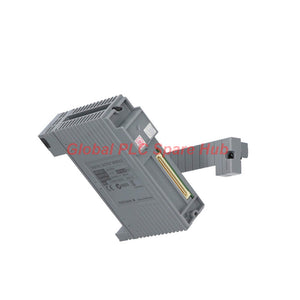
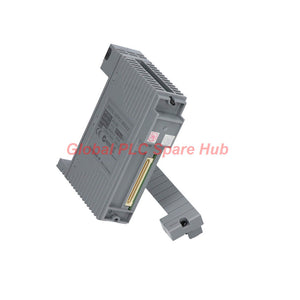
ADV551-P00 Yokogawa Digital Output Module | CENTUM VP 32-Channel Pulse Control
Manufacturer: Yokogawa
Product No.: ADV551-P00
Condition: In stock
Product Type: Digital Output Module
Product Origin: SG
Payment: T/T, Western Union
Weight: 500g
Shipping port: Xiamen
Warranty: 12 months
Estimate delivery times: 12-26 days (International), 3-6 days (United States).
Return within 30 days of purchase. Duties & taxes are non-refundable.
Guaranteed Safe Checkout
ADV551-P00 Yokogawa Digital Output Module — 32-Channel Pulse Control
The ADV551-P00 is a Yokogawa 32-channel digital output module for compatible industrial control systems. It supports 24 V DC output circuits and current-sink switching.
This module provides status output, one-shot pulse width output, and time-proportional output functions. These functions help engineers control discrete loads and implement time-based output sequences within supported system configurations.
The ADV551 series supports a maximum load current of 100 mA per channel under the specified conditions. The pulse width range extends from 8 ms to 7200 seconds. Confirm the suffix code, cable interface, and system compatibility before ordering.
- Manufacturer: Yokogawa
- Model: ADV551-P00
- Product Type: Digital Output Module
- Channel Count: 32 outputs
- Rated Output Voltage: 24 V DC
- Output Format: Current sink
- Special Functions: Pulse width output and time-proportional output
- Approximate Weight: 0.20 kg
Technical Specifications
| Parameter | Specification |
|---|---|
| Manufacturer | Yokogawa |
| Model | ADV551-P00 |
| Module Family | ADV551 |
| Module Type | Digital output module |
| Number of Output Channels | 32 |
| Rated Applied Voltage | 24 V DC |
| External Supply Voltage Range | 20.4–26.4 V DC |
| External Supply Rating | 24 V DC, 50 mA |
| Maximum Load Current | 100 mA per channel at the specified conditions |
| Output ON Voltage | 2 V DC maximum |
| Output OFF Leakage Current | 0.1 mA maximum |
| Output Format | Current sink |
| Status Output Response | 3 ms or less |
| Mixed Status and Pulse Output Response | 10 ms or less |
| Pulse Width Range | 8 ms to 7200 s |
| Pulse Width Resolution | 8 ms, with up to 1 ms additional ON/OFF delay |
| Signal-to-System Withstand Voltage | 2 kV AC for 1 minute |
| Between-Common Withstand Voltage | 500 V AC for 1 minute |
| Common Arrangement | Negative-side common for each 16-channel group |
| Maximum Internal Current Consumption | 700 mA at 5 V DC |
| External Supply Current Consumption | 60 mA maximum, according to the supplied specification |
| Approximate Weight | 0.20 kg |
| External Connection | Pressure-clamp terminal or dedicated cable interface |
Specification note: The supplied information lists both a 50 mA external supply rating and a maximum channel load of 100 mA. These values describe different parameters and must not be treated as interchangeable. Confirm the applicable electrical ratings in the official manual.
Suffix Codes and Configuration Breakdown
The complete model code helps identify the module's output functions and hardware configuration. Review each code before purchasing a replacement.
| Code Element | Meaning | Selection Consideration |
|---|---|---|
| ADV551 | 32-channel digital output module family | Confirm the target system supports this module family. |
| P | Pulse width output and time-proportional output functions | Required for applications that use these output modes. |
| 0 | Basic type code in the supplied model description | Check the complete ordering code against the product nameplate. |
| /D5A00 | Option code for the KS cable interface adapter, model ATD5A-00 | Confirm whether the application requires this adapter. |
Ordering caution: The supplied information also references suffix code 5 for a version without status display and without explosion protection. However, this code does not appear consistently in the stated ADV551-P00 designation. Confirm the complete ordering code before assuming that the described display or protection characteristics apply to this exact unit.
Output Functions and Control Behavior
- Status Output: Switches output states according to the configured control logic.
- One-Shot Pulse Output: Generates a pulse with a configured duration.
- Time-Proportional Output: Controls ON/OFF timing according to the configured time ratio.
- 32-Channel Operation: Provides multiple discrete outputs for compatible control applications.
- Electrical Isolation: Provides the specified withstand voltage between output signals and the system.
The actual output behavior depends on controller logic, module configuration, field wiring, and the connected load. Verify application timing before using the module in a control loop.
Compatible Equipment and Industrial Applications
The Yokogawa ADV551-P00 is intended for compatible Yokogawa control system configurations. Confirm the exact platform, base unit, terminal arrangement, and adapter requirements before installation.
- Process Control Systems: Discrete actuator commands and equipment status control.
- Valve Control Panels: Compatible 24 V DC output circuits for solenoid or relay interfaces within electrical ratings.
- Industrial Sequencing: Output switching for machine sequences and auxiliary equipment.
- Time-Proportional Control: Configured ON/OFF timing for suitable process applications.
- Pulse-Based Operations: One-shot output commands for compatible devices.
- Plant Maintenance: Replacement of a matching output module after hardware and configuration verification.
These examples describe potential applications, not universal compatibility. Confirm the field device's electrical requirements and the approved control-system design.
Installation and Commissioning Checklist
- Verify the Model: Match ADV551-P00 against the installed unit and system bill of materials.
- Confirm the Adapter: Check whether the application requires the ATD5A-00 adapter and /D5A00 option.
- Review Output Wiring: Confirm the current-sink interface and negative-side common arrangement.
- Check the Load: Verify operating current, startup demand, and compatibility with the output ratings.
- Inspect the Supply: Confirm that the external supply remains within 20.4–26.4 V DC.
- Check Isolation Requirements: Follow the system's wiring and grounding instructions.
- Configure Output Timing: Set pulse width or time-proportional parameters as required.
- Perform Functional Tests: Verify output voltage, load switching, response timing, and controller status.
- Document Results: Record the final wiring, configuration, and commissioning observations.
Always isolate the equipment before wiring changes. Follow the manufacturer's instructions and the site's approved electrical safety procedures.
Diagnostic Capabilities and Troubleshooting
The supplied specifications describe output functions and response times. They do not establish every built-in diagnostic feature for the exact hardware revision. Use available controller alarms, module indicators, and approved maintenance tools.
| Symptom | Recommended Investigation |
|---|---|
| Output does not switch the load | Check control logic, field supply, output wiring, and load current. |
| Load remains active after an OFF command | Measure the output state and check for wiring faults, leakage paths, or a load-side issue. |
| Pulse duration differs from the target | Review the configured pulse width, output mode, and specified timing tolerance. |
| Output response appears slow | Check whether the application uses status-only or mixed status and pulse output operation. |
| Multiple channels behave unexpectedly | Inspect the common wiring, supply stability, and channel assignments. |
Field example: A solenoid valve responds correctly to a steady ON command but misses short pulse commands. Check the configured pulse duration and the output response requirements first. Then verify the external supply, load characteristics, and controller timing. This method helps separate configuration issues from electrical problems.
This example illustrates a general troubleshooting process. It does not establish a confirmed failure mode for the ADV551-P00.
Global PLC Spare HUB's Insight
When selecting the ADV551-P00, engineers should focus on three points: output function, load compatibility, and interface configuration.
The pulse width function is particularly relevant when an application requires controlled ON/OFF durations. However, the stated 8 ms resolution and possible additional delay matter when the process depends on short timing intervals.
The current-sink output format also affects wiring design. Confirm the field device's input arrangement and the module's common connections before connecting loads. Never assume that a sourcing output device can replace a sinking output module without circuit review.
For replacement orders, provide the complete model code, the terminal or cable interface details, and the controller platform. This information helps reduce incorrect configuration selection and commissioning delays.
Packaging, Shipping, and Warranty
- Product: Yokogawa ADV551-P00 digital output module.
- Quantity: One module per confirmed order line.
- Packaging: Protective packaging for international transport.
- Accessories: Adapter, cables, and terminals are included only when stated in the quotation.
- Warranty: 12 months, subject to the seller's written warranty terms.
- Shipping Options: DHL, FedEx, or UPS, subject to destination and service availability.
- Dispatch Time: Typically 24–48 hours after order confirmation, stock verification, and payment clearance.
Contact us to confirm stock, the exact suffix configuration, included accessories, dispatch timing, and warranty coverage before ordering.
Frequently Asked Questions
Q1: How do I determine whether my field device needs a current-sink output?
A1: Check the device wiring diagram and input circuit design. Confirm the required switching polarity and common arrangement before connecting the module.
Q2: What should I consider when using short pulse commands?
A2: Compare the required pulse duration with the 8 ms minimum pulse width and specified timing resolution. Validate actual behavior during commissioning.
Q3: Can I connect a load that draws more than 100 mA per channel?
A3: The supplied specifications list 100 mA per channel as the maximum load current under stated conditions. Do not exceed the verified rating. Use an approved external interface when the load requires a different current capacity.
Q4: How can I identify whether the adapter is included in my order?
A4: Check the complete model and option code. The /D5A00 option identifies the ATD5A-00 KS cable interface adapter in the supplied information. Request written confirmation of included accessories.
Q5: What information should I send when requesting a replacement quotation?
A5: Provide the full ADV551 model code, system model, adapter requirements, load details, required quantity, and delivery destination. A clear photo of the installed nameplate can help verify the configuration.
Request a Quote for ADV551-P00
Looking for the Yokogawa ADV551-P00 32-channel digital output module?
Contact Global PLC Spare HUB for pricing, availability, configuration checks, and international shipping through DHL, FedEx, or UPS.
Tags
Q: Are these parts 100% original and new?
A: Yes. Every component is guaranteed to be 100% original, brand-new, and factory-sealed. We also provide a 12-month comprehensive warranty for your peace of mind.
Q: How fast is the shipping to my country?
A: For in-stock items, we offer same-day dispatch. International express shipping (DHL/FedEx/UPS) typically delivers within 3–5 business days worldwide.
Q: Can I get a formal quotation with shipping costs?
A: Absolutely. Our sales team is ready to provide a detailed Proforma Invoice (PI) including the most competitive shipping rates for your location.
Q: Do you offer discounts for bulk orders?
A: We provide volume-based pricing for large projects or multiple-item orders. Please contact us to get our Best Price Guarantee.
12-Month Comprehensive Warranty
Every part supplied by Global PLC Spare Hub is covered by a 12-month warranty from the date of invoice.
- Coverage: Functional defects and hardware failures under normal operating conditions.
- Commitment: We provide immediate repair, replacement, or a full refund for any verified defective components to minimize your operational downtime.
Returns & Exchange Policy
We offer a 30-day return policy to ensure you receive the exact part your system requires.
- Eligibility: Returns are accepted for uninstalled items in their original, factory-sealed packaging.
- RMA Process: Please contact our support team to obtain a Return Merchandise Authorization (RMA) number before shipping.
- Fast Processing: Refunds or exchanges are processed within 3–5 business days after the returned item passes our technical inspection.
Need Technical Assistance?Not sure if this part is compatible with your system? [Consult our Engineers] before purchasing to ensure 100% compatibility.
People Also Bought


