


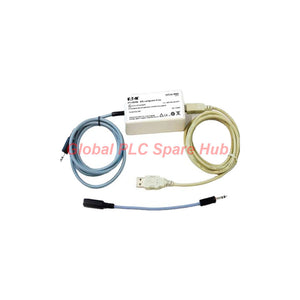

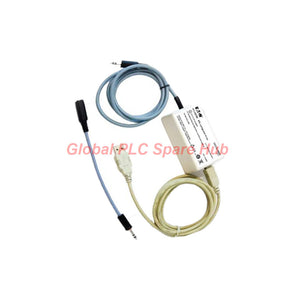
PCL45USB MTL Configurator – ATEX USB Interface for MTL4000 & MTL5500
Manufacturer: MTL
Product No.: PCL45USB
Condition: In stock
Product Type: USB Configuration Interface
Product Origin: USA
Payment: T/T, Western Union
Weight: 500g
Shipping port: Xiamen
Warranty: 12 months
Estimate delivery times: 12-26 days (International), 3-6 days (United States).
Return within 30 days of purchase. Duties & taxes are non-refundable.
Guaranteed Safe Checkout
MTL PCL45USB – USB Configuration Interface for Industrial Signal Converters
PCL45USB is an ATEX-certified configuration interface developed for MTL industrial signal converters. It connects compatible converters to a standard Windows-based PC through USB.
The configuration package combines the PCS45 software with the PCL45USB hardware interface. Engineers can configure supported converters from the safe area while equipment remains online.
The system supports four major product families: MTL4000, MTL4500, MTL5000, and MTL5500. Users can save configuration files to disk and print configuration records for maintenance documentation.
01 | Configuration Architecture and Operating Principle
| Configuration Component | Engineering Function |
| PCS45 Software | Provides the PC-based configuration environment. |
| PCL45USB Interface | Connects the computer to compatible MTL converters. |
| USB Connection | Provides the communication link between the PC and interface. |
| 3.5 mm Jack Connection | Connects the interface to supported MTL4500 and MTL5500 converters. |
| Adapter Cable | Supports earlier MTL converter connection arrangements. |
| Configuration Storage | Allows engineers to save settings to disk. |
| Print Function | Produces configuration records for maintenance documentation. |
Operational Advantage: Engineers can access converter settings without relocating field equipment to a workshop. Online configuration also supports maintenance activities during normal equipment operation.
02 | Technical Specifications
| Manufacturer | MTL |
| Model | PCL45USB |
| Product Type | USB Configuration Interface |
| Software Package | PCS45 Configuration Software |
| Hardware Certification | ATEX certified interfacing link |
| Installation Location | Safe area |
| PC Connection | USB Type-B female socket |
| Converter Connection | 3-pole, 3.5 mm jackplug for MTL4500 and MTL5500 |
| Legacy Converter Connection | Adapter cable supplied |
| Fitted Converter Cable | 1.5 m |
| Supplied USB Cable | 2 m, USB Type-A male to Type-B male |
| Operating Temperature | −10°C to +60°C |
| Storage Temperature | −20°C to +70°C |
| Relative Humidity | 5–95%, non-condensing |
| Weight | Approximately 200 g |
| Supported Converter Families | MTL4000, MTL4500, MTL5000, MTL5500 |
03 | PCS45 Software and PC Requirements
The PCS45 software provides the configuration environment for supported MTL converters. The original package supplies the software on CD.
| Software Item | Requirement |
| Operating System | Microsoft Windows 2000, Windows XP, or Windows 7 |
| Hard Disk Space | Minimum 20 MB available |
| Optical Drive | CD-ROM drive |
| USB Interface | One available USB port |
| Printing | Local or network printer |
| Software Medium | PCS45 installation CD |
| Software Updates | Manufacturer update resources at www.mtl-inst.com |
Operating System Note: The listed compatibility covers Windows 2000, XP, and Windows 7. Consult MTL before using other operating systems, including Windows Vista.
For newer Windows computers, verify USB driver recognition and software compatibility before scheduling field configuration work.
04 | Converter Compatibility and Connection Details
The interface supports four MTL converter families. Connector arrangements vary between product generations.
- MTL4000 Series: Supported through the supplied adapter cable for earlier converter designs.
- MTL4500 Series: Uses the fitted three-pole, 3.5 mm jackplug connection.
- MTL5000 Series: Included in the supported converter family range.
- MTL5500 Series: Uses the fitted three-pole, 3.5 mm jackplug connection.
Compatibility Warning: Series compatibility does not guarantee identical connector arrangements across every model. Verify the converter part number and required adapter before connection.
05 | Installation and Configuration Procedure
Follow a controlled connection sequence to reduce configuration errors and unnecessary equipment handling.
- Prepare the PC: Confirm the Windows version and available USB port.
- Install PCS45: Use the supplied CD and follow the software installation instructions.
- Connect USB: Attach the USB Type-A to Type-B cable to the PC and interface.
- Select the Converter Cable: Use the fitted jackplug or supplied adapter cable.
- Connect the Converter: Verify the correct connection for the selected MTL family.
- Start Configuration: Open PCS45 and establish communication with the converter.
- Verify Parameters: Review existing settings before making changes.
- Save Records: Store the configuration file and print a maintenance copy when required.
Engineering Recommendation: Save the original configuration before modifying operating parameters. Compare the revised settings against approved process documentation.
06 | Maintenance and Troubleshooting Considerations
| Observed Condition | Recommended Inspection |
| PC does not recognize the interface | Check USB connections, port availability, and driver recognition. |
| PCS45 cannot communicate | Verify converter selection and cable compatibility. |
| Connection fails on older converters | Check the supplied adapter cable and connector arrangement. |
| Software installation fails | Review operating system compatibility and installation requirements. |
| Configuration records are unavailable | Check disk permissions and available storage space. |
| Printed records are incomplete | Verify printer connectivity and output settings. |
- Inspect connector contacts for contamination and mechanical damage.
- Keep the USB and converter cables free from excessive bending.
- Store the interface within its specified temperature limits.
- Maintain backup copies of verified converter configurations.
- Use approved configuration procedures when modifying live equipment.
07 | Certification and Application Boundaries
The PCL45USB interfacing link carries ATEX certification. Its specified installation location is the safe area.
- Certification: ATEX-certified interface hardware.
- Installation Boundary: Safe-area use.
- Software Platform: Windows-based PC configuration.
- Application: Configuration and maintenance of compatible MTL converters.
Do not interpret interface certification as approval for unrestricted hazardous-area PC installation. Follow the applicable certification documentation and site safety procedures.
08 | Package Contents and Supply Information
| Item | Description |
| 1 | PCL45USB ATEX-certified interfacing link |
| 2 | PCS45 configuration software CD |
| 3 | 2 m USB Type-A male to Type-B male cable |
| 4 | 1.5 m fitted converter connection cable |
| 5 | Adapter cable for earlier MTL converter models |
Supply Note: Confirm the complete accessory configuration when requesting a quotation.
09 | Frequently Asked Questions
Q1. Can engineers change converter settings without disconnecting the converter from the operating system?
Yes. The interface supports configuration from the safe area while converters remain online. Engineers should still follow site-approved change management procedures. Verify process stability before modifying critical parameters.
Q2. Why does the PCL45USB use different converter-side connectors?
MTL converter generations use different configuration connection arrangements. The fitted three-pole jackplug supports MTL4500 and MTL5500 connections. The supplied adapter accommodates earlier converter designs.
Q3. What should engineers check when replacing an older configuration interface?
Compare the original interface model, converter family, connector type, cable arrangement, and software version. Also verify the replacement PC supports the required PCS45 environment. Matching the USB connection alone does not establish complete compatibility.
Q4. Why should engineers save configuration files before field adjustments?
Backup files provide a reference for troubleshooting and parameter recovery. They also help maintenance teams compare approved settings against current operating values. Use clear filenames containing converter identification and revision information.
Q5. Is the PCL45USB suitable for modern Windows computers?
The documented PCS45 compatibility lists Windows 2000, XP, and Windows 7. Newer operating systems require compatibility verification. Check software installation, USB driver recognition, and communication operation before purchasing for modern maintenance work.
10 | Purchasing and Model Selection Guidance
Before ordering, confirm the following technical details with your maintenance or instrumentation team.
- Interface Model: PCL45USB.
- Software Requirement: PCS45 configuration software.
- Converter Family: MTL4000, MTL4500, MTL5000, or MTL5500.
- Connection Type: Three-pole jackplug or required adapter.
- Computer Platform: Compatible Windows PC with an available USB port.
- Accessory Requirement: Confirm USB cable, fitted cable, adapter, and software CD.
Request a Quote: Contact our sales team for PCL45USB pricing, availability, and configuration accessory confirmation.
We support industrial automation spare-part sourcing and international delivery. Contact us with your converter model to help verify the required configuration interface.

Tags
Q: Are these parts 100% original and new?
A: Yes. Every component is guaranteed to be 100% original, brand-new, and factory-sealed. We also provide a 12-month comprehensive warranty for your peace of mind.
Q: How fast is the shipping to my country?
A: For in-stock items, we offer same-day dispatch. International express shipping (DHL/FedEx/UPS) typically delivers within 3–5 business days worldwide.
Q: Can I get a formal quotation with shipping costs?
A: Absolutely. Our sales team is ready to provide a detailed Proforma Invoice (PI) including the most competitive shipping rates for your location.
Q: Do you offer discounts for bulk orders?
A: We provide volume-based pricing for large projects or multiple-item orders. Please contact us to get our Best Price Guarantee.
12-Month Comprehensive Warranty
Every part supplied by Global PLC Spare Hub is covered by a 12-month warranty from the date of invoice.
- Coverage: Functional defects and hardware failures under normal operating conditions.
- Commitment: We provide immediate repair, replacement, or a full refund for any verified defective components to minimize your operational downtime.
Returns & Exchange Policy
We offer a 30-day return policy to ensure you receive the exact part your system requires.
- Eligibility: Returns are accepted for uninstalled items in their original, factory-sealed packaging.
- RMA Process: Please contact our support team to obtain a Return Merchandise Authorization (RMA) number before shipping.
- Fast Processing: Refunds or exchanges are processed within 3–5 business days after the returned item passes our technical inspection.
Need Technical Assistance?Not sure if this part is compatible with your system? [Consult our Engineers] before purchasing to ensure 100% compatibility.
People Also Bought


